I Write All My Articles in a Terminal. Here’s My Full AI Setup
Section titled “I Write All My Articles in a Terminal. Here’s My Full AI Setup”
My Daily Driver. Claude Code and Warp.
Every AI setup article reads the same. Someone lists ten tools, describes what each one does, includes a few screenshots, and wraps up with “find what works for you.” You read it, bookmark it, and forget it.
This isn’t that. This is what I actually use every day, why I use it, and, more importantly, the invisible layer underneath the tools that makes the whole thing work. No affiliate links. No tools I tried once. Just the honest wiring.
The whole thing costs me about 300 euros a month. That might sound like a lot. By the end of this article, you can decide whether it’s worth it.
The daily driver: Claude Code in Warp
Section titled “The daily driver: Claude Code in Warp”This is where I live.
Section titled “This is where I live.”Claude Code running inside Warp terminal. Not Claude Desktop. Not the browser. The terminal.
I know this sounds backwards. There are plenty of pretty interfaces available. But Claude Code in the terminal gives me direct access to my file system, git, and every CLI tool on my machine, with no abstraction layer in between.
When I’m writing an article, Claude reads my drafts folder, checks my existing articles, creates new files, edits existing ones, and commits to git. When I need to research, it runs web searches. When I need to generate images, it calls my image generation tool. All from the same interface.
No switching apps. No context lost. I actually use Edit as an editor. Yes, old-school MS-DOS users know this one. In Warp.
https://github.com/microsoft/edit
Warp makes the terminal comfortable. It’s fast, the output is readable, and the history is searchable. But the real reason I’m in the terminal is that everything is a command, and Claude Code can chain commands into workflows. The terminal isn’t a limitation. It’s the integration layer.
I need the 20x Claude subscription for this. Not because I run 20 agents on the same task, that’s not something I can manage cognitively, but because I run multiple agents on different things throughout the day. Writing in one session. Research in another. Code in a third. The parallelism isn’t orchestrated. It’s just having enough capacity to keep moving.
Cowork: the structured workspace
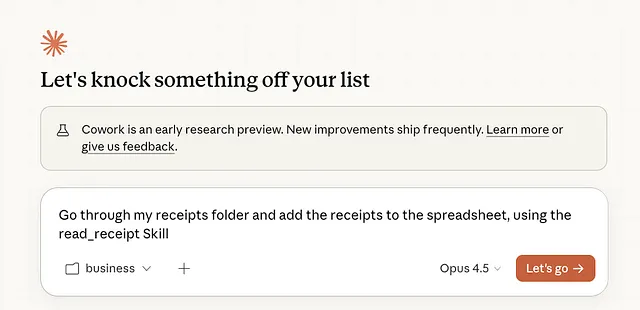
Section titled “Cowork: the structured workspace”Claude Code is the daily driver, but Cowork handles a different category of work: anything that benefits from a long-running, structured conversation with persistent file access.
My biggest Cowork use case is finances. Sorting invoices, building spreadsheets, reconciling business expenses. This is work where I need Claude to look at a folder of documents, process them systematically, and produce clean output. Cowork’s file access and visual interface make this easier than doing it from the terminal.
But the more interesting use is long-form conversations where I have Cowork manage its own context. I’ll start a research session or a complex planning conversation, and instead of relying on the chat history, I have Cowork write intermediate findings to markdown files as we go. research-topics.md, draft.md, sites.md, whatever the session needs. Cowork reads these files, updates them, and uses them as its own memory.
This means I can close the session, come back days later, and pick up exactly where I left off. The context isn’t in the conversation. It’s in the files.
More on this pattern in a moment.
Markdown as memory
Section titled “Markdown as memory”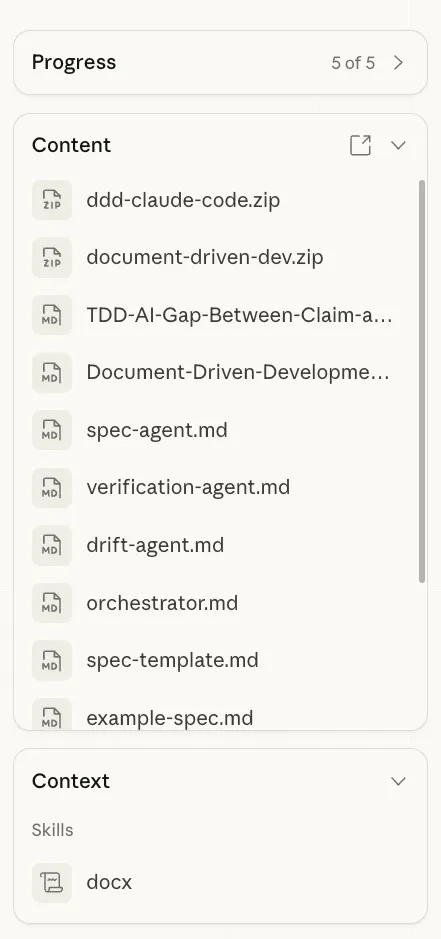
This is probably the most important pattern in my entire setup, and it runs through everything.
I use .md files as memory. Not just for notes. As actual working memory for AI sessions.
When I research a topic, I don’t keep everything in my head or in a chat window. I create markdown files as I go: research-notes.md, sources.md, topic-ideas.md, draft.md. Each file captures one piece of the process. Claude, whether in Code or Cowork, reads these files at the start of every session and picks up where things left off.
This is how I get continuity across sessions without relying on conversation history. Chat history is fragile. It gets summarized, truncated, or lost entirely when a session ends. Files persist. They’re editable. They’re portable. I can start a research session in Cowork, save the intermediate files, then open those same files in Claude Code when I’m ready to write.
The AI doesn’t have memory. But my file system does. And that’s enough.
Every project in my workspace has a folder with these intermediate files. When I look at my drafts directory, each article has a trail: description.md, research-notes.md, topic-ideas.md, draft.md, sometimes sources.md or opening.md. That trail isn’t just for me. It’s for whichever AI picks up the work next.
The configuration layer
Section titled “The configuration layer”My tools don’t work because they’re special. They work because of the files underneath them.
Every project I work in has a CLAUDE.md file. Claude reads it first, every time. It contains my writing preferences (no em-dashes, short paragraphs, no emojis), project context (what this folder is for, what the output should look like), and specific instructions for the type of work I’m doing.
Write this once. It applies forever. No more repeating “match my tone” or “keep it conversational” in every prompt. The AI already knows.
On top of that, I have Skills. These are reusable instruction packets that Claude can execute on demand.
==The Gemini Collaboration Skill.== ==I tell Claude to send my draft to Gemini for review. They go back and forth, writer and editor, three rounds==. Claude writes, Gemini critiques, Claude revises, Gemini sharpens, one more round, then I get the final version to work from. Two AIs arguing over my article produces better output than either one alone. I just watch and step in at the end.
The Doc Write Skill. When I need to produce a product requirements document, I don’t open Word. I tell Claude to create it. The skill handles formatting, structure, and presentation. If something needs fixing, I tell Claude. No manual formatting. The document lives where my work lives: in my file system.
The Google Dork Skill. I built this one in Codex. It makes it easy to run targeted Google searches with specific operators, like site:medium.com "Anthropic". Instead of manually constructing search queries, I just tell it what I’m looking for and where.
I’m actively trying to build a habit of creating more skills. There are two ways I do it. Explicit: I sit down and write a skill for a specific workflow, like the Google Dork one. Implicit: when a chat session produces great results, I turn that conversation into a skill so I can reproduce it. A good session shouldn’t be a one-off. It should be a template.
Anything I do more than twice becomes a skill. Anything Claude needs to know every time goes in CLAUDE.md. The configuration layer is what turns a chatbot into a system.
And no, I don’t use MCP servers. Skills plus whatever CLI tools are available cover everything I need. MCP adds infrastructure overhead for a problem I’ve already solved with simpler tools. Maybe for enterprise work the calculation is different, but for everything I do, it’s overkill.
Research workflow
Section titled “Research workflow”Research is where the most tools touch each other.
It usually starts with Google. Not AI. Just regular searching, often with specific operators, to get a feel for what’s out there. I want to see the landscape before I ask an AI to summarize it.
Then the Claude Chrome extension takes over. I have it visit search results, read each page, and compile findings into a markdown file. When I was researching how articles about Anthropic perform on Medium, I searched "Anthropic" site:medium.com and had Claude visit each result, extracting title, author, likes, and description. Sorted, deduplicated, saved as a file. This is faster and more reliable than asking any AI to “research this topic” in a chat window. You control the sources. The AI does the extraction.
For deeper research, I move into Cowork., not any of the Deep Research tools that are inside the Chat Clients. I’ll start a session and write out intermediate files as I go: research-topics.md for angles I’m exploring, sites.md for sources, draft.md for anything that’s starting to take shape. I iterate over these files, check what’s missing, ask Claude to fill gaps.
When the research is solid, I transport the markdown files over to Claude Code and use them as context for writing. The research lives in files. The writing happens in the terminal. The handoff is just opening a folder.
The rest of the stack
Section titled “The rest of the stack”Antigravity for file exploring, editing, and working through markdown files visually. When I need to evaluate a codebase or write a spec, I use it as my editor. I’ll run Claude Code in the terminal itself or in the background in Warp while I’m in Antigravity, switching between the two. I use its agents occasionally, mostly out of convenience since I’m already there.
ChatGPT gets health-related questions. I’m not entirely sure how this happened. It grew organically. When I’m looking into a medical topic, something about a symptom or a condition, I reach for ChatGPT. Maybe it’s because I started there before Claude was available, maybe it’s because the interaction style feels different for that type of question. I haven’t analyzed it. It just stuck.
Gemini is the editor- well, the API is. I don’t use it directly. It comes in through the collaboration skill, reviewing and sharpening work that Claude has already produced. It’s the second opinion, not the first. I am trying to get into using NotebookLM more, but I just can’t seem to make it stick.
Nanobanana for image generation. I’ve tried ChatGPT for images. It works, but it’s slow. Nanobanana gives me what I need faster, and speed matters when you’re generating hero images for articles mid-flow.
Google AI Studio for a very specific trick that I think more people should know about. When I’m unsure about a product requirements document, or when a set of features feels abstract and I can’t wrap my head around the scope, I have Google AI Studio generate an information website for it. A simple page that presents the requirements as if they were a product landing page.
Prototyping also starts in Google AI Studio. This used to be Vercels V0 domain but- it saves me another 20 bucks and AI Studio is very very capable.
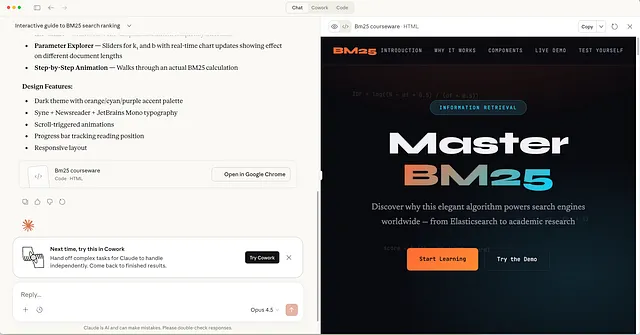
Anyhoo, this sounds trivial but the effect is significant. Something about seeing requirements framed as a website, with sections, visual hierarchy, and clear language, matches how my brain processes information. It’s like a cognitive hook. The same requirements that felt fuzzy in a bullet list suddenly click when they’re presented as a page someone would actually read. I use this regularly to gut-check whether I actually understand what I’m building. I do this with difficult concepts too. Here I am figuring out the inner workings of the BM25 Algorithm. By using Claude’s Artifacts to create a course website specifically for me.
Codex App. I’m still finding a place for this one. I’ve been using it to create skills, like the Google Dork skill, and for long chat sessions similar to what I do in Cowork. It’s capable, but it hasn’t carved out a clear role in my workflow yet. I’m giving it time. It for sure will do, I see a lot of potential here. But it’s only 2 days old.;)
Cloud deployment is split between what I prefer and what clients require. My personal deployment target is Railway. It’s the closest thing to “just deploy” that exists right now. You connect a GitHub repo, it detects the framework, and you have a running URL in minutes. No YAML, no infrastructure configuration, no dedicated DevOps knowledge required. For prototypes, side projects, and anything where I control the stack, Railway is the default. It does one thing well: get your code running without making you think about servers. Running, and running well. Scalable, Fast, Safe!
But most of my client work lands on Azure. Enterprise clients use Azure, so that’s where things go. The contrast is stark. Azure gives you everything, hundreds of services, fine-grained control, compliance certifications, and the cognitive overhead that comes with all of it. Deploying the same app that takes five minutes on Railway can take an afternoon on Azure, not because Azure is worse, but because it’s solving a different problem. It’s built for organizations that need governance, scale, and auditability. Railway is built for developers who need something running now.
I don’t fight this. When a client’s infrastructure is Azure, I deploy to Azure. When I’m building something for myself or prototyping, I deploy to Railway. The skill is knowing which problem you’re actually solving: shipping fast or fitting into an enterprise architecture. They’re different problems and they deserve different tools.
How I plan
Section titled “How I plan”This is the opinionated part.
I either plan manually. Or I plan together with AI, like a conversation where we’re both thinking. What I don’t do is hand AI a goal and ask it to generate a plan.
The difference matters. When AI plans alone, you get something comprehensive and logical and completely disconnected from your actual priorities. It covers every edge case, suggests every feature, and produces a beautiful document that doesn’t reflect what you actually care about.
When I plan manually or collaboratively, I decide what matters. What to cut. What the real goal is. Then AI helps me think through the approach, poke holes, consider things I might have missed. But the spine of the plan is mine.
For coding specifically: I only vibe-code one-off apps and prototypes. Things where the architecture doesn’t matter and I just need something running. For anything bigger, I write the spec first, think through the approach, then hand it to Claude. This isn’t slower. It’s faster, because I don’t waste cycles on AI-generated architecture that I’ll have to review and most likely undo later.
The graveyard
Section titled “The graveyard”Short honesty section. Things I’ve tried and genuinely dropped.
MCP servers. For my use case, it was complexity for complexity’s sake. Skills and CLI tools cover everything. But I fully underwrite the power of MCP Servers. Was their early champion. Still am. But everything has to have a solid use-case.
TDD with AI. I’ve written about this before. The short version: test-driven development doesn’t work the way most people think it does when AI is writing the code. The feedback loop changes.
AI planning solo. Tried it early on. Got plans that sounded great and missed the point. Planning together works. Delegating the plan entirely doesn’t.
Cursor, Windsurf, Lovable, V0, Manus … oh my. It just didn’t stick or was overtaken by a better tool. And I am not too proud to admit, sometimes just a shinier tool.
That’s about it. The graveyard is small because I don’t adopt things quickly. Most tools that made it into my stack have earned their place.
What this actually costs
Section titled “What this actually costs”300 euros a month, roughly. The bulk of that is the Claude 20x subscription. The rest is smaller subscriptions across ChatGPT, Google, and a few utilities.
Is it worth it? For me, yes. My entire development and content workflow runs through this stack. Research, writing, editing, image generation, document creation, financial management. I don’t have an assistant. I don’t use a separate writing tool, a separate research tool, a separate finance tool. This is all of it.
Whether 300 a month makes sense depends on how much of your work this replaces. For someone who writes occasionally, it’s steep. For someone who produces content, manages projects, and runs a business through these tools daily, it pays for itself quickly.
The actual lesson
Section titled “The actual lesson”My setup will be outdated in six months. The specific tools don’t matter. What matters is the pattern underneath:
One primary tool that touches everything. For me, that’s Claude Code. It reads files, writes files, runs commands, calls other tools. The terminal is the hub.
Markdown as memory. Every session produces files. Every new session reads those files. Continuity lives in the file system, not in chat history. This is the single most impactful habit I’ve built.
A configuration layer that persists.CLAUDE.md and skills mean I never start from scratch. Every session inherits what came before. Good sessions become skills. Preferences become config.
The right model for the right job. Not loyalty to one provider. Different strengths for different tasks, and the honesty to admit when a habit isn’t logical but works anyway.
Plan yourself, execute with AI. The plan is mine, or ours. The execution is theirs. This order matters.
That’s the setup. Not glamorous. Not ten shiny apps. A terminal, some markdown files, a few models, and the wiring that connects them. The wiring is the part that matters.
Tech person. I write about technology, Generative AI, the cloud, design and development. Deeper AND broader at acdigest.substack.com
Responses (1)
Section titled “Responses (1)”Talbot Stevens
What are your thoughts?
==The Gemini Collaboration Skill. I tell Claude to send my draft to Gemini for review. They go back and forth, writer and editor, three rounds==
I'm very interested in learning how you did that, if you can point me in the direction.
Thanks for the article, there are so many envs and tools now that the primary force is divergence, your article helps with convergence.
More from Marco Kotrotsos
Section titled “More from Marco Kotrotsos”Recommended from Medium
Section titled “Recommended from Medium”[
See more recommendations