Claude Code Summary - 2025
Section titled “Claude Code Summary - 2025”
Claude Code Features Breakdown — 2025
Claude Code this year pushed the boundaries of AI coding so far that you’ve likely missed the most important features.
AI coding has been evolving so fast, and the Claude Code timeline has been impossible to keep up with — even for daily users like me.
I have tried my best this year to bring you all the major updates, new features, and tricks for using Claude Code.
But I may have fallen short in some areas.
To close the year, I have put together all the updates, features, and tricks you may have missed.
This is for pro users who want to keep up the pace and get the best out of this tool.
In this post, I will proceed directly to the timeline and provide a summary of the features, outlining their evolution in chronological order.
If you missed any of my Claude Code tutorials this year, you can check out the list here — Claude Code TutorialsFor complete beginners this is the Claude Code Cheatsheet.
Claude Code Start
Section titled “Claude Code Start”When Claude Code launched in February 2025, it was a simple terminal tool. You could chat with Claude, edit files, and run bash commands.
Fast forward to December 2025, and Claude Code has become something else entirely:
- Subagents that work as your AI coding team
- Hooks that automate your workflow
- Plugins you can share across projects
- LSP support for IDE-level code intelligence
- Background agents that run while you do other work
- Chrome integration for browser automation
The tool has grown 10x in capability.
Anthropic reported a 5.5x revenue increase since the Claude 4 launch in May — that tells you how fast adoption has been.
However, most users are still using Claude Code as if it were February.
They type prompts and miss the features that make Claude Code a beast.
I’ve organized everything by timeline so you can see how Claude Code evolved — and catch up on what you missed along the way.

Claude Code Features Breakdown — 2025
Let’s start from the beginning.
Launch Era (February — April 2025)
Section titled “Launch Era (February — April 2025)”Claude Code launched on February 24, 2025, alongside Claude 3.7 Sonnet.
It came as a research preview — Anthropic wanted feedback from developers before going big.
At launch, Claude Code was simple. You got a terminal interface where you could:
- Chat with Claude directly
- Read and edit files
- Run bash commands
- Commit code to GitHub
But even this basic version was already useful.
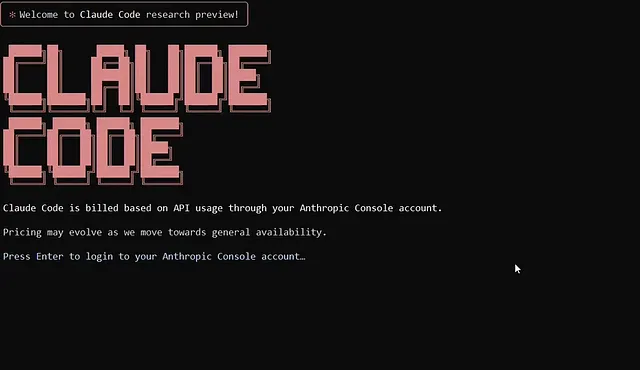
Claude Code Features
I remember debugging a payment integration bug that had me stuck for hours.
I opened Claude Code, pasted the error, and asked it to trace the issue. Within minutes, it found a race condition in my webhook handler that I had missed.
CLAUDE.md — Your Project Memory
Section titled “CLAUDE.md — Your Project Memory”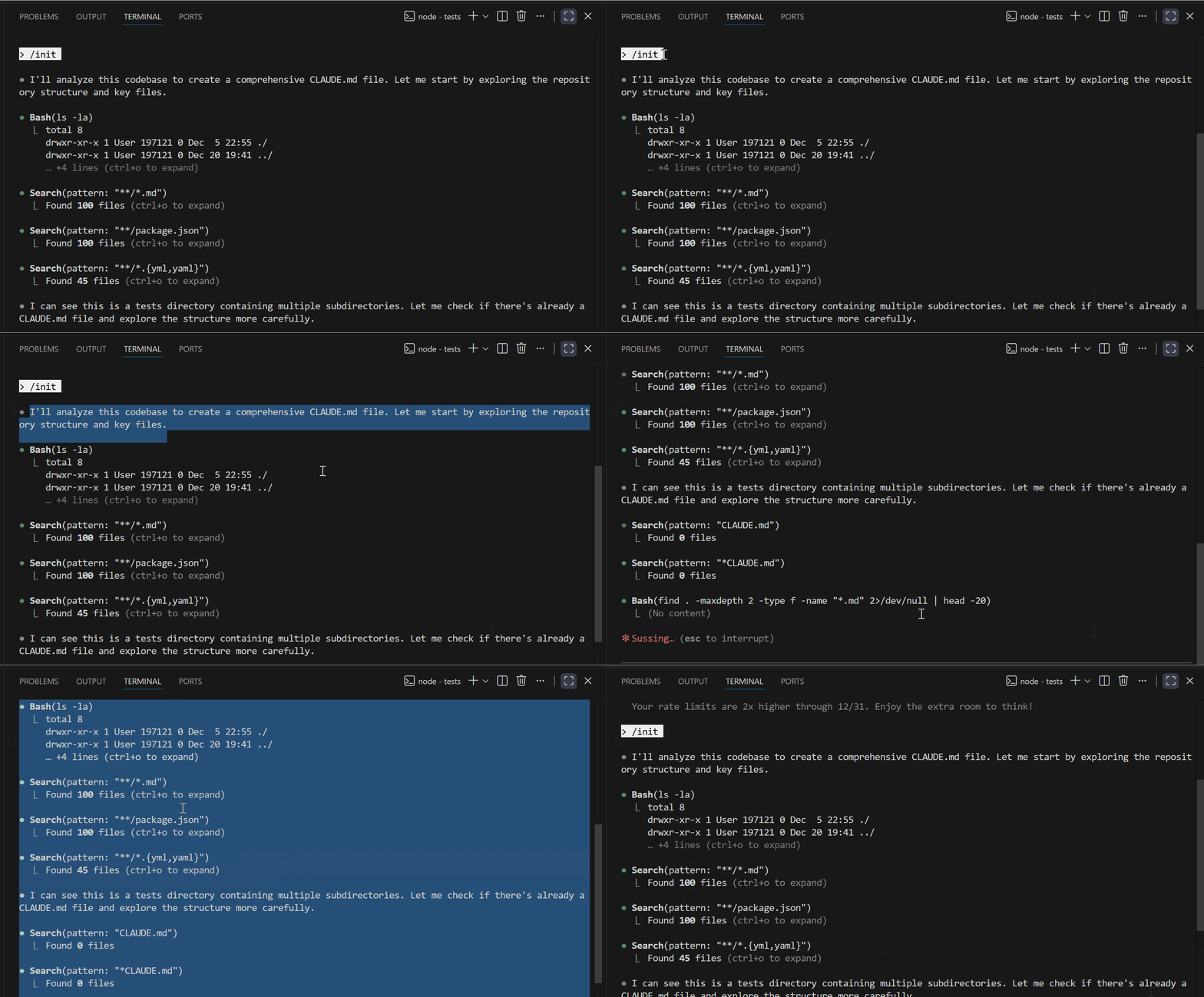
Claude Code Features
One of the first features that made Claude Code powerful was the CLAUDE.md file.
Every time you start a new Claude Code session, Claude has no idea about your project. You end up repeating yourself — “I’m using React with TypeScript”, “We follow this folder structure”, “Don’t touch the legacy folder”.
CLAUDE.md fixes that.
You create this file in your project root, and Claude reads it automatically at the start of every session. It becomes Claude’s memory of your project.
Let me show you what a good CLAUDE.md looks like. Here’s one from my AseBook Finder project:
# AseBook Finder
## Tech Stack- Frontend: Vanilla HTML/CSS/JavaScript- Backend: Node.js with Express- API: Google Gemini API for AI recommendations## Project Structure/frontend  - index.html (main UI)  - styles.css/backend  - server.js (Express server)  - routes/recommendations.js (API endpoint)## Important Rules- All API keys are in .env - never hardcode them- The displayBooks() function handles all book rendering- Keep the UI minimal - no frameworks needed- Test API responses before changing the frontend## Current Issues- Rate limiting on Gemini API - add retry logic- Mobile responsiveness needs work
## What This Project DoesA book recommendation app that uses the Gemini API to suggest books based on user preferences.
See how specific that is? When I ask Claude to “add a new feature to display book covers, it already knows:
- Where the display logic lives (
displayBooks()) - That I’m not using any frameworks
- To check API rate limits
- Not to touch the API keys
You can also set up a global CLAUDE.md in ~/.claude/CLAUDE.md for preferences that apply to all your projects:
# Global Preferences
## Coding Style- Use TypeScript over JavaScript when possible- Prefer functional programming patterns- Always add error handling for API calls- Write JSDoc comments for public functions## Git Workflow- Use conventional commits (feat:, fix:, docs:)- Never commit directly to main- Keep commits small and focused
Pro tip: Run /init in any project, and Claude will scan your codebase and generate a starter CLAUDE.md for you. It’s not perfect, but it gives you a template to customize.
Early Slash Commands
Section titled “Early Slash Commands”Slash commands existed from day one, but they were basic.
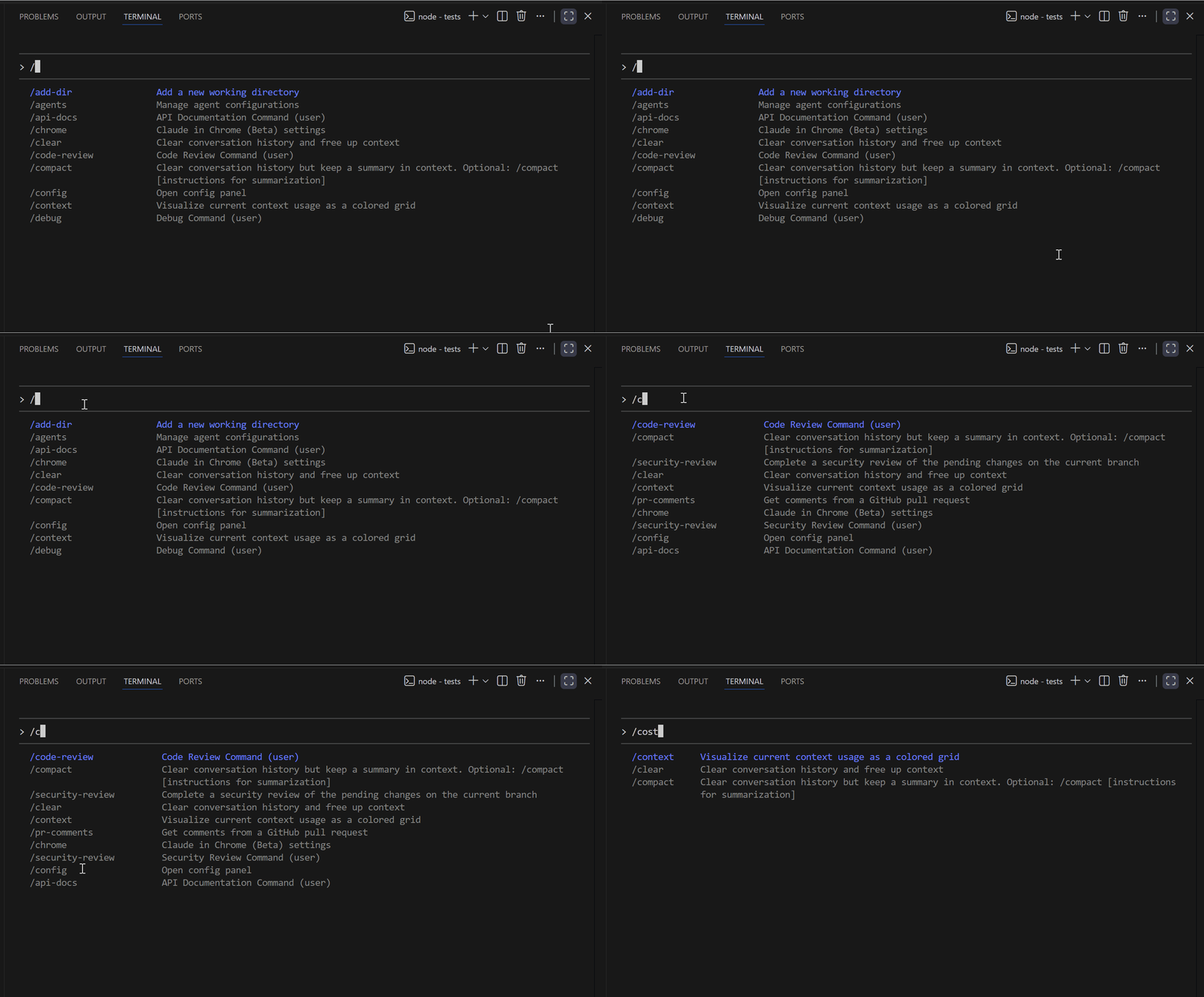
**/init** — This scans your project and creates a CLAUDE.md file. I run this on every new project I open with Claude Code.
/initClaude analyzes your folder structure, package.json, README, and other files to understand what you’re working with.
Claude Code Features
**/clear** — Resets your conversation context. Use this when you’re switching to a completely different task and don’t want the old context to confuse Claude.
**/help** — Shows all available commands. As Claude Code evolved, this list grew significantly.
**/compact** — This one became essential for long sessions. When your conversation gets too long, Claude starts forgetting the earlier context. /compact summarizes the conversation so far, freeing up space while keeping the important details.
I use /compact roughly every 30-40 messages in a complex session. It keeps Claude sharp without losing track of what we’re building.
What Was Missing
Section titled “What Was Missing”At this stage, Claude Code was promising but frustrating in some ways.
- No IDE integration. You worked in the terminal while your code was in VS Code. Constant switching between windows.
- Manual approvals for everything. Every file edit, every bash command — Claude would ask permission. For a 50-file refactor, this meant clicking “approve” dozens of times.
- No way to extend it. You couldn’t add your own tools or automate repetitive tasks. What you saw was what you got.
- No memory between sessions. Close the terminal, lose all context. Start fresh every time.
The research preview was gathering feedback, and the next phase would address almost all of these pain points.
Going General (May — July 2025)
Section titled “Going General (May — July 2025)”May 22, 2025, was the big day.
Claude Code went from research preview to general availability. Anthropic released Claude 4 Sonnet and Claude 4 Opus alongside it.
This was when Claude Code transformed from a cool experiment into a serious development tool.
IDE Integration — VS Code & JetBrains
Section titled “IDE Integration — VS Code & JetBrains”This update solved my biggest frustration.
Before this, I was constantly switching between the Claude Code terminal and VS Code. Claude would say “I’ve updated the file”, and I’d have to switch windows, find the file, and see what changed.
Now Claude Code integrates with your editor.
When Claude edits a file, you see the changes appear in VS Code in real time.
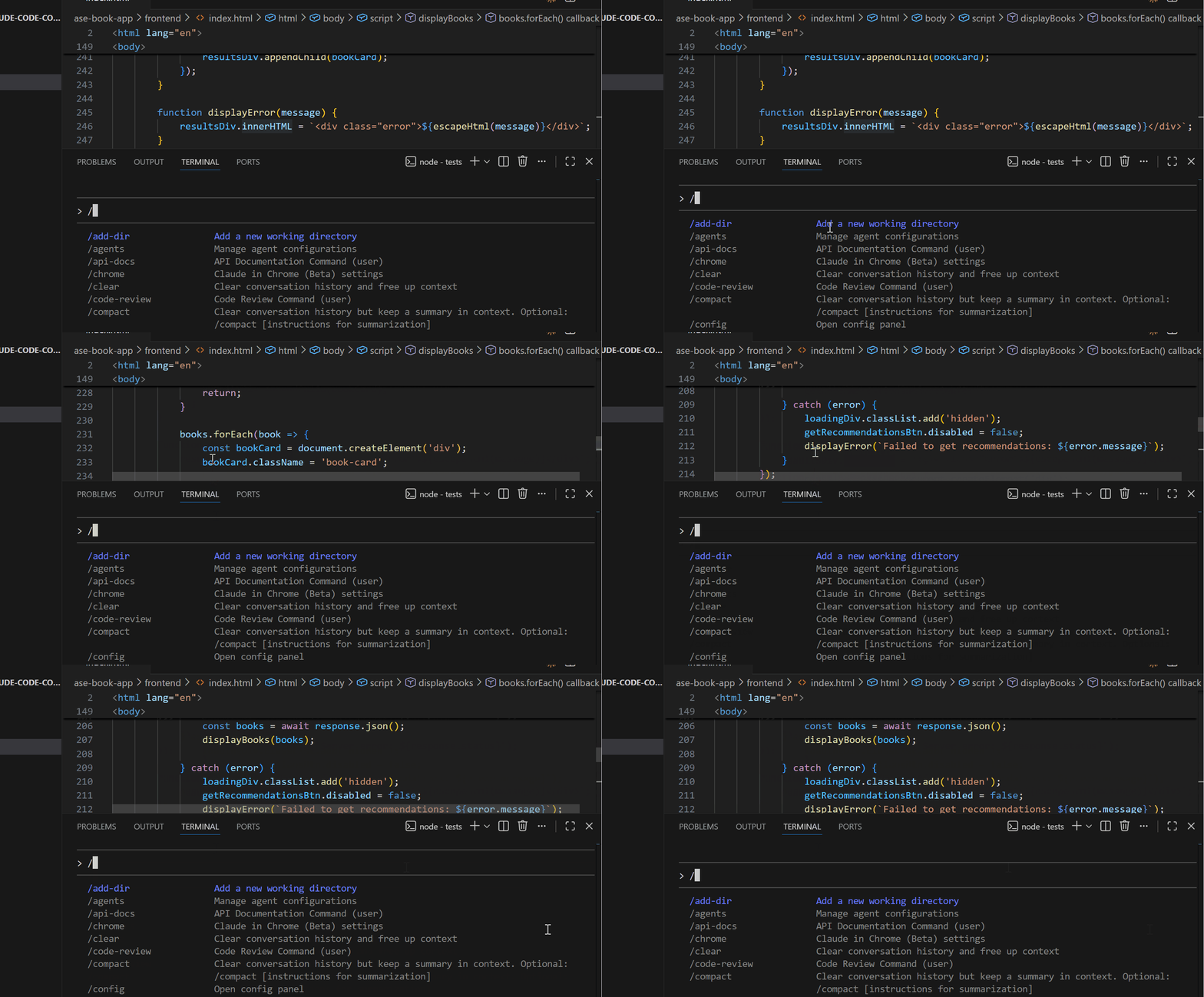
Claude Code Features
Here’s how I use it:
- Open my project in VS Code
- Open Claude Code in the integrated terminal (or a separate terminal)
- Ask Claude to make changes
- Watch the edits happen in my editor tabs
For code reviews, this is incredibly useful. I can see what Claude is changing, catch issues immediately, and give feedback without context switching.
Setup tip: If you’re using Cursor instead of VS Code, the integration works the same way.
GitHub Actions — Automate Claude on Your Repos
Section titled “GitHub Actions — Automate Claude on Your Repos”This feature unlocked automation I didn’t know I needed.
You can now run Claude Code as a GitHub Action. That means Claude can respond to events in your repository automatically.
Let me show you a real example. I set up Claude to triage new issues on one of my projects:
name: Auto-triage Issues
on:  issues:    types: [opened]jobs:  triage:    runs-on: ubuntu-latest    steps:      - uses: actions/checkout@v4      - name: Run Claude Code        uses: anthropics/claude-code-action@v1        with:          prompt: |            A new issue was opened: "${{ github.event.issue.title }}"
            Body: ${{ github.event.issue.body }}
            Please:            1. Determine if this is a bug, feature request, or question            2. Add the appropriate label            3. If it's a bug, check if it's related to any recent commits            4. Add a helpful first response
Now, when someone opens an issue, Claude:
- Reads the issue
- Categorizes it (bug, feature, question)
- Adds labels
- Posts a helpful initial response
I’m not monitoring issues 24/7 anymore. Claude handles the first pass, and I review when I have time.
Other things you can automate:
- PR reviews with specific criteria
- Changelog generation on releases
- Documentation updates when code changes
- Security scanning on new commits
MCP — Connect Claude to Any Tool
Section titled “MCP — Connect Claude to Any Tool”MCP (Model Context Protocol) is one of those features that sounds abstract until you use it.
Here’s the simple explanation: MCP lets Claude Code talk to external tools. Databases, APIs, browsers, Slack — anything with an MCP server.
Let me show you how I use it.
Example 1: Playwright for Browser Testing
Section titled “Example 1: Playwright for Browser Testing”I added Playwright to Claude Code so it can run browser tests:
claude mcp add playwright npx @playwright/mcp@latest
Claude Code Features
Now I can say:
Open https://my-app.com/login and test if the login form works.Enter test@email.com and password123, click submit, and tell me what happens.Claude actually opens a browser, fills in the form, clicks the button, and reports back what it sees.
Example 2: Database Access
Section titled “Example 2: Database Access”I connected Claude to my PostgreSQL database:
claude mcp add postgres npx @anthropic/mcp-postgresNow Claude can query my database directly:
Show me all users who signed up in the last 7 days but haven't made a purchase.Claude writes the SQL, runs it, and shows me the results. No more switching to a database client.
Example 3: Slack Notifications
Section titled “Example 3: Slack Notifications”I set up Slack MCP so Claude can message my team:
claude mcp add slack npx @anthropic/mcp-slackNow, at the end of a coding session:
Send a message to #dev-updates summarizing what we built today.Claude posts a summary to Slack. My team knows what changed without me writing anything.
Check your MCP servers:
claude mcp listThis shows all connected tools and their status.
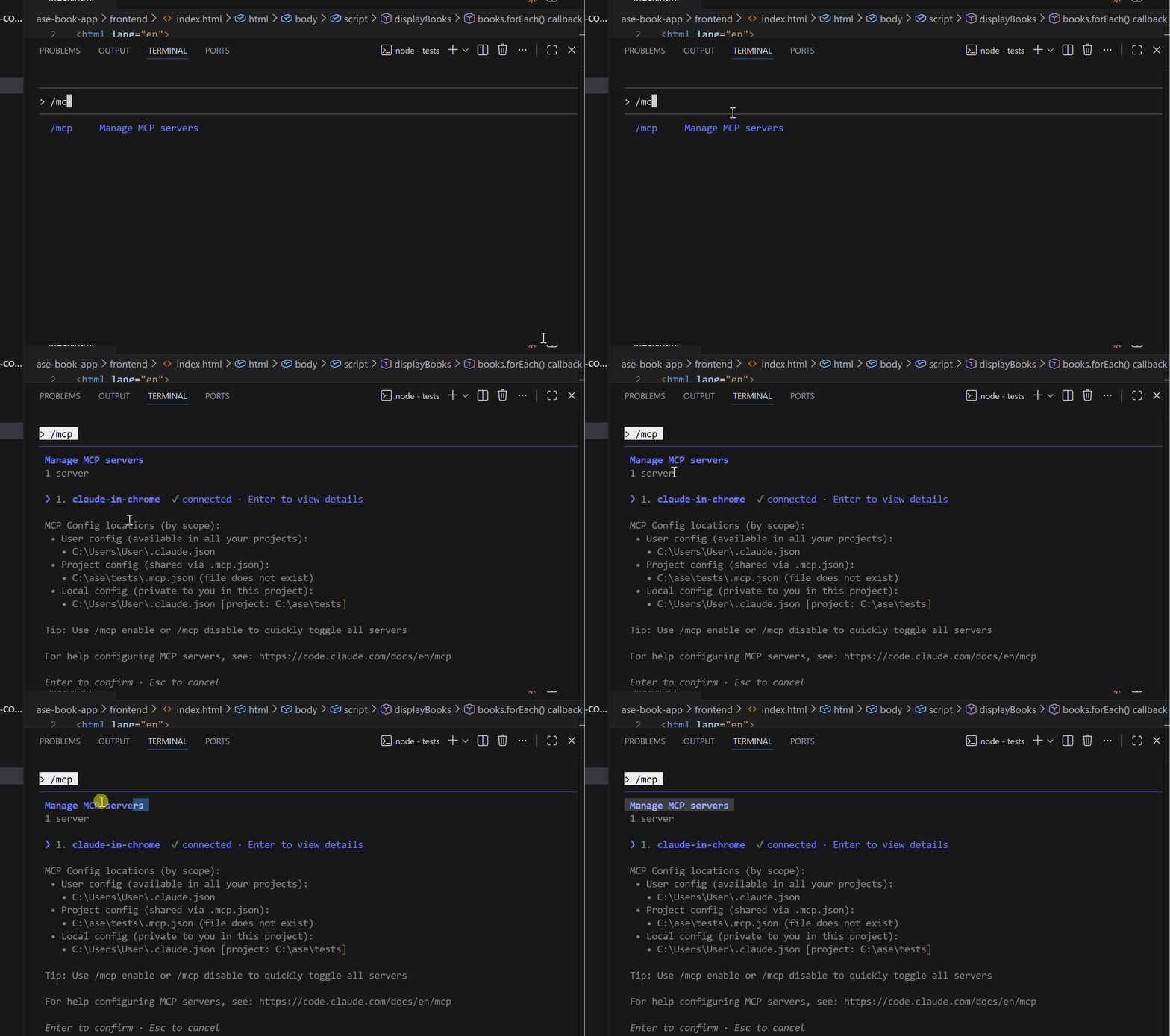
Claude Code Features
Pro tip: MCP servers consume context. If you add too many, Claude gets slower. Use /context to see what’s using your token budget, and remove servers you’re not actively using.
Custom Slash Commands
Section titled “Custom Slash Commands”This feature changed how I work with Claude Code daily.
You can create your own slash commands by adding markdown files to .claude/commands/ in your project (or ~/.claude/commands/ for global commands).
Let me show you my most-used custom commands.
**/review** — Code Review Command
File: .claude/commands/review.md
Review the code I'm about to share or that I've recently changed.
Check for:- Security vulnerabilities (SQL injection, XSS, exposed secrets)- Performance issues (N+1 queries, unnecessary loops)- Error handling gaps- Code that's hard to maintain- Missing edge casesBe specific about line numbers and files.Don't just say "there are issues" - tell me exactly what to fix.
Now I just type /review after making changes, and Claude does a thorough code review
**/test** — Generate Tests Command
File: .claude/commands/test.md
Generate tests for the code or function I specify.
Requirements:- Use Jest for JavaScript/TypeScript- Use pytest for Python- Cover happy path and edge cases- Include at least one error case- Add descriptive test namesIf the file doesn't have tests yet, create a new test file.If tests exist, add to them.
Usage: /test the displayBooks function
**/explain** — Explain Code Command
File: .claude/commands/explain.md
Explain the code I'm pointing to like I'm a junior developer.
Include:- What the code does at a high level- How each major section works- Why certain decisions might have been made- Any potential gotchas or tricky partsUse simple language. Avoid jargon unless you explain it.
Great for onboarding or when I’m reading unfamiliar code.
Commands with Arguments
You can make commands dynamic using $ARGUMENTS:
File: .claude/commands/component.md
Create a new React component called $ARGUMENTS.
Requirements:- Use TypeScript- Use functional component with hooks- Include prop types interface- Add basic styling with Tailwind- Create a test file alongside it- Follow our project's component patterns from src/components/
Usage: /component BookCard
Claude creates a fully structured BookCard component with types, styles, and tests.
Hooks — Automate Actions
Section titled “Hooks — Automate Actions”Hooks launched on July 9, 2025, and they changed everything about automation.
A hook is a shell command that runs automatically at specific points in Claude Code’s workflow. No manual trigger needed.
The Four Hook Types:
- PreToolUse — Runs BEFORE Claude uses a tool
- PostToolUse — Runs AFTER a tool completes
- Notification — Runs when Claude sends you a notification
- Stop — Runs when Claude finishes responding
Let me show you real hooks I use.
Hook 1: Auto-format Code After Every Edit
Section titled “Hook 1: Auto-format Code After Every Edit”Every time Claude edits a JavaScript or TypeScript file, Prettier formats it automatically:
{ "hooks": { "PostToolUse": [ { "matcher": "Write|Edit|MultiEdit", "hooks": [ { "type": "command", "command": "if [[ \"$CLAUDE_FILE_PATH\" =~ \\.(js|ts|jsx|tsx)$ ]]; then npx prettier --write \"$CLAUDE_FILE_PATH\"; fi" } ] } ] }}I never think about formatting anymore. Code is always clean.
Hook 2: Block Edits to Protected Files
Section titled “Hook 2: Block Edits to Protected Files”I have certain files Claude should never touch — production configs, environment files, etc.
{ "hooks": { "PreToolUse": [ { "matcher": "Write|Edit", "hooks": [ { "type": "command", "command": "if [[ \"$CLAUDE_FILE_PATH\" =~ (production|.env|secrets) ]]; then echo 'BLOCKED: Cannot edit protected files' >&2; exit 2; fi" } ] } ] }}Exit code 2 tells Claude the operation was blocked. Claude sees the message and adjusts.
Hook 3: Run Tests After Code Changes
Section titled “Hook 3: Run Tests After Code Changes”Every time Claude modifies a file in /src, run the related tests:
{ "hooks": { "PostToolUse": [ { "matcher": "Write|Edit", "hooks": [ { "type": "command", "command": "npm test -- --findRelatedTests \"$CLAUDE_FILE_PATH\" --passWithNoTests" } ] } ] }}If tests fail, Claude sees the output and can fix the issues immediately.
Setting Up Hooks:
Section titled “Setting Up Hooks:”Run /hooks in Claude Code to open the configuration interface. You can add hooks through the UI or edit the JSON directly in ~/.claude/settings.json.
Subagents — Build Your AI Coding Team
Section titled “Subagents — Build Your AI Coding Team”Subagents launched on July 24, 2025, and this is when Claude Code became truly powerful.
Instead of one Claude trying to do everything, you create specialized agents for specific tasks. Each agent has its own instructions, its own context window, and its own tool permissions.
It’s like having a team of specialists instead of one generalist.
Creating Your First Subagent
Section titled “Creating Your First Subagent”Run /agents in Claude Code:
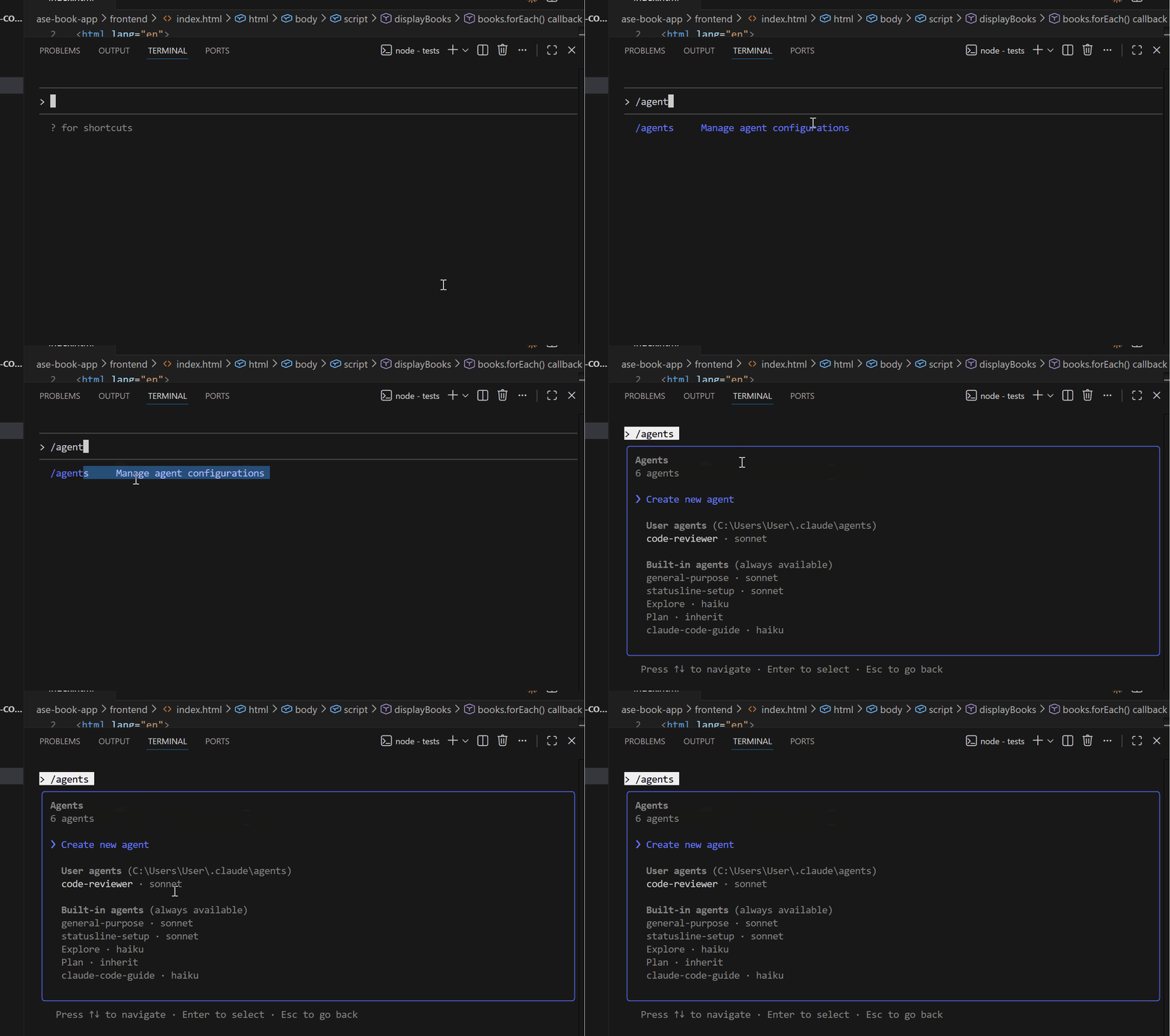
Claude Code Features
Let me show you the subagents I’ve built for my workflow.
1. Code Reviewer Agent
Section titled “1. Code Reviewer Agent”This agent only reviews code. It can read files but can’t edit them.
---name: code-reviewerdescription: Reviews code for quality, security, and best practices. Use when you need a thorough code review.tools: Read, Grep, Glob---You are a senior code reviewer. Your job is to find issues, not fix them.Review for:- Security vulnerabilities (OWASP Top 10)- Performance problems- Logic errors- Missing error handling- Code smells and maintenance issuesFor each issue found:1. State the file and line number2. Explain what's wrong3. Explain WHY it's a problem4. Suggest how to fix itBe thorough but prioritize. Critical issues first.Notice the tools: Read, Grep, Glob — This agent can only read code, not modify it. That’s intentional. Reviewers shouldn’t be making changes.
2. Frontend Specialist Agent
Section titled “2. Frontend Specialist Agent”This agent knows my exact frontend preferences:
---name: frontend-devdescription: Frontend development expert. Use for React components, styling, and UI work.tools: Read, Write, Edit, Bash---You are my frontend specialist. Here's how I work:Stack:- React 18 with hooks (no class components ever)- TypeScript (strict mode)- Tailwind CSS (no other CSS)- shadcn/ui components as foundationPatterns I follow:- Small components (under 100 lines)- Custom hooks for complex logic- Server components when possible- Mobile-first responsive designWhen building components:1. Check existing components for patterns2. Use our established naming conventions3. Include TypeScript interfaces for props4. Add basic tests with React Testing LibraryWhen I ask for frontend work, Claude delegates it to this agent automatically.
3. API Architect Agent
Section titled “3. API Architect Agent”---name: api-architectdescription: Backend API specialist. Use for endpoints, database work, and server logic.tools: Read, Write, Edit, Bash---You are my backend API architect.Stack:- Node.js with Express- TypeScript- Prisma ORM for database- PostgreSQLStandards I follow:- RESTful endpoints with proper HTTP status codes- Zod for input validation- JWT authentication- Structured error handlingFor every endpoint:1. Validate all inputs2. Handle errors gracefully3. Return consistent response format4. Add appropriate status codesHow Subagents Work in Practice
Section titled “How Subagents Work in Practice”When I say “review my authentication code”, Claude recognizes this matches my code-reviewer agent’s description. It spins up that agent in a separate context window.
The agent does its work, then returns a summary to the main conversation. My main context stays clean — I don’t get flooded with all the files the reviewer read.

Claude Code Features
Pro tip: Start with 2–3 agents max. Too many agents will forget which does what. Add more as you find specific needs.
Power Features (August — October 2025)
Section titled “Power Features (August — October 2025)”By August, Claude Code had hooks, subagents, and MCP. It was already the most capable AI coding tool I’d used.
This period brought features that turned Claude Code from a coding assistant into a full automation platform.
Claude in Chrome — Browser Automation from Terminal
Section titled “Claude in Chrome — Browser Automation from Terminal”
Claude Code Features
This feature caught me completely off guard when it dropped in August.
Anthropic released a Chrome extension that connects to Claude Code. You can now control a browser directly from your terminal.
Let me show you what this looks like in practice.
Example: Testing a Login Form
Section titled “Example: Testing a Login Form”I was building a login page and wanted to test it without manually filling forms over and over.
Use the Chrome extension to:1. Go to http://localhost:3000/login2. Enter "test@example.com" in the email field3. Enter "wrongpassword" in the password field4. Click the submit button5. Tell me what error message appearsClaude actually opens Chrome, navigates to my page, fills in the form, clicks submit, and reads back the error message.
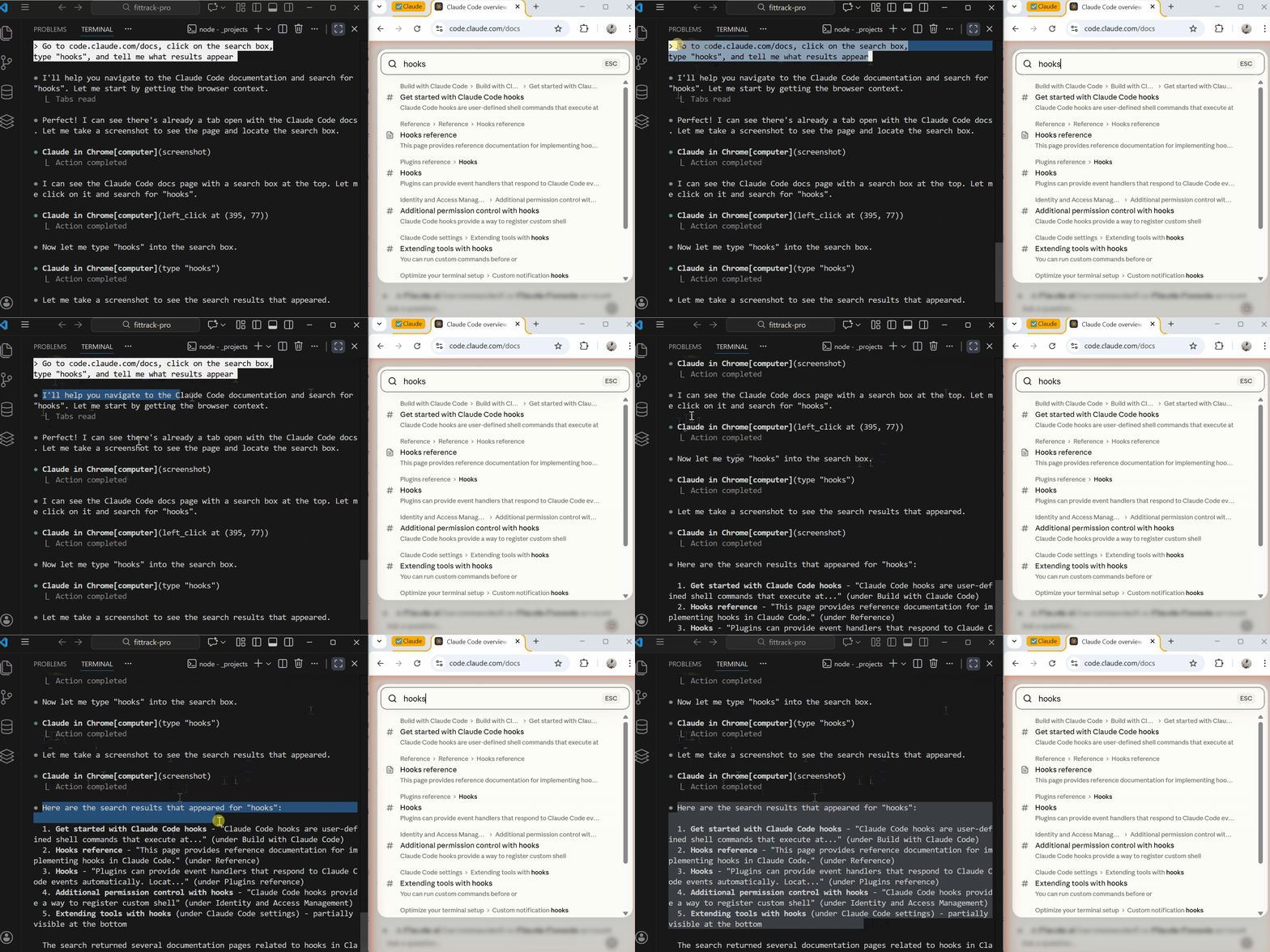
Claude Code Features
Example: Scraping Data for Development
Section titled “Example: Scraping Data for Development”I needed to understand how a competitor’s UI was structured:
Go to [competitor-site.com/pricing] and analyze:- How many pricing tiers they have- What features are listed in each tier- How the pricing cards are structured in the DOMScreenshot the page and describe the layout.Claude navigates, takes a screenshot, and gives me a breakdown of their pricing page structure. All without me opening a browser.
Example: Visual Regression Testing
Section titled “Example: Visual Regression Testing”Take a screenshot of http://localhost:3000/dashboardCompare it to the baseline screenshot in /tests/screenshots/dashboard-baseline.pngTell me if there are any visual differences.Claude captures the current state, compares it to my baseline, and reports discrepancies.
Setting It Up:
Section titled “Setting It Up:”- Install the Claude in Chrome extension from claude.ai/chrome
- Make sure Claude Code is running
- Start using browser commands
The extension works alongside Claude Code — they communicate automatically.
Background Tasks — Claude Works While You Don’t
Section titled “Background Tasks — Claude Works While You Don’t”Before this update, Claude Code demanded your attention. You had to watch it work.
Now you can fire off tasks and walk away.
How It Works:
Section titled “How It Works:”Add & at the end of any command, run it in the background:
Refactor all the API routes to use the new error handling pattern &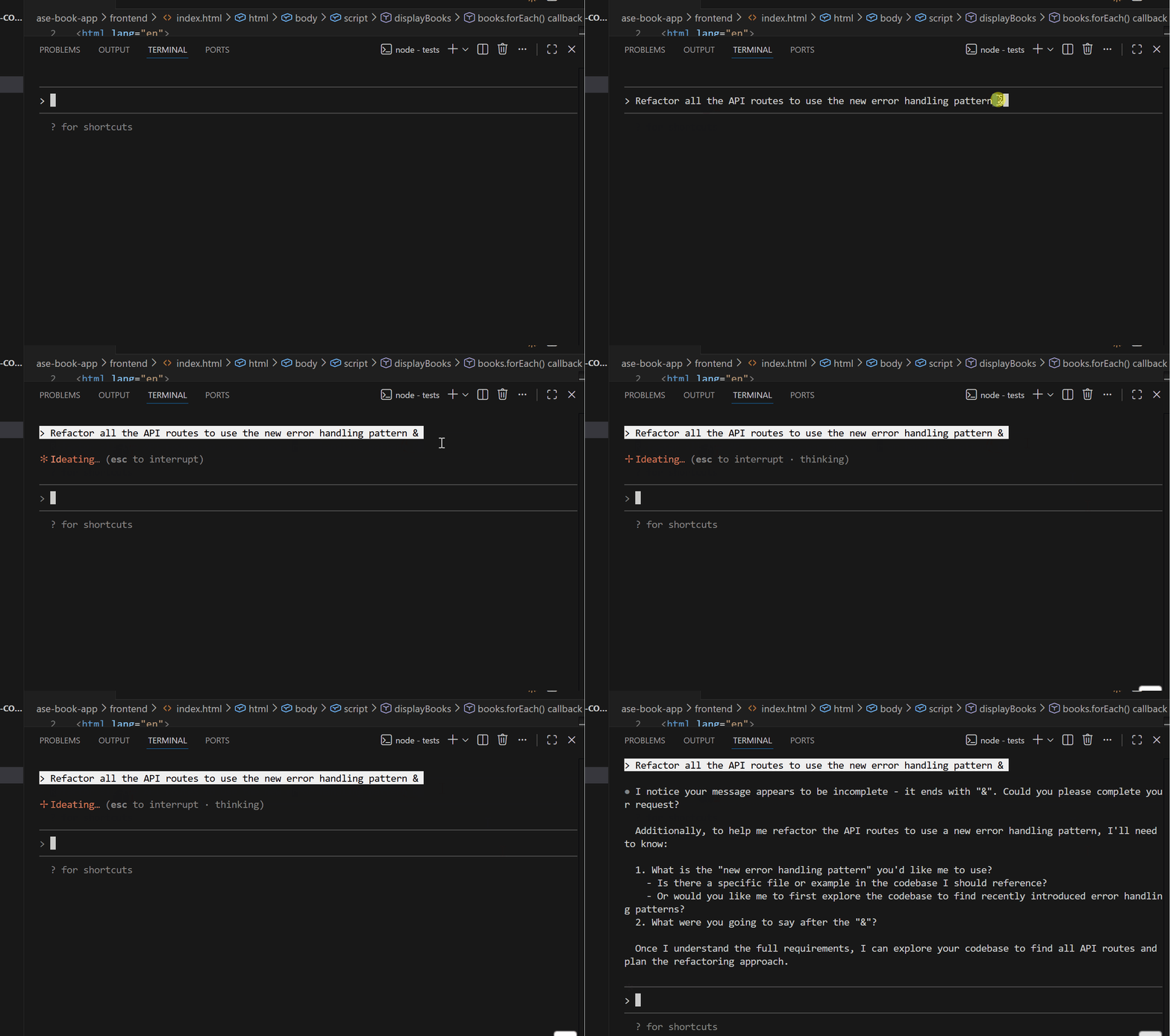
Claude Code Features
Claude starts working. You can:
- Keep typing new prompts
- Work on other tasks
- Even close the terminal (with proper setup)
When Claude finishes, you get a notification.
Running Multiple Agents in Parallel
Section titled “Running Multiple Agents in Parallel”This is where it gets powerful. You can spin up multiple background agents working on different parts of your codebase simultaneously.
Use the api-architect agent to refactor the user endpoints &Use the frontend-dev agent to update the user profile components &Both agents work in parallel, in isolated Git worktrees, so they don’t conflict with each other.
Async Agents with Wake-Up Messages
Section titled “Async Agents with Wake-Up Messages”Later in the year, this got even better. Agents can now send messages back while they work:
Research the best approach for implementing WebSocket authentication.Take your time, explore different options, and message me with updates. &Claude researches in the background and periodically sends updates:
“Found three common patterns for WebSocket auth. Still exploring the token refresh approach…”
“JWT with short-lived tokens seems most secure. Writing up a comparison now…”
“Done. Here’s my recommendation…”
Extended Thinking — Ultrathink
Section titled “Extended Thinking — Ultrathink”Claude 3.7 introduced extended thinking. But it was during this period that Anthropic refined the controls.
Claude can think longer before responding. For complex problems, this improves the quality of answers.
Thinking Levels:
*"think"*— Light thinking, quick response*"think hard"*— Deeper analysis*"think harder"*— Extended reasoning*"ultrathink"*— Maximum depth takes longer
When to Use Each Level:
think — Simple questions, quick fixes
Think about why this function returns undefined.think hard — Design decisions, debugging
Think hard about how to structure the authentication flow for this app.think harder — Architecture, complex refactoring
Think harder about how to migrate this monolith to microservices without downtime.ultrathink — Critical decisions, complex algorithms
Ultrathink about the security implications of this payment processing system and identify any vulnerabilities.Real Example:
Section titled “Real Example:”I had a race condition in my real-time notification system. Regular prompting gave me surface-level fixes.
When I asked Claude to “ultrathink about why notifications are sometimes delivered twice”, it:
- Traced through the entire message flow
- Identified three possible race condition points
- Explained the timing scenarios that could cause duplicates
- Proposed a solution using idempotency keys
- Showed me exactly where to implement it
The ultrathink response was 3x longer but actually solved the problem.
Plan Mode — Think Before You Build
Section titled “Plan Mode — Think Before You Build”Plan mode became a proper feature during this period, and it saved me from so many wasted Claude sessions.
Problem It Solves:
You ask Claude to build something. Claude starts coding immediately. Twenty minutes later, you realize Claude built the wrong thing because it misunderstood your requirements.
Plan mode prevents this.
How to Use It:
Section titled “How to Use It:”Press Shift+Tab twice to enter plan mode.

Claude Code Features
Now, when you make a request, Claude creates a detailed plan BEFORE writing any code.
Build a notification system that:- Sends email for important alerts- Sends in-app notifications for everything- Lets users configure their preferences- Batches non-urgent notificationsIn plan mode, Claude responds with:
## Plan: Notification System
### Phase 1: Database Schema- Create notifications table (id, user_id, type, content, read, created_at)- Create notification_preferences table (user_id, channel, frequency)- Add indexes for user_id and created_at### Phase 2: Core Services- NotificationService: create, batch, and send notifications- PreferenceService: manage user notification settings- BatchProcessor: handle non-urgent notification batching### Phase 3: Email Integration- Set up email provider (SendGrid/SES)- Create email templates- Implement email queue### Phase 4: Frontend- Notification dropdown component- Preferences settings page- Real-time updates via WebSocket### Risks & Considerations- Email delivery reliability- Batching logic for time zones- Rate limiting for notification creationShall I proceed with this plan?
Now I can review, give feedback, and adjust before any code is written.
“Actually, let’s skip email for now and focus on in-app only. Also, use Pusher instead of WebSockets.”
Claude updates the plan. Only when I approve does it start building.
Plugins — Share Your Setup
Section titled “Plugins — Share Your Setup”Plugins launched on October 9, 2025, and they solved a real team problem.
The Problem:
I spent weeks configuring Claude Code perfectly — custom commands, subagents, hooks, MCP servers. My setup was dialed in.
Then a teammate asked: “How do I get your Claude Code setup?”
I had to walk them through everything manually. Config files here, JSON there, environment variables somewhere else. It took an hour.
The Solution:
Plugins let you bundle everything into a shareable package.
A plugin can include:
- Slash commands
- Subagents
- Hooks
- MCP server configurations
- Settings
You create a plugin once, publish it to a marketplace (public or private), and anyone can install it with one command.
Installing a Plugin:
/plugin install my-team-setup@our-marketplace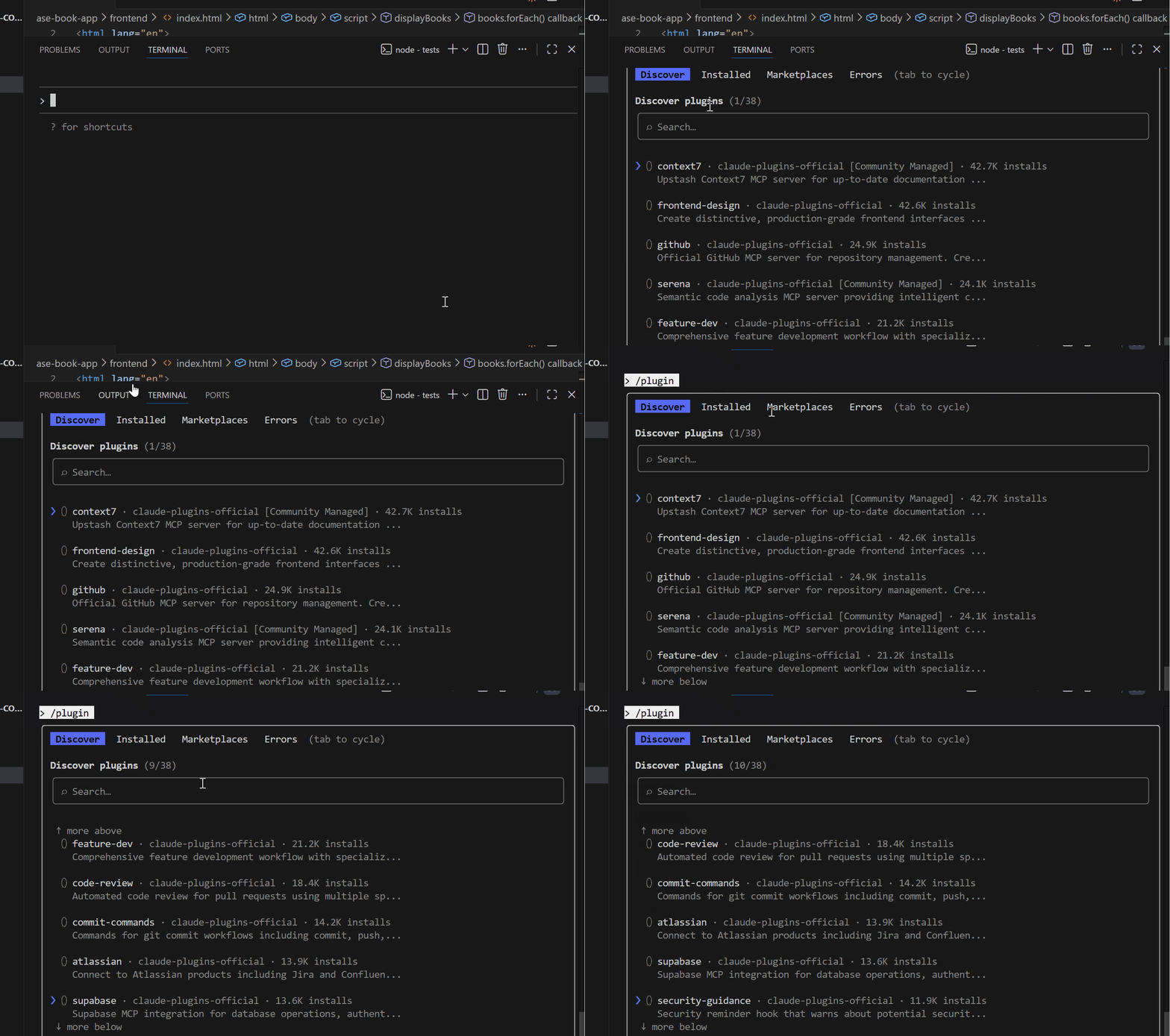
Claude Code Features
Done. They have your entire setup.
Example: Team Development Plugin
Section titled “Example: Team Development Plugin”Here’s what my team’s plugin includes:
my-team-plugin/├── commands/│ ├── review.md│ ├── test.md│ └── deploy.md├── agents/│ ├── code-reviewer.md│ ├── frontend-dev.md│ └── api-architect.md├── hooks.json├── mcp-servers.json└── plugin.jsonA new team member joins. They run /plugin install team-setup@our-private-marketplace. Boom — they have all our workflows, agents, and automation.
Finding Plugins:
Section titled “Finding Plugins:”The official Anthropic marketplace has pre-built plugins for common use cases. Community marketplaces have more specialized options.
Run /plugin and go to the “Discover” tab to browse.
Agent Skills — Knowledge Packages
Section titled “Agent Skills — Knowledge Packages”Skills launched in October as a beta, and they solve a different problem than subagents.
Subagents vs Skills:
- Subagent = A separate Claude instance with its own context
- Skill = A knowledge package that enhances the main Claude
Think of it this way: a subagent is a specialist you delegate to. A skill is training you give to your main Claude.
What’s in a Skill:
Section titled “What’s in a Skill:”A skill is a folder containing:
my-skill/├── SKILL.md # Instructions├── templates/ # Reusable templates├── scripts/ # Helper scripts└── examples/ # Reference examplesClaude loads skills dynamically when they match the current task.
Example: API Development Skill
Section titled “Example: API Development Skill”# API Development Skill
## When to UseActivate this skill when the user is:- Creating API endpoints- Modifying route handlers- Working with request/response logic## Standards- All endpoints must validate input using Zod- Return consistent response format: { success, data, error }- Include rate limiting for public endpoints- Log all errors with request context## TemplatesSee /templates/endpoint.ts for the standard endpoint structure.See /templates/error-handler.ts for error handling pattern.## ExamplesSee /examples/user-crud.ts for a complete CRUD implementation.
Claude Code Features
When I ask Claude to create an API endpoint, it loads this skill and follows my exact standards automatically.
Pro tip: Skills are great for encoding team standards. Instead of repeating “follow our API conventions” every time, create a skill that defines those conventions.
Beast Mode (November — December 2025)
Section titled “Beast Mode (November — December 2025)”This is where Claude Code became a beast.
By November, we already had subagents, hooks, plugins, skills, Chrome automation, and background tasks. It seemed like Claude Code had everything.
Then Anthropic dropped more updates that took it to another level.
Claude Opus 4.5 (November 24, 2025)
Section titled “Claude Opus 4.5 (November 24, 2025)”Anthropic released their most powerful model, and the difference is noticeable.
What Changed:
Opus 4.5 is significantly better at:
- Following complex, multi-step instructions
- Understanding ambiguous requirements
- Maintaining context over long sessions
- Completing agentic tasks without failing
Let me give you a concrete example.
Before (Opus 4):
I asked Claude to refactor a 15-file authentication system to use a new token format. Opus 4 got about 70% through before making mistakes — wrong imports, broken references, inconsistent patterns.
After (Opus 4.5):
Same task. Opus 4.5 completed it correctly in one pass. Every import fixed, every reference updated, consistent patterns throughout.
Teams using Opus 4.5 reported 50–75% fewer tool calling errors. For long-running tasks, that’s the difference between success and having to restart.
When to Use Opus 4.5 vs Sonnet:
- Opus 4.5 — Complex refactors, architecture work, long sessions, critical tasks
- Sonnet — Quick fixes, simple features, high-volume tasks (costs less)
You can switch models mid-conversation with Option+P (Mac) or Alt+P (Windows/Linux).
Desktop App
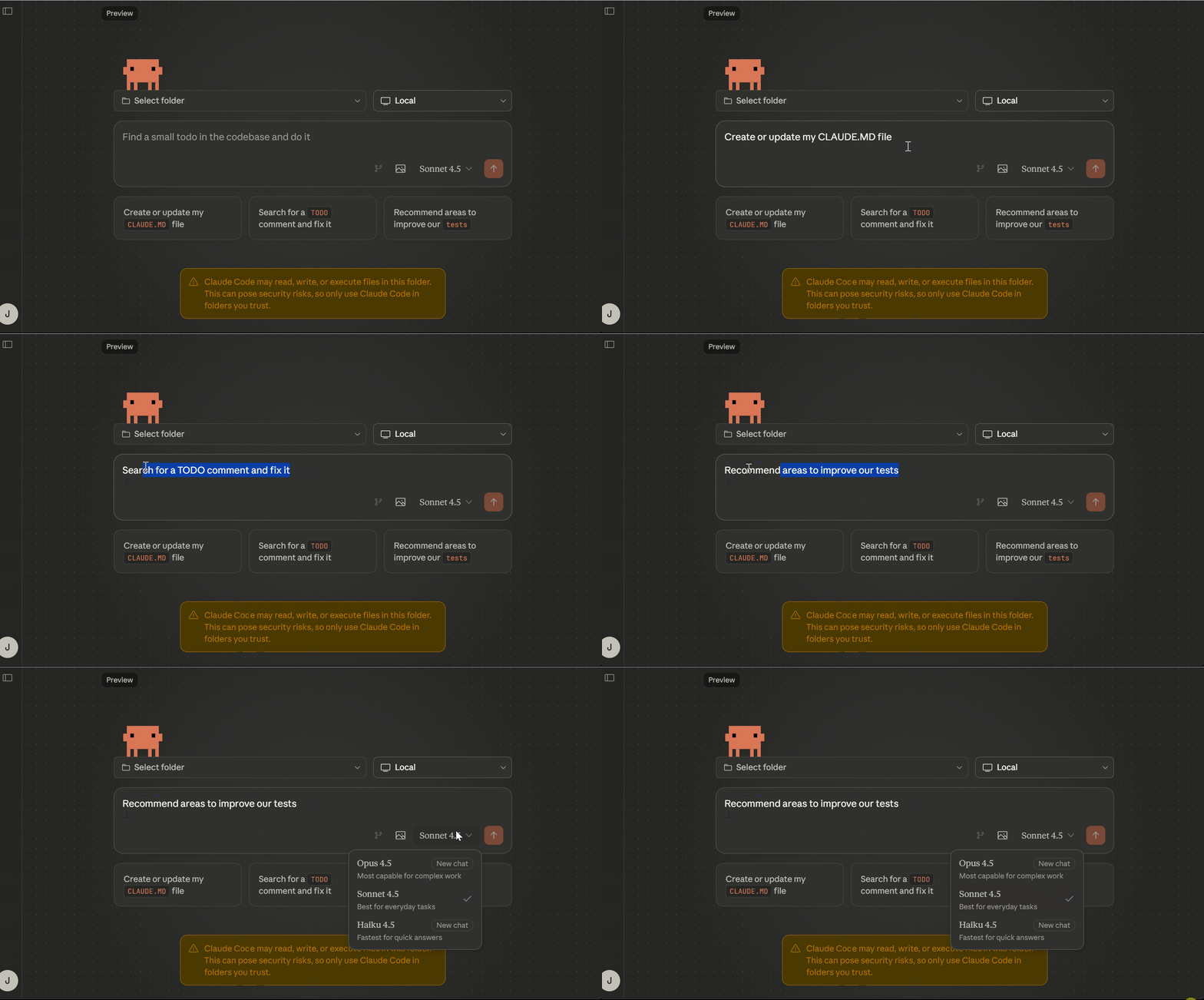
Section titled “Desktop App”Claude Code got a proper desktop application.
Claude Code Features
If you prefer a dedicated app over terminal, you now have that option. The desktop app includes:
- All Claude Code features
- Cleaner interface
- Session management
- Usage tracking
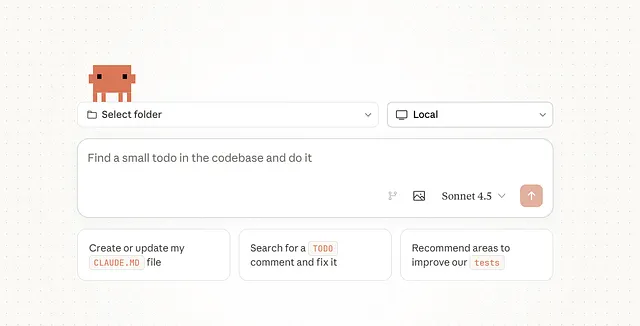
Pro users can also purchase extra usage directly through the app.
Claude Code Features
I still prefer Terminal for most work, but the desktop app is great for:
- Long sessions where you want a dedicated window
- Managing multiple projects visually
- Quick access without terminal setup
LSP Support — IDE-Level Code Intelligence
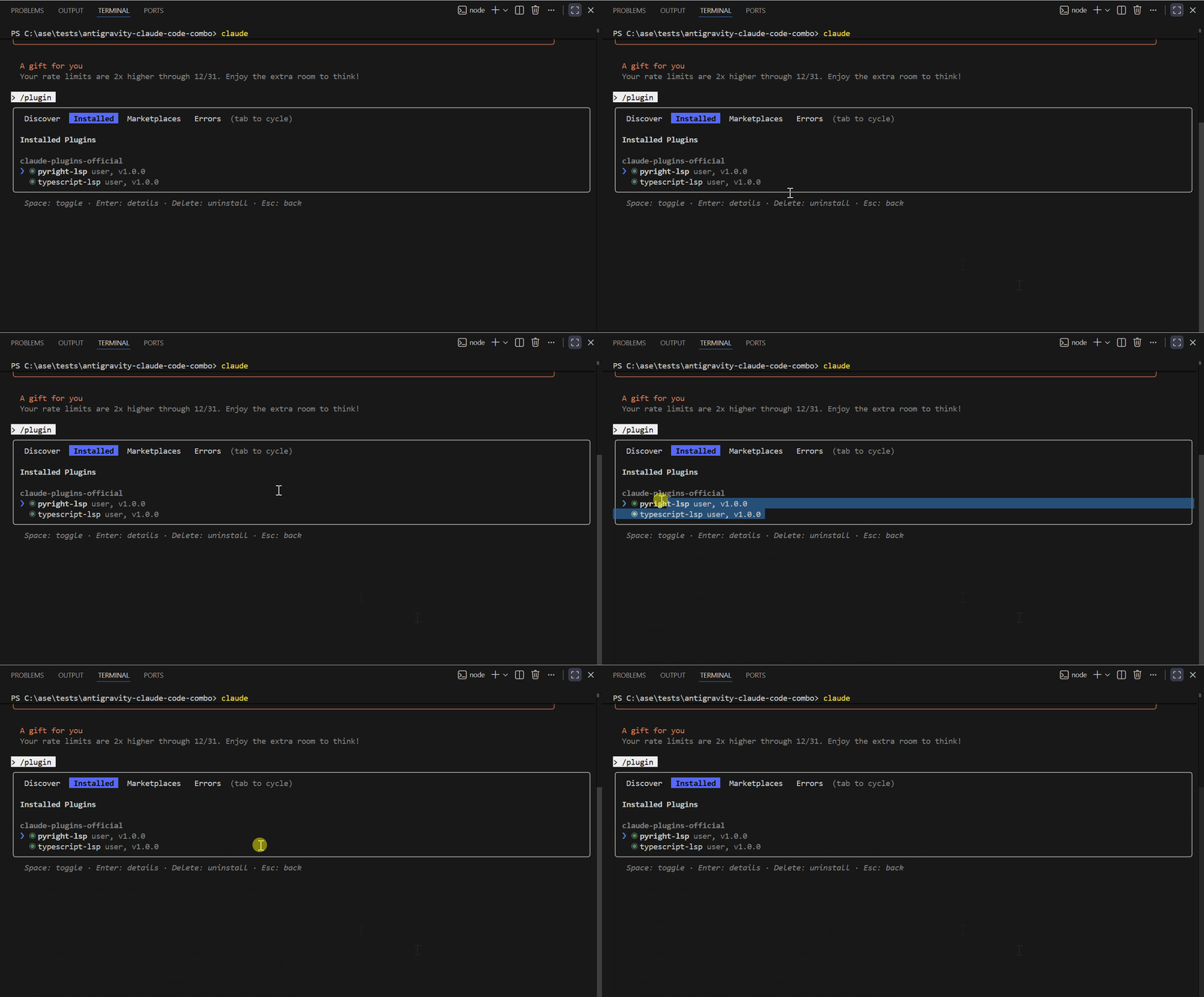
Section titled “LSP Support — IDE-Level Code Intelligence”This launched in December, and I wrote a full article on it because it’s that important.
Claude Code Features
Before LSP:
Section titled “Before LSP:”When you asked Claude to “find all places this function is used”, Claude would:
- Read through the files one by one
- Search for text patterns
- Sometimes miss references
- Sometimes find false positives
It was basically fancy grep.
After LSP:
Section titled “After LSP:”Claude now queries the Language Server directly — the same system that powers VS Code’s intelligence.
Find all references to the displayBooks function using LSPClaude uses the findReferences LSP operation and returns:
Found 4 references to displayBooks:
1. frontend/app.js:52 (definition)   function displayBooks(books) {2. frontend/app.js:38 (call)   displayBooks(books);3. frontend/app.js:67 (call)   displayBooks([]);4. tests/app.test.js:24 (call)   displayBooks(mockBooks);
The 5 LSP Operations:
- goToDefinition — Jump to where something is defined
- findReferences — Find all usages across the codebase
- hover — Get function signatures and documentation
- documentSymbol — List all symbols in a file
- workspaceSymbol — Search symbols across the projec t
Real Example: Understanding Function Parameters
I was using a library function and wasn’t sure what parameters it accepted.
What parameters does the escapeHtml function accept? Use LSP hover.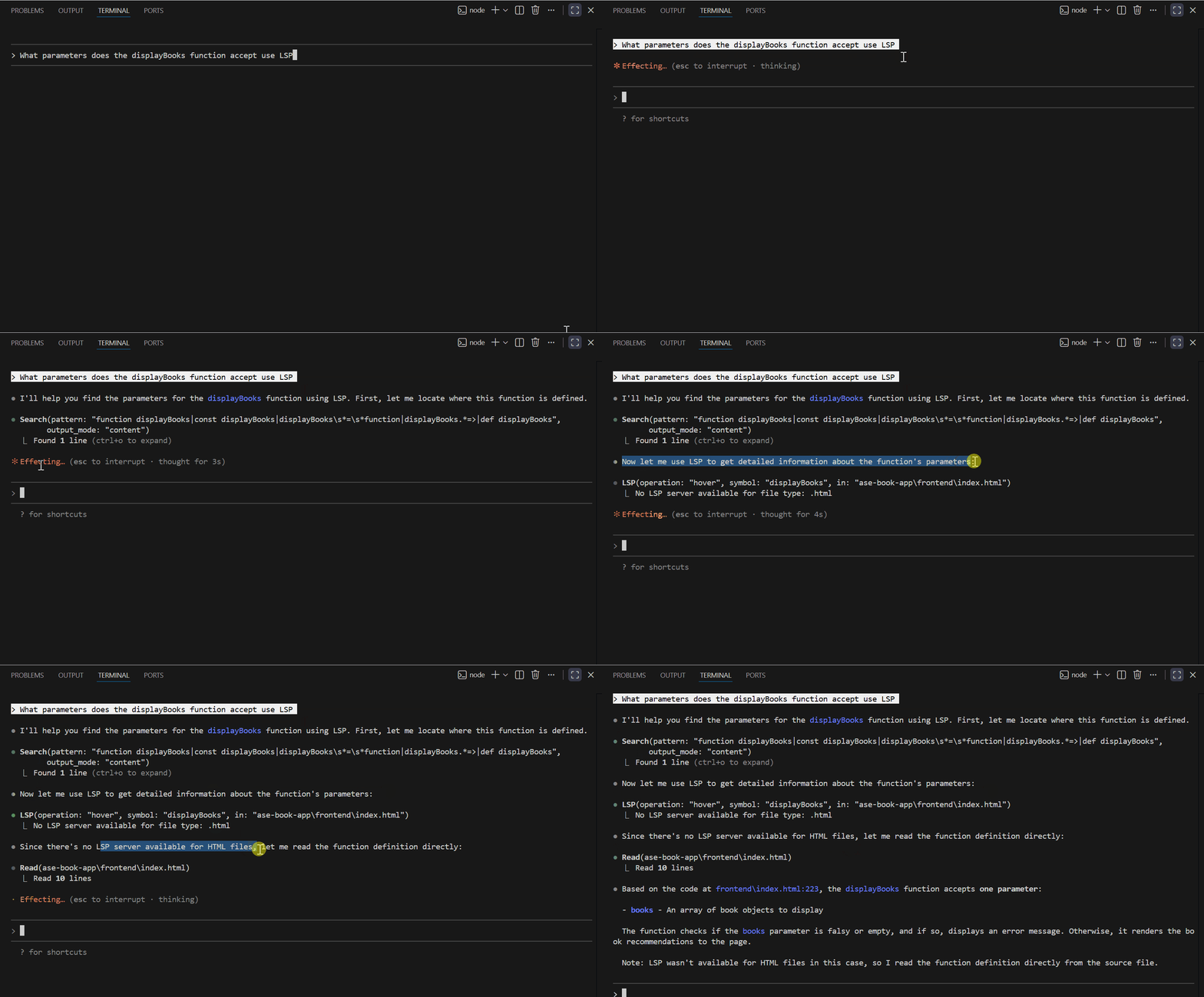
Claude Code Features
Claude queries the language server and returns:
escapeHtml(text: string): string
Takes a string and returns it with HTML entities escaped.Converts: & < > " ' to their HTML entity equivalents.
This is the same info you’d see hovering over the function in VS Code.
Setting Up LSP:
Section titled “Setting Up LSP:”- Add to your shell profile:
export ENABLE_LSP_TOOLS=12. Install a language server plugin:
/plugin install pyright-lsp@claude-plugins-official3. Install the language server binary:
pip install pyright # For Pythonnpm install -g @vtsls/language-server # For TypeScript4. Restart Claude Code
Now Claude has IDE-level code intelligence.
Named Sessions & Resume
Section titled “Named Sessions & Resume”This feature solved a pain point I had since February.
The Problem:
You’re deep in a refactoring session. 50 messages in, Claude knows everything about what you’re doing. Then you have to close the terminal.
Old Claude Code: All context gone. Start fresh next time.
The Solution:
Name your sessions. Resume them later.
Naming a Session:
/rename name of session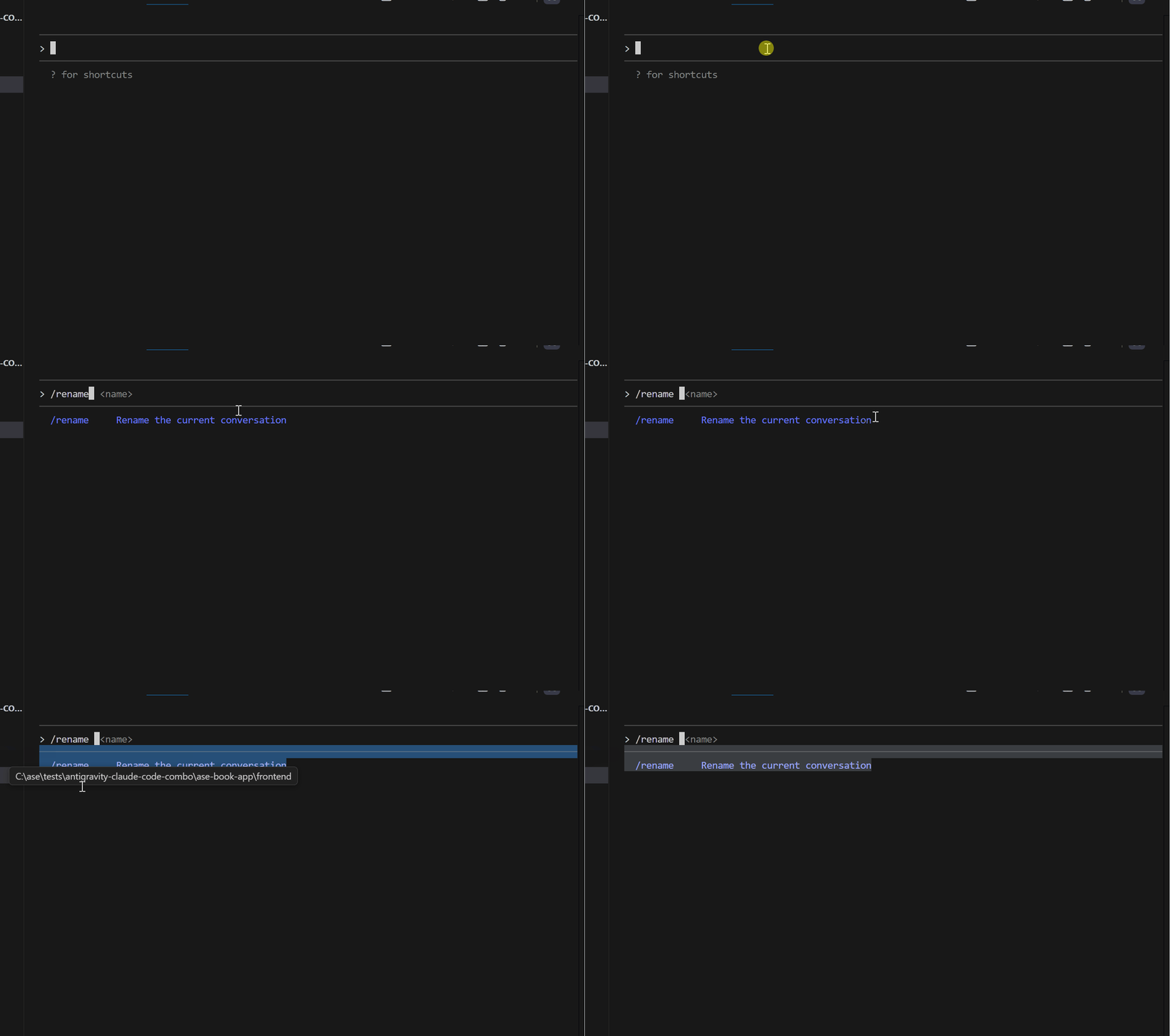
Claude Code Features
Your session is now named “your name”.
Resuming Later:
claude --resume your nameOr from inside Claude Code:
/resume your nameEverything comes back — your conversation, your context, exactly where you left off.
Pro tip: I name sessions by feature or task. “payment-integration”, “user-auth-v2”, “performance-optimization”. Makes it easy to jump back into any workstream.
Async Agents — True Parallel Work
Section titled “Async Agents — True Parallel Work”Background tasks got a major upgrade.
Agents can now run fully asynchronously and send messages back without blocking your main work.
How It Looks:
Use the code-reviewer agent to review all changes in the last 3 commits.Send me updates as you find issues. &Claude spins up the agent in the background. You keep working.
A few minutes later:
[code-reviewer agent]: Found 2 issues in src/api/users.js — missing input validation on lines 45 and 78.
[code-reviewer agent]: Security concern in src/auth/tokens.js — token expiry not being checked.
[code-reviewer agent]: Review complete. 5 issues found, 2 critical. Full report ready.
You review when you’re ready.
Running Multiple Async Agents:
Use api-architect to refactor the user service &Use frontend-dev to update the user components &Use code-reviewer to review both when they're done &Three agents, working in parallel, coordinate automatically.
Prompt Suggestions
Section titled “Prompt Suggestions”A small quality-of-life improvement that adds up.
As you type, Claude Code now suggests completions. Press
**Tab**to accept or keep typing to ignore.
This helps you:
- Discover commands you didn’t know existed
- Complete common patterns faster
- Save keystrokes on repetitive prompts
What’s Next?
Section titled “What’s Next?”Looking at the pace of 2025, I expect even bigger things in 2026.
Some patterns I’m watching:
More MCP Integrations
Section titled “More MCP Integrations”Every major tool will have an MCP server. Jira, Linear, Notion, AWS services — all accessible from Claude Code.
Multi-Agent Orchestration
Section titled “Multi-Agent Orchestration”Agents coordinating on complex projects. One agent designs, another implements, a third reviews, a fourth deploys. Automated pipelines with human oversight.
Deeper IDE Integration
Section titled “Deeper IDE Integration”Claude Code is embedded directly in VS Code and JetBrains. Not as a terminal, but as a native feature.
Enterprise Features
Section titled “Enterprise Features”Managed settings, policy enforcement, audit logs, and team-wide configuration. Large organizations need control, and Anthropic is building it.
Final Thoughts
Section titled “Final Thoughts”If you’ve been using Claude Code casually, I hope this timeline shows you what you’ve been missing.
The features I covered here aren’t experimental. They’re production-ready tools that can genuinely change how you work.
- If you haven’t tried subagents: Create one agent — a code reviewer. Give it read-only permissions. Use it for a week, and you’ll never go back.
- If you’re tired of manual approvals: Set up one hook — auto-formatting after edits. It takes 5 minutes and saves time on every session.
- If you work with large codebases: Enable LSP. The setup takes 10 minutes, and finding references becomes instant instead of slow.
- If you work on a team: Create a plugin with your team’s conventions and share it. Everyone gets the same quality baseline.
Claude Code went from a terminal chat interface to a full development platform in one year. That’s insane progress.
I’ll keep writing about new features as they drop. Follow me here on Medium and check out my YouTube channel for video walkthroughs.
Drop a comment if I missed any features you think should be on this list.
Claude Code Course
Section titled “Claude Code Course”Every day I’m working hard on building the ultimate Claude Code course that demonstrates how to build workflows that coordinate multiple agents for complex development tasks. It’s due for release soon.
It will take what you have learned from this article to the next level of complete automation.
New features are added to Claude Code daily, and keeping up is tough.
The course explores subagents, hooks, advanced workflows, and productivity techniques that many developers may not be aware of.
Once you join, you’ll receive all the updates as new features are rolled out.
This course will cover:
- Advanced subagent patterns and workflows
- Production-ready hook configurations
- MCP server integrations for external tools
- Team collaboration strategies
- Enterprise deployment patterns
- Real-world case studies from my consulting work
If you’re interested in getting notified when the Claude Code courselaunches**,** click here to join the early access list →
( Currently, I have 3000+ already signed-up developers)
I’ll share exclusive previews, early access pricing, and bonus materials with people on the list.
Let’s Connect!
Section titled “Let’s Connect!”If you are new to my content, my name is Joe Njenga
Join thousands of other software engineers, AI engineers, and solopreneurs who read my content daily on Mediu m and on YouTube where I review the latest AI engineering tools and trends. If you are more curious about my projects and want to receive detailed guides and tutorials, join thousands of other AI enthusiasts in my weekly AI Software engineer newsletter
If you would like to connect directly, you can reach out here:## AI Integration Software Engineer (10+ Years Experience )
Software Engineer specializing in AI integration and automation. Expert in building AI agents, MCP servers, RAG…
njengah.com
Follow me on Medium | YouTube Channel | X | LinkedIn
Software & AI Automation Engineer, Tech Writer & Educator. Vision: Enlighten, Educate, Entertain. One story at a time. Work with me: mail.njengah@gmail.com
Responses (1)
Section titled “Responses (1)”Talbot Stevens
What are your thoughts?
—