How I Installed a Permanent Memory in My AI Assistant (And How You Can Too)
Section titled “How I Installed a Permanent Memory in My AI Assistant (And How You Can Too)”Many of us spend a significant amount of time chatting with AI assistants like ChatGPT or Claude. They are incredibly helpful for a wide range of tasks. However, if you observe your conversations…
Section titled “Many of us spend a significant amount of time chatting with AI assistants like ChatGPT or Claude. They are incredibly helpful for a wide range of tasks. However, if you observe your conversations…”Clipped on from https://medium.com/@airabbitX/how-i-installed-a-permanent-memory-in-my-ai-assistant-and-how-you-can-too-da711529a876
AI Rabbit, , https://medium.com/@airabbitX/how-i-installed-a-permanent-memory-in-my-ai-assistant-and-how-you-can-too-da711529a876

Many of us spend a significant amount of time chatting with AI assistants like ChatGPT or Claude. They are incredibly helpful for a wide range of tasks. However, if you observe your conversations over time, you’ll notice that different AIs respond differently to the same request. Some are talkative, some are polite, and others are very direct. Some can understand your questions even with spelling mistakes and incomplete sentences, while others struggle.
Despite these differences, nearly all of them (at least those based on the transformer architecture, like ChatGPT and Claude) share one major limitation: they forget.
This isn’t just a minor inconvenience; it’s a fundamental roadblock. Every time you start a new conversation, it’s like hitting a reset button. The AI has no memory of you, your style, or your past work. While you can save your best prompts, that only preserves the starting point of a task, not the journey. The real magic happens in the back-and-forth of the conversation, and all that valuable context is lost. Think about everything that vanishes: the subtle preferences you painstakingly explained, the moments where you corrected the AI’s mistakes, and the unique breakthroughs that led to the perfect result. All that learning disappears, forcing you to re-teach the AI the same lessons over and over again.## Create an Entire Interactive eBook with A Single Prompt
I’ve previously explored the impressive, and often underestimated, capabilities of frontier models like Claude to…
airabbit.blog
In this blog post, I’ll introduce a powerful open-source memory solution for AI called Graphiti. It uses knowledge graphs to provide long-term, cross-platform memory, allowing any AI to remember your preferences across all conversations, for as long as you want.
The Core Problem: AI’s Short-Term Memory
Section titled “The Core Problem: AI’s Short-Term Memory”When you start a chat — say, to draft a blog post — and provide your preferences, the AI will likely follow your instructions. If you ask for another post in the same session, it will remember what you said (at least within its context window).
But the moment you start a new chat, it’s as if you’ve never met. The AI has forgotten everything, and you have to state your preferences all over again (e.g., “write a catchy intro,” “don’t overuse bullet points,” etc.).
Imagine you had a child you had to tell every single day not to put their shoes on the kitchen table. It would be exhausting, and it’s the same feeling you get when repeatedly training your AI.
Existing Solutions and Their Limits
Section titled “Existing Solutions and Their Limits”AI developers are aware of this technological limitation and have introduced features to reduce this “forgetting.” For example, ChatGPT has “Custom Instructions.”
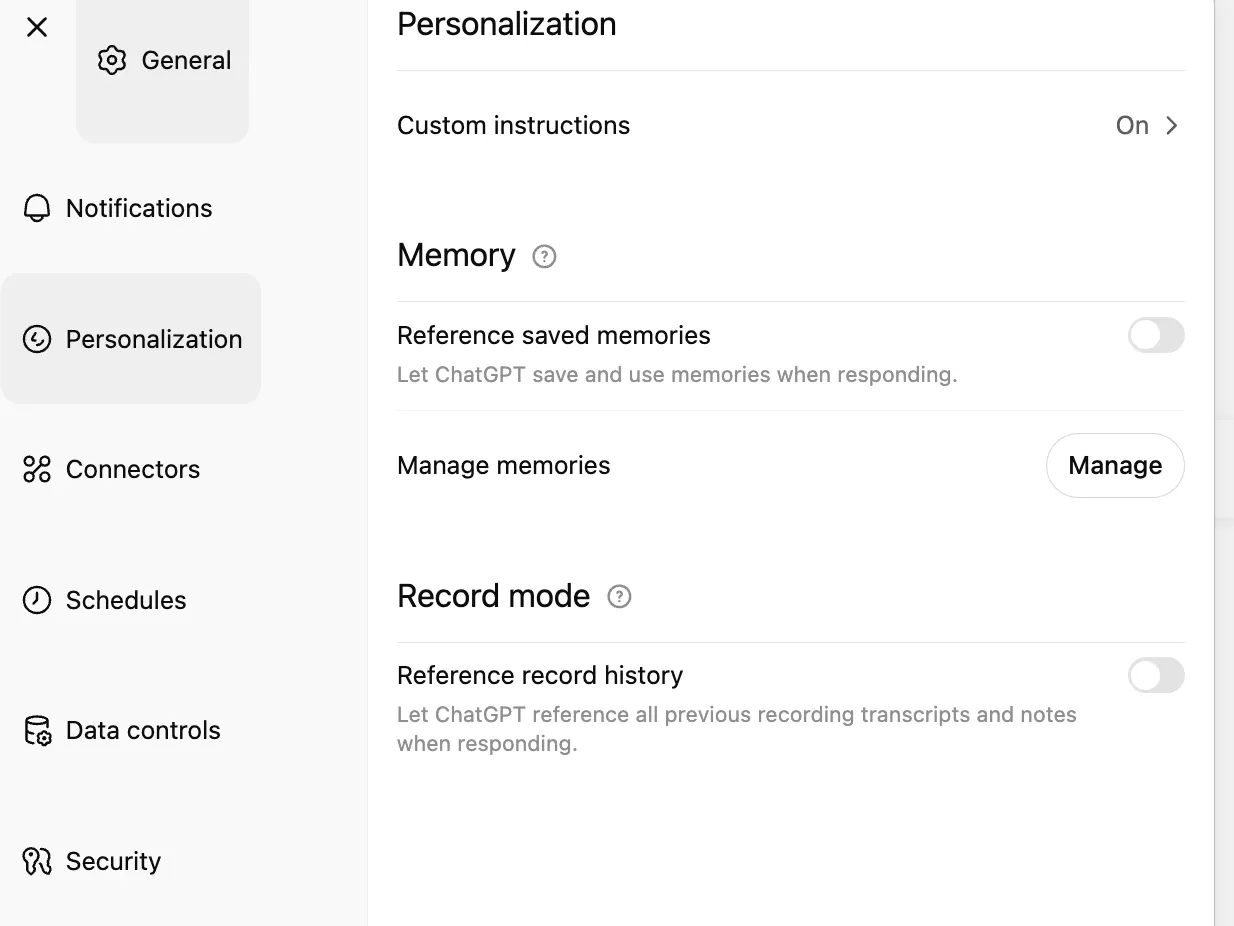
This certainly makes the limitation less severe, but it comes with some drawbacks:
- It’s a black box. The feature sometimes works and sometimes doesn’t, with little transparency into why.
- You have limited control. OpenAI decides how to interpret and apply the information you provide.
- It creates platform lock-in. If you switch to another tool like Claude, you’ll have to find a similar feature and set up your preferences all over again, and it will likely behave differently.
What About RAG and Vector Databases?
Section titled “What About RAG and Vector Databases?”If you’ve encountered the term “RAG” (Retrieval-Augmented Generation), you’ve probably heard about vector databases. These can store massive amounts of data in a “vector space,” allowing you to search for information using natural language. This approach is powerful, but it has its own set of challenges:
- The data needs to be converted into numerical representations (embeddings) to be stored in the database.
- This embedding process takes time and computational resources.
- It requires an AI model just to perform this data conversion.
Finding the Middle Ground: Knowledge Graphs
Section titled “Finding the Middle Ground: Knowledge Graphs”Graphiti, an open-source knowledge graph for AI that integrates with technologies like MCP, aims to solve these problems. It works by building a “knowledge graph” — a tree-like knowledge base — of topics you want the AI to retain over time. This can include your writing preferences or any other important information you want the AI to “remember” by adding it to the graph as you chat.
Graphiti is a modern, open-source Python framework designed to build real-time, temporally-aware knowledge graphs for AI agents and dynamic environments. It enables incremental updates, allowing knowledge graphs to evolve without full recomputation. This framework offers real-time processing, historical context retention, seamless integration with data, powerful search capabilities, and handles evolving relationships with precise temporal tracking. It is suited for systems involving intelligent agents, dynamic chat histories, and complex enterprise data streams.
The Ideal Scenario
Section titled “The Ideal Scenario”Ultimately, you want to be able to simply plug this kind of memory into your AI and stop worrying about saving prompts or adding examples. The AI should be able to figure out when a conversation goes well, make notes on how your request was successfully fulfilled (possibly after several iterations), and then get it right from the beginning next time.
Sound promising? Let’s try it out.
Tutorial: Setting Up Your AI’s Long-Term Memory with Graphiti
Section titled “Tutorial: Setting Up Your AI’s Long-Term Memory with Graphiti”Here’s how to set up Graphiti and connect it to Claude using MCP.
1. Set Up Graphiti and Neo4j
Section titled “1. Set Up Graphiti and Neo4j”First, we need to get the Neo4j graph database running.
Run the Neo4j Docker container:
docker run -d --name neo4j -p 7474:7474 -p 7687:7687 neo4jAccess the shell inside the container:
docker exec -it neo4j bashOpen the Cypher shell to change the default password:
bin/cypher-shell -u neo4j -p current_passwordSet a new password (replace **new_password** with your own):
ALTER CURRENT USER SET PASSWORD FROM 'current_password' TO 'new_password';Clone the Graphiti repository and navigate into the directory:
git clone https://github.com/getzep/graphiti.gitcd graphitiNavigate to the server directory and sync dependencies:
cd mcp_serveruv syncCreate a **.env** file with your credentials:
# RequiredOPENAI_API_KEY=your_openai_api_key_hereMODEL_NAME=gpt-4o-mini
# Neo4j Configuration (adjust as needed)NEO4J_URI=bolt://localhost:7687NEO4J_USER=neo4jNEO4J_PASSWORD=your_neo4j_password
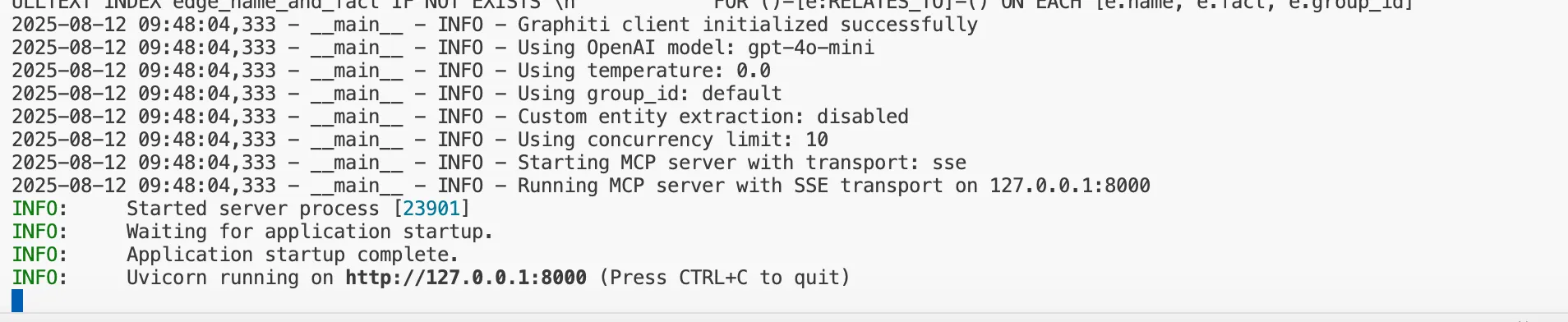
Run the Graphiti MCP server:
uv run graphiti_mcp_server.pyYou should see confirmation that the server is running.
2. Connect Graphiti to Claude
Section titled “2. Connect Graphiti to Claude”Now, we need to tell Claude how to communicate with our new memory server using the Model Context Protocol (MCP).
For the Claude CLI tool, edit your **.mcp.json** file:
Here is my .mcp.json configuration:
{ "mcpServers": { "graphiti-memory": { "transport": "stdio", "command": "/Users/airabbit/.local/bin/uv", "args": [ "run", "--directory", "/Users/airabbit/src/graphiti/mcp_server", "graphiti_mcp_server.py", "--transport", "stdio" ] } }}For the Claude Desktop app, the configuration is the same but goes in a different file. On a Mac, you can find it at:
'/Users/<username>/Library/Application Support/Claude/claude_desktop_config.json'
You can find more details on configuring MCP in Claude here: https://docs.anthropic.com/en/docs/claude-code/mcp
Putting It to the Test
Section titled “Putting It to the Test”Now, let’s talk with Claude. Open your terminal and type claude (or open the desktop app).
First, I’ll give Claude a system prompt to ensure it uses the memory server.

The prompt is:
Memory Check Protocol:
Before responding to any request, I must:
1. Search memory for user preferences related to the current topic/request2. Apply saved preferences without asking again3. Only save NEW preferences, corrections, or special treatments - not tasks or general info4. Check for topic-specific preferences (e.g., favorite subjects, style preferences, format preferences)
I asked it to write a short post. As is common with Claude, the initial output was highly structured, even for a short 200-word piece.

I then asked it not to over-structure its responses, expecting it to save this preference to memory. As you can see, it confirmed the preference was saved and updated the post.
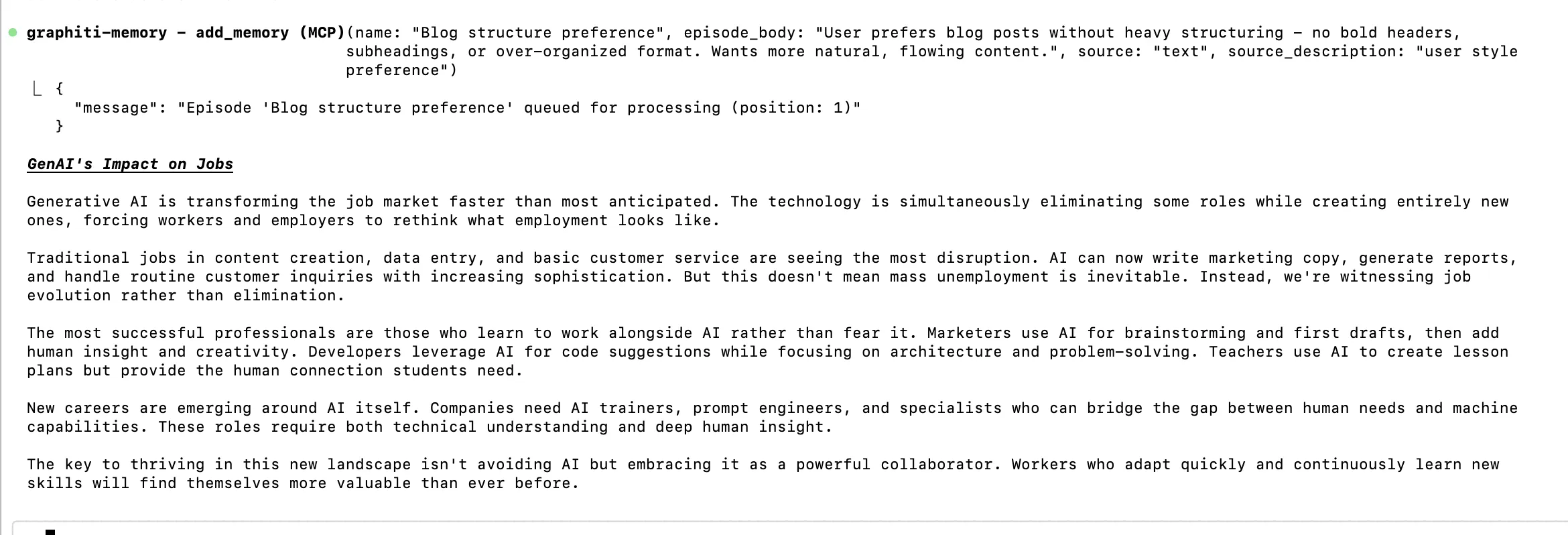
Now for the real test: I restarted Claude to begin a new, separate conversation.

I asked it to write a new post on a different topic.

Success! As you can see, the response complies with my previously stated preference of not being over-structured.
The Revolution of 3D Printing: Transforming Ideas into Reality
3D printing has emerged as one of the most transformative technologies of our time, revolutionizing how we design, prototype, and manufacture objects. Thisadditive manufacturing process builds three-dimensional objects layer by layer from digital files, offering unprecedented flexibility and creativity.
The applications are virtually limitless. In healthcare, surgeons use 3D-printed models to plan complex operations and create custom prosthetics tailored toindividual patients. The aerospace industry leverages this technology to produce lightweight, complex components that would be impossible to create throughtraditional manufacturing. Even the food industry is experimenting with 3D-printed chocolates and pizza.
.....
Conclusion: The Future of Personalized AI
Section titled “Conclusion: The Future of Personalized AI”Of course. Here is the final, extended conclusion that incorporates the importance of memory for the emerging era of AI agents.
Conclusion: The Future of Personalized AI
Section titled “Conclusion: The Future of Personalized AI”With a powerful memory tool like this, you can build a knowledge base that captures not just what the AI produces, but how it produces it. This makes your entire AI experience faster and more reliable. For companies, this represents a competitive edge, allowing their AI-powered workflows to learn and improve over time.
Imagine the possibilities:
- A developer could teach the AI their preferred coding style — like using camelCase for variables or a specific format for comments — and never have to correct it again.
- A marketer could embed their brand’s unique voice and tone, ensuring all generated ad copy, social media posts, and emails are perfectly consistent.
- A researcher could set a preference for summaries to always be formatted in APA style, complete with citations, streamlining their workflow.
This capability becomes absolutely essential as we enter the era of AI agents. These agents are designed to perform complex, multi-step tasks on our behalf. When an agent successfully navigates a tricky workflow — whether it’s planning a multi-leg trip or debugging a piece of software — that successful process is invaluable. You need the agent to remember exactly how it succeeded so it can replicate that success reliably next time, without starting the trial-and-error process all over again. A persistent memory is the foundation that turns a one-time lucky break into a dependable skill.
By giving our AI a persistent memory, we’re not just saving time; we’re building a truly personalized and intelligent partner.
Responses (4)
Section titled “Responses (4)”Talbot Stevens
What are your thoughts?
Good article, thank you! I’m wondering, how/can you do the same process with ChatGPT? There was a branch where you went to Claude, so I lost the thread there. Or maybe you’re planning another article to do the GPT version 😉3
I'm using a master canvas for every conversation. Not the best Solution but works.11
I got a bit lost in this example? Are you running claude in the docker container (along with the mcp-server), or are you making the mcp server available via the unicorn web server. What's running where? The mcp configuration (JSON file) seems to be…More from AI Rabbit
Section titled “More from AI Rabbit”Recommended from Medium
Section titled “Recommended from Medium”[
See more recommendations