OpenAI just added Skills to Codex.
Claude has had them for months. Both platforms now work the same way.
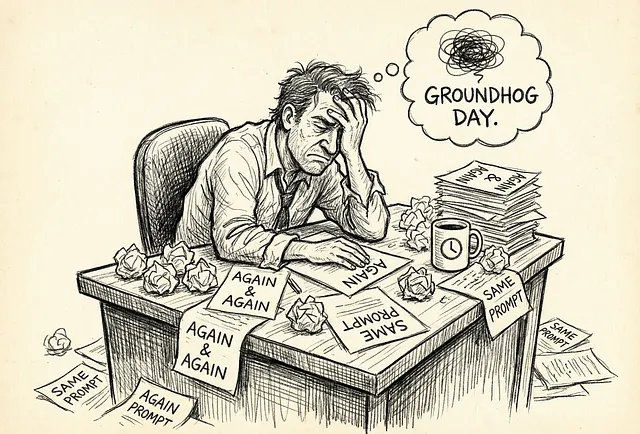
If you’re still writing prompts from scratch or from templates, every time, you’re doing it the hard way.
The Problem With Prompts
Section titled “The Problem With Prompts”You’ve done this before. You write a good prompt, get great results, close the chat. Three weeks later you need to do the same thing. The prompt is gone. You rewrite it from memory, but it’s not quite the same. The results are worse.
Or you copy your best prompts into a notes app. Now you have twelve versions and no idea which one actually worked.
Prompts are disposable. Every conversation starts from zero. Your best work disappears when you close the tab.
What Skills Actually Are
Section titled “What Skills Actually Are”A skill is a prompt that lives in a file.
That’s it. You write your instructions once, save them in a folder, and the AI uses them whenever you need that capability again.
Here’s a real example. Say you summarize meeting notes every week. Instead of prompting from scratch each time:
---name: meeting-summarydescription: Summarizes meeting notes into action items and decisions---When given meeting notes:1. List the key decisions made2. Extract action items with owners3. Note any unresolved questions4. Keep it under 200 words5. Use bullet pointsSave that file. Next time you say “summarize these meeting notes,” the AI knows exactly what you mean and exactly how you want it done.
No retyping. No remembering. The process is saved.
The Folder Structure
Section titled “The Folder Structure”A skill is just a folder with a SKILL.md file inside. That’s the minimum. You can add more if you need it:
my-skill/├── SKILL.md # Required: instructions + metadata├── scripts/ # Optional: code the AI can run├── references/ # Optional: docs, examples, context└── assets/ # Optional: templates, imagesMost skills are just the SKILL.md file. Start simple. Add complexity only when you need it.
Where to Save Skills
Section titled “Where to Save Skills”Both Claude Code and Codex load skills from specific locations. The closer to your current project, the higher the priority.
For Claude Code:
| Location | When to use |
| — — — — — | — — — — — — -|
| .claude/skills/ in your project | Skills specific to this project |
| ~/.claude/skills/ | Personal skills that work everywhere |
For Codex:
| Location | When to use |
| — — — — — | — — — — — — -|
| .codex/skills/ in your project | Skills specific to this project |
| ~/.codex/skills/ | Personal skills that work everywhere |
| /etc/codex/skills/ | Shared skills for a team or machine |
If you have a skill with the same name in multiple locations, the one closest to your project wins.
How to Create a Skill
Section titled “How to Create a Skill”Option 1: Just make a folder
Create a folder, add a SKILL.md file, write your instructions. Done.
mkdir -p ~/.claude/skills/meeting-summaryThen create SKILL.md inside with your name, description, and instructions.
Option 2: Use the built-in skill creator
Both platforms have a skill that helps you build skills.
In Claude Code:
/skill-creatorIn Codex:
$skill-creatorDescribe what you want the skill to do. It scaffolds the folder and file for you.
How to Install Existing Skills
Section titled “How to Install Existing Skills”You don’t have to build everything from scratch. Both platforms let you install skills others have made.
In Codex:
$skill-installer linearThis downloads the Linear integration skill from OpenAI’s skill repository. You can also point it at other GitHub repos.
In Claude Code:
Skills are typically shared as folders you copy into your skills directory. Check Anthropic’s cookbook or community repos for examples.
How Skills Get Used
Section titled “How Skills Get Used”Once a skill is in place, the AI uses it in two ways:
Explicit: You mention the skill directly. In Codex, type $ to see available skills. In Claude Code, use /skills or reference the skill by name.
Implicit: You don’t mention the skill at all. You just ask for something. The AI reads your request, checks available skill descriptions, and loads the relevant one automatically.
This is why the description field matters. It’s not just documentation. It’s the trigger. Write it like you’re telling a colleague when to use a tool.
Why This Matters Now
Section titled “Why This Matters Now”OpenAI adding Skills to Codex isn’t just a feature. It’s a signal.
When both major AI platforms converge on the same approach, that approach is becoming standard. The skills you build today will work across tools tomorrow. You’re not learning a vendor-specific trick. You’re learning how AI agents work.
This also means the barrier is lower than people think. You don’t need to code. You don’t need APIs. You need to write clear instructions in plain text.
If you can explain a task to a person, you can build a skill.
What Changes
Section titled “What Changes”The difference between prompting and building skills is small but significant.
Prompting: You’re having a conversation. Every time you need something done, you explain it again. You’re the bottleneck.
Skills: You’re building a system. You explain it once, save it, and the AI executes the same way every time. Your knowledge compounds.
Most people treat AI like a chat partner. The people getting more out of it treat it like something you can train.
Start Here
Section titled “Start Here”Pick one task you do regularly. Something you could explain in five minutes.
Write down the steps. Be specific. Include what good output looks like.
Save it as a SKILL.md in your skills folder.
That’s your first skill. You’ve moved from prompting to building.
The prompt dies when the conversation ends. The skill stays.
Tech person. I write about technology, Generative AI, the cloud, design and development.
More from Marco Kotrotsos
Section titled “More from Marco Kotrotsos”Recommended from Medium
Section titled “Recommended from Medium”[
See more recommendations