Hooks have a 50% activation rate by default. After 6 months of production testing, here’s how I got to 84% — plus the timeout trap, matcher gotchas, and guardrails that don’t kill productivity.
Section titled “Hooks have a 50% activation rate by default. After 6 months of production testing, here’s how I got to 84% — plus the timeout trap, matcher gotchas, and guardrails that don’t kill productivity.”Hooks have a 50% activation rate by default.
These things, I am going to talk about are not written in the documentation. I discovered it after three weeks of wondering why my carefully configured PreToolUse hooks were only firing half the time.
Turns out, I was matching “bash” when the tool is actually named “Bash” — matchers are case-sensitive, and Claude Code doesn’t warn you when nothing matches.

Use Hooks in Claude Code The Good Way | Image Generated with Gemini 3 Pro ©
Note: AI tools helped research this piece. The 6 months of testing, the activation metrics, and every failure mode below are from my actual production environment.
After 6 months running Claude Code hooks in production — across my 141 agent setup, daily development work, and a 7-person engineering team — I’ve catalogued every gotcha, every timeout trap, and every configuration that actually works.
These patterns power the 48 skills in my open-source library and integrate with 10 commands that cut my dev time 60%.
Here’s the honest report.
Claude Code Hooks: The 8 Lifecycle Events
Section titled “Claude Code Hooks: The 8 Lifecycle Events”Before diving into what breaks, you need to understand where hooks can fire. Claude Code provides eight hook events that cover the full session lifecycle:
Claude Code Hook Metrics and Performance | Image by Alireza Rezvani ©
The first mistake almost everyone makes: treating all hooks the same. They’re not. PreToolUse and PermissionRequest can prevent actions. PostToolUse can only react to them.
Stop and SubagentStop can block completion but not individual tool calls.
Understanding this hierarchy saved me from building hooks that couldn’t do what I needed.
PreToolUse vs PostToolUse: When to Use Each
Section titled “PreToolUse vs PostToolUse: When to Use Each”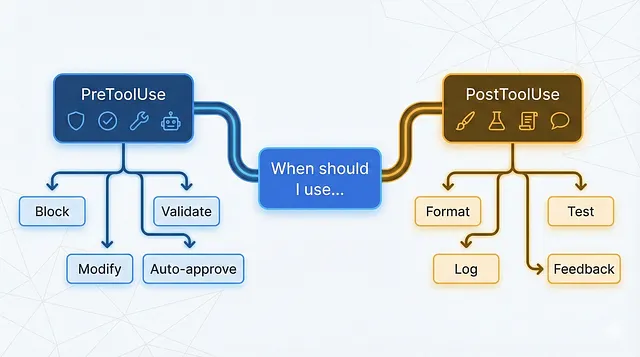
When and How to Use Hooks | Image Generated with Gemini 3 Pro ©
This is the decision I got wrong for the first month. I kept building PostToolUse hooks when I needed PreToolUse, and vice versa.
PreToolUse: The Gatekeeper
Section titled “PreToolUse: The Gatekeeper”PreToolUse fires after Claude creates tool parameters but before executing the tool. This is your chance to:
- Block dangerous commands — Prevent
rm -rf /before it runs - Modify tool inputs — Change parameters transparently (since v2.0.10)
- Enforce conventions — Reject file paths that violate project structure
- Auto-approve safe operations — Skip permission prompts for trusted tools
Here’s my production PreToolUse hook for security:
{ "hooks": { "PreToolUse": [ { "matcher": "Bash", "hooks": [ { "type": "command", "command": "./scripts/security-gate.sh" } ] } ] }}And the script it calls:
#!/bin/bash# security-gate.sh - Block dangerous bash commands
json=$(cat)command=$(echo "$json" | jq -r '.tool_input.command // empty')# Dangerous patternsdangerous_patterns=(  "rm -rf /"  "rm -rf ~"  "chmod 777"  "> /dev/sda"  "mkfs."  ":(){:|:&};:")for pattern in "${dangerous_patterns[@]}"; do  if [[ "$command" == *"$pattern"* ]]; then    echo '{"hookSpecificOutput":{"permissionDecision":"deny","permissionDecisionReason":"Blocked: dangerous command pattern detected"}}'    exit 0  fidone# Allow everything elseecho '{"hookSpecificOutput":{"permissionDecision":"allow"}}'
Key insight: The permissionDecision field controls whether the tool runs. Return "allow" to bypass the permission system entirely, or "deny" to block execution. The permissionDecisionReason is shown to the user but not to Claude.
PostToolUse: The Reactor
Section titled “PostToolUse: The Reactor”PostToolUse fires immediately after a tool completes successfully. It can’t undo what happened, but it can:
- Run formatters — Prettier/Black after every file edit
- Execute tests — Run relevant test suites after code changes
- Log activity — Track what Claude modified and when
- Provide feedback to Claude — Add context for its next action
My most-used PostToolUse hook runs the linter after file edits:
{ "hooks": { "PostToolUse": [ { "matcher": "Edit|MultiEdit|Write", "hooks": [ { "type": "command", "command": "./scripts/post-edit-lint.sh" } ] } ] }}#!/bin/bash# post-edit-lint.sh - Run linter and feed results back to Claudejson=$(cat)file_path=$(echo "$json" | jq -r '.tool_input.file_path // empty')# Only lint supported file typesif [[ "$file_path" =~ \.(js|ts|jsx|tsx)$ ]]; then lint_output=$(npx eslint "$file_path" 2>&1) lint_exit=$?
if [ $lint_exit -ne 0 ]; then # Feed lint errors back to Claude echo "{\"hookSpecificOutput\":{\"additionalContext\":\"Linting issues found:\\n$lint_output\"}}" fifiKey insight: The additionalContext field in PostToolUse output gets added to Claude’s context. Use this to give Claude feedback about what just happened — lint errors, test failures, or validation results.
For code review automation specifically, see how PostToolUse hooks power my automated code review pipeline.
Decision Framework
Section titled “Decision Framework”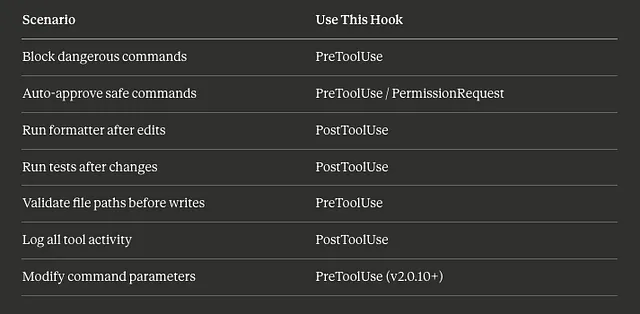
Hooks Decision Framework That works | Image by Alireza Rezvani ©
The 60-Second Timeout Trap (And How to Avoid It)
Section titled “The 60-Second Timeout Trap (And How to Avoid It)”Here’s a failure mode that cost me an entire afternoon.
Claude Code has a default timeout on hooks. The documentation mentions you can set a custom timeout value, but what it doesn’t emphasize: if your hook doesn’t respond in time, it fails silently.
My test suite hook was running the full test suite — 4 minutes on a good day. The hook would start, Claude would wait 60 seconds, and then… nothing. No error. No feedback. Just Claude continuing as if the hook never existed.
If the timeout trap sounds familiar, you’ve probably experienced what kills 97% of Claude Code agents — context loss from silent failures.
The Fix
Section titled “The Fix”Set explicit timeouts for anything that might take more than a few seconds:
{ "hooks": { "PostToolUse": [ { "matcher": "Edit|Write", "hooks": [ { "type": "command", "command": "./scripts/run-affected-tests.sh", "timeout": 300 } ] } ] }}That timeout: 300 gives the hook 5 minutes. But here’s the real lesson: don’t run your full test suite in a hook.
Instead, I now run only affected tests:
#!/bin/bash# run-affected-tests.sh - Quick feedback, not full suitejson=$(cat)file_path=$(echo "$json" | jq -r '.tool_input.file_path // empty')# Find related test filetest_file="${file_path%.ts}.test.ts"if [ -f "$test_file" ]; then # Run only this test file with 30s timeout timeout 30 npx jest "$test_file" --silent 2>&1fiTimeout Guidelines
Section titled “Timeout Guidelines”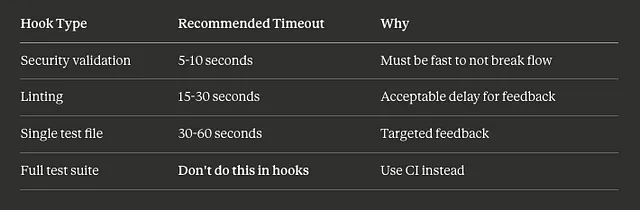
A Timeline Guideline for Hooks | Image by Alireza Rezvani ©
Matcher Gotchas That Kill Activation Rates
Section titled “Matcher Gotchas That Kill Activation Rates”Remember that 50% activation rate I mentioned? Here’s exactly what went wrong — and how I fixed it.
Gotcha 1: Case Sensitivity
Section titled “Gotcha 1: Case Sensitivity”This fails silently:
{ "matcher": "bash"}The tool is named Bash, not bash. Matchers are case-sensitive, and there’s no warning when nothing matches.
Fix: Always match the exact tool name. The main tools are: Bash, Edit, MultiEdit, Write, Read, Glob, Grep, LS, Task, WebFetch, WebSearch.
Gotcha 2: Overly Broad Matchers
Section titled “Gotcha 2: Overly Broad Matchers”This fires on EVERY bash command:
{ "matcher": "Bash", "hooks": [ { "type": "command", "command": "./scripts/expensive-validation.sh" } ]}Including ls, pwd, cat, and every other trivial command. My validation script was running 200+ times per session.
Fix: Use argument patterns for expensive validations:
{ "matcher": "Bash(npm *|yarn *|pnpm *)", "hooks": [ { "type": "command", "command": "./scripts/package-manager-validator.sh" } ]}Now it only fires for package manager commands.
Gotcha 3: The Pipe Syntax
Section titled “Gotcha 3: The Pipe Syntax”To match multiple tools, use the pipe character:
{ "matcher": "Edit|MultiEdit|Write"}Not:
"Edit, MultiEdit, Write"— doesn’t work["Edit", "MultiEdit", "Write"]— doesn’t work"Edit OR MultiEdit OR Write"— doesn’t work
Gotcha 4: Wildcard Behavior
Section titled “Gotcha 4: Wildcard Behavior”"*" matches all tools. So does an empty string "". So does omitting matcher entirely.
These are all equivalent:
{ "matcher": "*" }{ "matcher": "" }{ } // matcher omittedFor events that don’t use matchers (UserPromptSubmit, Notification, Stop, SessionStart), omit the matcher field entirely.
My Activation Rate Fix
Section titled “My Activation Rate Fix”After fixing case sensitivity and scoping matchers properly:
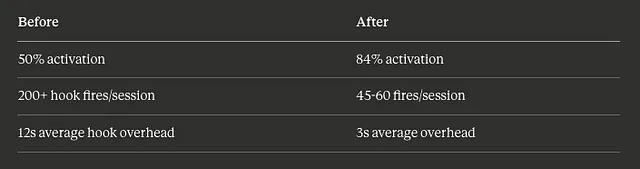
Comparisson Table for Hooks | Image by Alireza Rezvani ©
The remaining 16% non-activation comes from legitimate edge cases where the matcher pattern doesn’t apply.
Enterprise Guardrails That Don’t Kill Productivity
Section titled “Enterprise Guardrails That Don’t Kill Productivity”The tension with hooks: too many guardrails, and you’re fighting your tools instead of using them. Too few, and you’re one bad command away from disaster.
These hook patterns power several skills in my open-source claude-skills library, including the security-auditor and code-reviewer skills that use PreToolUse validation.
After 6 months, here’s the balance I’ve found.
Guardrail 1: Tiered Permissions
Section titled “Guardrail 1: Tiered Permissions”Not all tools need the same scrutiny:
{ "hooks": { "PermissionRequest": [ { "matcher": "Read|LS|Glob|Grep", "hooks": [ { "type": "command", "command": "echo '{\"hookSpecificOutput\":{\"permissionDecision\":\"allow\"}}'" } ] }, { "matcher": "Bash", "hooks": [ { "type": "command", "command": "./scripts/bash-permission-check.sh" } ] } ] }}Read-only operations auto-approve. Bash commands go through validation. Write operations use default permissions (human approval).
Guardrail 2: Path-Based Restrictions
Section titled “Guardrail 2: Path-Based Restrictions”Some directories are off-limits:
#!/bin/bash# path-validator.shGuardrail 3: Command Auditing (Not Blocking)json=$(cat)file_path=$(echo "$json" | jq -r '.tool_input.file_path // empty')# Protected pathsprotected_paths=( ".env" ".env.local" "*.secret" "config/production/*" "credentials/*")for pattern in "${protected_paths[@]}"; do if [[ "$file_path" == $pattern ]]; then echo '{"hookSpecificOutput":{"permissionDecision":"deny","permissionDecisionReason":"Protected file: requires manual edit"}}' exit 0 fidoneecho '{"hookSpecificOutput":{"permissionDecision":"allow"}}'For compliance requirements, I log everything without blocking:
#!/bin/bash# audit-logger.sh - Log all commands for compliancejson=$(cat)timestamp=$(date -u +"%Y-%m-%dT%H:%M:%SZ")session_id=$(echo "$json" | jq -r '.session_id')tool_name=$(echo "$json" | jq -r '.tool_name')tool_input=$(echo "$json" | jq -c '.tool_input')# Append to audit logecho "{\"timestamp\":\"$timestamp\",\"session\":\"$session_id\",\"tool\":\"$tool_name\",\"input\":$tool_input}" >> ~/.claude/audit.jsonl# Don't block - just logexit 0Guardrail 4: Rate Limiting Expensive Operations
Section titled “Guardrail 4: Rate Limiting Expensive Operations”Prevent runaway costs:
#!/bin/bashRATE_FILE="/tmp/claude-api-rate"MAX_PER_MINUTE=30current_minute=$(date +%Y%m%d%H%M)current_count=$(grep -c "^$current_minute$" "$RATE_FILE" 2>/dev/null || echo 0)if [ "$current_count" -ge "$MAX_PER_MINUTE" ]; then echo '{"hookSpecificOutput":{"permissionDecision":"deny","permissionDecisionReason":"Rate limit exceeded. Wait 60 seconds."}}' exit 0fiecho "$current_minute" >> "$RATE_FILE"echo '{"hookSpecificOutput":{"permissionDecision":"allow"}}'What I Stopped Blocking
Section titled “What I Stopped Blocking”Early on, I blocked too much. These turned out to be counterproductive:
- Git commands — Claude needs these for context
- Package install commands — Just slows down setup
- File reads in node_modules — Claude often needs to check API signatures
The principle: block what’s dangerous, audit what’s sensitive, allow everything else.
Real Metrics from 6 Months of Production
Section titled “Real Metrics from 6 Months of Production”Here’s what my hook setup actually achieved:
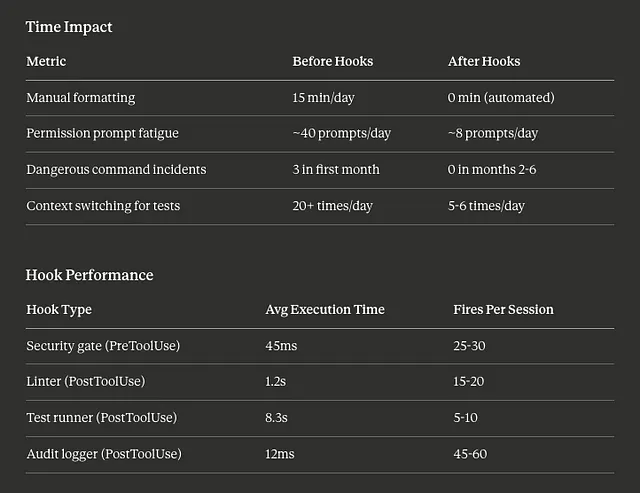
Time Impact
Section titled “Time Impact”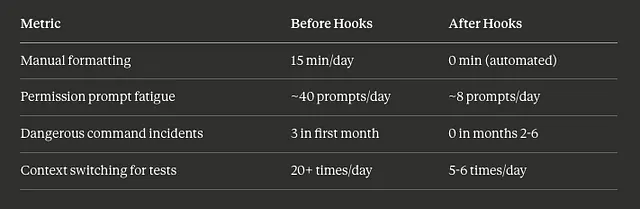
Time Impact for Using Claude Code Hooks for 6 Months | Image by Alireza Rezvani ©
Hook Performance
Section titled “Hook Performance”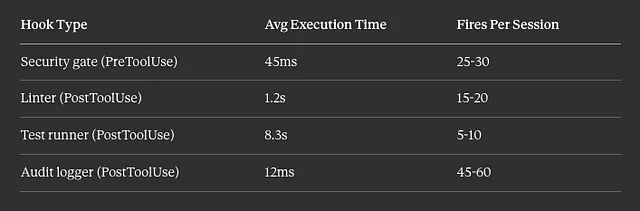
Performance Table for using Claude Code Hooks | Image by Alireza Rezvani ©
Reliability
Section titled “Reliability”- Hook activation rate: 84% (up from 50%)
- False positive blocks: 2.1% of PreToolUse denials were wrong
- Timeout failures: 0.3% after setting explicit timeouts
- Hook crashes: 4 total over 6 months (all from malformed JSON output)
What I’m Still Optimizing
Section titled “What I’m Still Optimizing”The test runner at 8.3s average is too slow. I’m experimenting with:
- Running tests in a background process
- Only running on certain file patterns
- Batching multiple edits before testing
For patterns on coordinating hooks with skills that use hooks, I’ve documented which skills benefit most from hook integration.
Quick Reference: Claude Code Hooks
Section titled “Quick Reference: Claude Code Hooks”What are Claude Code hooks?
Claude Code hooks are scripts that run at specific points during a Claude Code session — before tool execution (PreToolUse), after completion (PostToolUse), when permissions are requested (PermissionRequest), and at session lifecycle events (SessionStart, Stop). They let you automate formatting, enforce security rules, auto-approve safe operations, and inject context without manual intervention.
When should I use PreToolUse vs PostToolUse hooks?
Use PreToolUse when you need to prevent or modify an action before it happens — blocking dangerous commands, validating file paths, or auto-approving safe tools. Use PostToolUse when you need to react after something completes — running formatters, executing tests, logging activity, or giving Claude feedback about results.
How do I debug hooks that aren’t firing?
Section titled “How do I debug hooks that aren’t firing?”Check three things:
(1) Case sensitivity — matchers are case-sensitive, so “bash” won’t match “Bash”.
(2) Timeout — hooks that take too long fail silently.
(3) JSON output — malformed JSON causes silent failures. Add logging to a temp file as the first line of your script to verify it’s executing at all.
The Setup That Actually Works
Section titled “The Setup That Actually Works”After 6 months, my production hook configuration is:
4 PreToolUse hooks:
- Security gate (blocks dangerous patterns)
- Path validator (protects sensitive files)
- Rate limiter (prevents runaway API costs)
- Auto-approver (skips prompts for safe tools)
3 PostToolUse hooks:
- Linter (immediate feedback on code quality)
- Test runner (affected tests only)
- Audit logger (compliance trail)
1 SessionStart hook:
- Context loader (injects git status, recent changes)
Total overhead: ~4 seconds per session for setup, ~1.5 seconds average per tool call.
The full configuration lives in my 141 agent setup repository. For orchestrating these hooks across multiple agents, see my guide on subagent hook patterns.## 141 Claude Code Agents: The Setup That Actually Works. A Complete Guide
After 6 months building agents in production, here’s the 10-team structure, 8 autonomous skills, and 19 slash commands…
alirezarezvani.medium.com
I’m still iterating. The hook system is more powerful than the documentation suggests, but also more fragile. If you’re building something similar, start with one PostToolUse formatter hook. Get that working. Then expand.
What hooks are you running in production? I’m especially curious about creative uses of the input modification feature in PreToolUse — that’s my next area to explore.
Subagent hooks become critical when orchestrating multi-agent workflows that actually work.
Keep Reading
Section titled “Keep Reading”- The Production-Ready Claude Code Hooks Guide: 7 Hooks That Actually Matter — My deeper dive on essential hooks
- 7 Claude Code Plugins That Cut Dev Time 5x — How plugins leverage these patterns
- Claude Code Checkpoints: 5 Patterns for Disaster Recovery — What to do when hooks fail
Full code: claude-skills repository (48 skills using these patterns)
About the Author
I’m Alireza Rezvani (Reza), CTO building AI development systems for engineering teams. I write about turning individual expertise into collective infrastructure through practical automation.
Read more on Medium:
As CTO of a Berlin AI MedTech startup, I tackle daily challenges in healthcare tech. With 2 decades in tech, I drive innovations in human motion analysis.
Responses (2)
Section titled “Responses (2)”Talbot Stevens
What are your thoughts?
Hi Reza,Thank you for the very insightful article on Claude Code hooks :“The Claude Code Hooks Nobody Talks About: My 6-Month Production Report”. I really appreciated your detailed exploration of real failure modes and how you raised hook activation…2
More from Reza Rezvani
Section titled “More from Reza Rezvani”Recommended from Medium
Section titled “Recommended from Medium”[
See more recommendations