Use Skills, not Prompts
Section titled “Use Skills, not Prompts”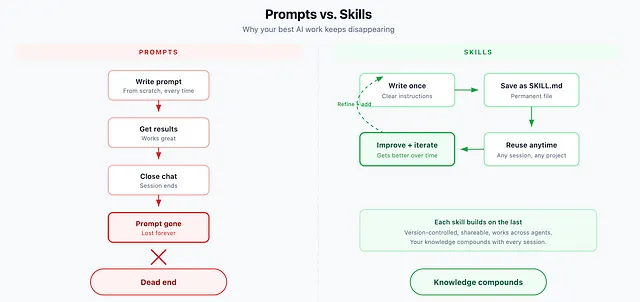
You’ve been typing the same instructions into AI tools for months. Every new chat, every new project, you start from scratch. Write the context. Explain the format. Describe what good output looks like. Again.
There’s a better way, and the entire AI industry just converged on it.
Your Best Prompts Disappear
Section titled “Your Best Prompts Disappear”You’ve done this before. You write a great prompt, get exactly what you need, close the chat. Three weeks later you need the same thing. The prompt is gone. You rewrite it from memory, but it’s not quite right. The results are worse.
Or you copy your best prompts into a notes app. Now you have twelve versions and no idea which one actually worked.
Prompts are disposable by design. Every conversation starts from zero. Your best work vanishes when you close the tab.
Skills Fix This
Section titled “Skills Fix This”A skill is a prompt that lives in a file.
That’s the whole concept. You write your instructions once, save them in a folder, and your AI agent uses them whenever that capability is needed again. No retyping. No remembering. The process is saved.
Here’s a real example. Say you summarize meeting notes every week:
---name: meeting-summarydescription: Summarizes meeting notes into action items and decisions---When given meeting notes:1. List the key decisions made2. Extract action items with owners3. Note any unresolved questions4. Keep it under 200 words5. Use bullet pointsSave that file. Next time you say “summarize these meeting notes,” the AI knows exactly what you mean and exactly how you want it done.
That’s a skill. A prompt with a permanent address.
This Works Everywhere Now
Section titled “This Works Everywhere Now”When I first wrote about skills, they were supported by Claude Code and a handful of other tools. That’s changed.
Skills now work across the entire ecosystem. Claude Code, OpenAI’s Codex, Google Gemini CLI, GitHub Copilot, Cursor, Windsurf, Goose, AMP, Kilo, and more. The list keeps growing because the concept is so simple that every platform can implement it the same way: a markdown file in a folder.
This isn’t a vendor-specific feature. It’s becoming how AI agents work, period.
Finding Skills Used to Be the Hard Part
Section titled “Finding Skills Used to Be the Hard Part”The concept was always simple. The problem was discovery. Where do you find good skills? How do you know what’s available? The answer used to be “browse GitHub repos and copy folders manually.”
That’s over. Skills.sh changed the game.
Skills.sh is an open directory with thousands of skills, searchable and installable with a single command. Think of it as an app store for agent capabilities.
Want to install Vercel’s React best practices skill? One command:
npx skills add nicepkg/vercel-react-best-practicesThat’s it. It downloads the skill and puts it in the right place for your agent. Works for Claude Code, Codex, Gemini, Cursor, Copilot, and dozens of other tools.
The top skills on the platform have over 100,000 installs. This isn’t experimental. People are using this at scale.
What’s in the Directory
Section titled “What’s in the Directory”Skills.sh has a leaderboard ranked by installations. Some of the most popular skills right now:
- Web design guidelines (80K+ installs), a comprehensive set of frontend standards
- React best practices from Vercel (106K+ installs)
- find-skills (150K+ installs), a meta-skill that helps your agent discover and install other skills
There are skills for security auditing, database design, API architecture, content writing, testing patterns, deployment workflows. Categories span everything from cloud infrastructure to design systems.
The contributions come from organizations like Vercel, Supabase, Expo, and Google alongside individual developers. Quality varies, but the install counts give you a signal.
The Folder Structure (Still Simple)
Section titled “The Folder Structure (Still Simple)”A skill is just a folder with a SKILL.md file inside. That’s the minimum:
my-skill/├── SKILL.md # Required: instructions + metadata├── scripts/ # Optional: code the AI can run├── references/ # Optional: docs, examples, context└── assets/ # Optional: templates, imagesMost skills are just the SKILL.md file. Start simple. Add complexity only when you need it.
Where Skills Live
Section titled “Where Skills Live”Every agent loads skills from specific locations. The pattern is consistent: a skills folder in your project for project-specific skills, and one in your home directory for skills that work everywhere.

Other tools follow similar conventions. The npx skills add command handles placement automatically, so you don’t need to memorize paths.
Building Your Own
Section titled “Building Your Own”You have two options.
Option 1: Just make a folder. Create a directory, add a SKILL.md file, write your instructions. Done.
mkdir -p ~/.claude/skills/meeting-summaryThen write your instructions in SKILL.md inside that folder. Name, description, step-by-step process.
Option 2: Use the built-in skill creator. Most agents have a skill that helps you build skills. In Claude Code, type /skill-creator. Describe what you want the skill to do. It scaffolds the folder and writes the file for you.
Both approaches take under five minutes.
What I do? I start a new Claude Code Session. Collaborate with Claude and together we create a capability- then I just tell Claude “Turn this into a skill please…”
Section titled “What I do? I start a new Claude Code Session. Collaborate with Claude and together we create a capability- then I just tell Claude “Turn this into a skill please…””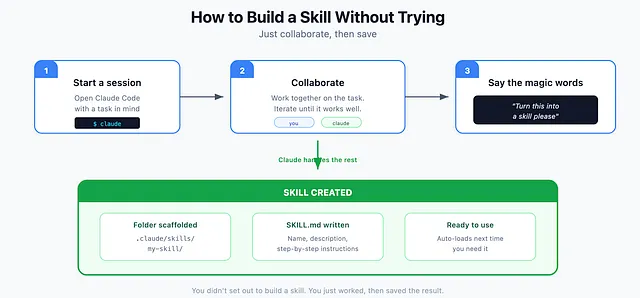
How Skills Get Triggered
Section titled “How Skills Get Triggered”Once a skill is installed, your AI uses it in two ways.
Explicitly: You mention the skill directly. In Codex, type $ to see available skills. In Claude Code, reference the skill by name or use / to browse.
Implicitly: You don’t mention the skill at all. You just ask for something. The AI reads your request, checks available skill descriptions, and loads the relevant one automatically.
This is why the description field in your SKILL.md matters. It’s not just documentation. It’s the trigger. Write it like you’re telling a colleague when to use a particular checklist.
Why This Matters
Section titled “Why This Matters”The shift from prompting to skills is small but significant.
Prompting means you’re having a conversation. Every time you need something done, you explain it again. You are the bottleneck, the keeper of all the context, the person who has to remember how things should work.
Skills mean you’re building a system. You explain something once, save it, and the AI executes the same way every time. Your knowledge compounds. Each skill you build makes the next project faster.
Most people treat AI like a chat partner. The people getting more out of it treat it like infrastructure you can configure.
Start Here
Section titled “Start Here”You can go from zero to a working skill in thirty seconds.
Path 1: Install something useful. Go to skills.sh, browse the directory, find something relevant to your work. Run npx skills add with the skill name. Done. You now have a new capability in your agent.
Path 2: Build your first skill. Pick one task you do regularly. Something you could explain to a colleague in five minutes. Write down the steps. Be specific about what good output looks like. Save it as SKILL.md in your skills folder.
Either way, you’ve moved from prompting to building.
The prompt dies when the conversation ends. The skill stays.
Tech person. I write about technology, Generative AI, the cloud, design and development. Deeper AND broader at acdigest.substack.com