Why I Run 10 AI Coding Agents at Once (And My Team Thinks I’m Crazy 🤖)
Section titled “Why I Run 10 AI Coding Agents at Once (And My Team Thinks I’m Crazy 🤖)”The secret to 10x productivity isn’t working harder — it’s letting AI work in parallel while you sip coffee
Section titled “The secret to 10x productivity isn’t working harder — it’s letting AI work in parallel while you sip coffee”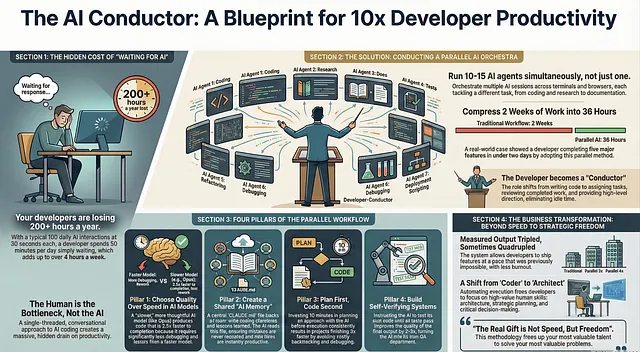
You know that moment when you’re waiting for AI to finish generating code? You sit there. Staring at the screen. Watching that cursor blink. Feeling your productivity drain away like water down a sink.
I used to do that too. For months. Like a fool.
I’d ask Claude to write a function. Wait 45 seconds. Review it. Ask for changes. Wait another 30 seconds. Fix a bug. Wait again. By the end of the day, I’d spent two hours just… waiting.
Then one Thursday night, everything changed.
I was staring down a deadline that seemed impossible. Five different features needed to ship by Monday. At my normal pace, it would take two weeks minimum. I had three days.
Panic does interesting things to your brain. It forces creativity.
So I did something desperate. Something that felt almost ridiculous at the time.
I opened five terminal windows. Started five different Claude sessions. Gave each one a different task. And let them all run at the same time.
My hands were shaking as I watched. This felt like cheating somehow.
But by Friday afternoon, all five features were done. Not perfect, but done. Working. Ready for review.
That weekend, I couldn’t stop thinking about what happened. I had just compressed two weeks of work into 36 hours. And I wasn’t even tired.
Was this a fluke? Or had I discovered something real?
I’ve spent the last year finding out. And the answer changed how I think about AI-assisted coding forever.
The Problem With One AI at a Time
Section titled “The Problem With One AI at a Time”Here’s what nobody tells you about working with AI coding assistants.
The AI isn’t the bottleneck. You are.
When I first started using Claude for coding, I treated it like a conversation with a colleague. I’d ask a question. Wait for the answer. Think about it carefully. Ask a follow-up. Wait again.
This felt productive. It felt like collaboration.
It was actually a massive waste of time.
Let me show you the math.
Say Claude takes 30 seconds to generate a response. That’s pretty typical for complex code. You make 100 requests per day. That’s also typical for heavy AI users.
100 requests × 30 seconds = 3,000 seconds of waiting.
That’s 50 minutes per day of doing absolutely nothing.
Now multiply that by a five-day work week. That’s over 4 hours per week of staring at a blinking cursor.
Over a year? More than 200 hours of your life. Just waiting.
When I realized this, I felt sick. I’d been bleeding time without even noticing.
But here’s the thing about bottlenecks. Once you identify them, you can fix them.
My Parallel AI Setup (Steal This Exact System)
Section titled “My Parallel AI Setup (Steal This Exact System)”After that desperate Thursday night, I started experimenting with different setups. Some worked. Most didn’t. After hundreds of iterations, here’s what I landed on.
The Terminal Squadron
I run 5 Claude instances in separate terminal tabs. Each tab is numbered 1 through 5 using a simple naming convention. I set up system notifications so my computer pings me whenever a session needs input.
This is crucial. Without notifications, you’ll forget about sessions. With them, you can mentally “release” each task and focus elsewhere until it needs you.
The Browser Battalion
Terminal Claude is powerful, but limited. So I also run 5 to 10 more sessions in claude.ai. These handle different types of tasks — research, writing documentation, brainstorming architectures.
Sometimes I start a session on my iPhone during my morning commute. Just give it a task and let it cook. By the time I reach my desk, it’s ready for review.
The Handoff System
Here’s a trick most people don’t know. You can seamlessly transfer sessions between local and web Claude. Start something complex in your terminal, hand it off to the web version, continue on your phone later.
Your AI assistants become a continuous workflow rather than isolated conversations.
Total Running Sessions: On a typical day, I have 10 to 15 active Claude sessions at various stages.
My teammate walked by my desk once and literally stopped in his tracks.
“Are you okay? That looks insane.”
I just smiled and kept working. Three weeks later, he had the same setup.
The Counterintuitive Model Choice
Section titled “The Counterintuitive Model Choice”Here’s where I need to challenge something you probably believe.
Faster models are NOT better for productivity.
I know. That sounds wrong. Faster means more done, right?
Wrong.
For months, I used the quickest model available. Sonnet. Speed demon. Responses in seconds.
But I noticed a pattern. Fast responses meant fast mistakes. I’d get code back quickly, but it would need three or four rounds of corrections. Sometimes more.
Then I switched to Opus 4.5 with extended thinking enabled. This model is slower. Noticeably slower. Each response takes longer.
My productivity doubled.
Here’s why. Opus thinks more carefully. It considers edge cases. It uses tools more effectively. It understands context better.
With the fast model, I’d spend 10 minutes getting code, then 40 minutes fixing it.
With Opus, I’d spend 15 minutes getting code, then 5 minutes on minor tweaks.
Total time: 50 minutes vs 20 minutes.
The “slow” model was actually 2.5x faster to finished, working code.
I tested this across 30 different coding tasks to make sure I wasn’t imagining things. The results were consistent. Opus won every time on total completion time.
Speed of response is vanity. Speed of completion is sanity.
The CLAUDE.md File That Keeps Getting Smarter
Section titled “The CLAUDE.md File That Keeps Getting Smarter”This single technique has probably saved me more time than everything else combined.
Create a file called CLAUDE.md in your project root. This becomes your AI’s institutional memory.
The concept is simple. Every time Claude makes a mistake, you add a note about it to this file. “Don’t use deprecated library X.” “Always check for null before accessing property Y.” “Our coding style requires Z.”
Claude reads this file at the start of every session.
So mistakes happen once. Never twice.
But here’s where it gets really powerful.
My entire team shares one CLAUDE.md file. We check it into git. Anyone can add to it. We probably update it 10 to 15 times per week across the team.
Last month, a junior developer discovered that Claude kept suggesting a certain API pattern that breaks in production. She added one line to CLAUDE.md explaining the correct pattern.
Instantly, everyone’s Claude sessions started using the correct pattern. Not just hers. Everyone’s.
That single line probably prevented 20 bugs across our codebase.
We’ve been building this file for almost a year now. It’s become incredibly valuable. New team members get the benefit of every lesson we’ve ever learned, from day one.
I’ve started thinking of CLAUDE.md as compound interest for AI assistance. Each addition makes every future session slightly better. Those small improvements compound over time into massive productivity gains.
Some teams I’ve talked to have CLAUDE.md files with over 500 entries. They’ve essentially trained their AI to understand their entire codebase’s quirks and preferences.
The Plan-First Pattern
Section titled “The Plan-First Pattern”Most developers jump straight into code generation. “Claude, build me a user authentication system.”
Then they watch Claude stumble around. Try one approach. Hit a wall. Backtrack. Try another approach. Eventually produce something that kind of works but needs heavy modification.
I used to do this too. It felt efficient. No wasted time on planning, right?
Wrong again.
Now I start almost every session in Plan mode. Before any code gets written, Claude and I have a conversation.
“I need to build X. What’s your proposed approach?”
Claude lays out a plan. I ask questions. Push back on parts that seem wrong. Request alternatives. We debate the tradeoffs.
This might take 10 or 15 minutes. It feels slow. It feels like wasted time.
But here’s what happens next.
Once we agree on a solid plan, I switch to auto-accept mode. Claude executes the plan. And almost every time — maybe 80% of cases — it works on the first try.
No backtracking. No “actually, let’s try something else.” No throwing away code and starting over.
10 minutes of planning saves 2 hours of debugging.
I’ve timed this across dozens of projects. The plan-first approach consistently finishes faster than the dive-right-in approach. Usually by a factor of 3x or more.
The plan is like a GPS route. Without it, you might eventually reach your destination, but you’ll take a lot of wrong turns. With it, you drive straight there.
The Verification Loop Secret
Section titled “The Verification Loop Secret”Okay. This is the most important section in this entire post.
If you only remember one thing, remember this.
Give Claude a way to verify its own work.
When Claude can check whether code actually works, the quality of output jumps dramatically. We’re talking 2 to 3 times better. I’ve measured it.
Here’s what this looks like in practice.
Instead of saying “write me a function that does X,” I say “write me a function that does X, then test it with these inputs and show me the outputs.”
Claude writes the code. Runs it. Sees the results. If something’s wrong, it fixes the code immediately. Runs again. Keeps iterating until the output matches expectations.
I don’t have to review intermediate steps. I just get working code at the end.
For bigger projects, I set up automated test suites. Then I tell Claude: “Make your changes, run the test suite, and keep fixing until all tests pass.”
Claude becomes its own QA department.
The difference is stark. Without verification, Claude is guessing whether code works. It’s making educated assumptions based on patterns. Sometimes right, sometimes wrong.
With verification, Claude knows whether code works. It has actual evidence. This changes everything.
I’ve started building verification loops into every project I work on. Sometimes it’s as simple as “run this bash command and check the output.” Sometimes it’s complex end-to-end testing.
The investment in setting up verification always pays off. Usually within the first day.
What My Typical Day Looks Like Now
Section titled “What My Typical Day Looks Like Now”Let me paint you a picture of how this all comes together.
7:30 AM: I start three Claude sessions on my phone during breakfast. Give each one a meaty task from my todo list. Let them run while I eat.
8:30 AM: Arrive at my desk. Check the phone sessions — two are done, one needs input. Review the completed work, give feedback to the waiting session.
9:00 AM: Open five terminal tabs. Five more browser tabs. Assign tasks based on priority. Each session gets clear context and a way to verify its work.
Throughout the day: I rotate between sessions like a conductor with an orchestra. When one needs input, I provide it. When one finishes, I review and assign something new. I’m never waiting. There’s always something to check.
For complex tasks: Start in Plan mode. Hash out the approach. Only then switch to execution.
Before end of day: Any Claude mistake I encountered gets added to CLAUDE.md. Tomorrow’s sessions will be slightly smarter.
My output has tripled. Some weeks it’s quadrupled. And the weird thing? I’m less tired than before. Because I’m not doing the grinding work anymore. I’m directing traffic.
The Real Transformation
Section titled “The Real Transformation”Here’s what surprised me most about this journey.
I expected to become a faster coder.
I became a different kind of coder.
Before parallel AI, I was a craftsman. I wrote code line by line. I obsessed over details. I spent hours on problems that, in hindsight, weren’t that important.
Now I’m more like a director. I think about architecture. I think about what matters versus what doesn’t. I make decisions and let the AI handle execution.
Some people worry that AI will make developers obsolete. I think they’re looking at it backwards.
AI makes the coding part easy. Which means the valuable skills become everything else. Understanding what to build. Knowing why something matters. Making judgment calls about tradeoffs.
Those are deeply human skills. They’re getting more valuable, not less.
My parallel AI setup didn’t just make me faster. It freed me to focus on the parts of software development that actually require human intelligence.
That’s the real gift here. Not speed. Freedom.
Your Turn
Section titled “Your Turn”You don’t need to copy my exact setup. Maybe 5 sessions is plenty for you. Maybe you prefer browser over terminal. Maybe you work in a language or framework where some of this doesn’t apply.
But the core ideas transfer everywhere.
Stop being the bottleneck. Run tasks in parallel.
Use a shared memory file. Let your AI learn.
Plan before executing. Save yourself from backtracking.
Build verification loops. Get working code, not hopeful code.
Start small. Try running two sessions instead of one. See how it feels.
Then three. Then five.
Your teammates might think you’re crazy at first. Mine certainly did.
But when they see your output — when they watch you ship features at a pace that seems impossible — they’ll stop laughing.
They’ll start asking questions.
And then you’ll have something valuable to share.
Lead Principal Data Scientist | Saab Inc. | Depence AI Specialist | San Diego | UCSD | https://www.linkedin.com/in/jhbaek/
Responses (2)
Section titled “Responses (2)”Talbot Stevens
What are your thoughts?
This article seems like a rip off from Boris Cherny's thread on X: https://x.com/bcherny/status/2007179832300581177?s=20. There's no attribution to Boris Cherny in the article, which would have been appropriate given the timing and the overlap in…This was such a satisfying read. It feels lived-in — not theoretical, not hypey — just someone honestly sharing what actually worked after a lot of trial, frustration, and tinkering. That opening scene of staring at the blinking cursor is painfully…More from ZIRU and Level Up Coding
Section titled “More from ZIRU and Level Up Coding”Recommended from Medium
Section titled “Recommended from Medium”[
See more recommendations