Claude is Doubling My Website Traffic
Section titled “Claude is Doubling My Website Traffic”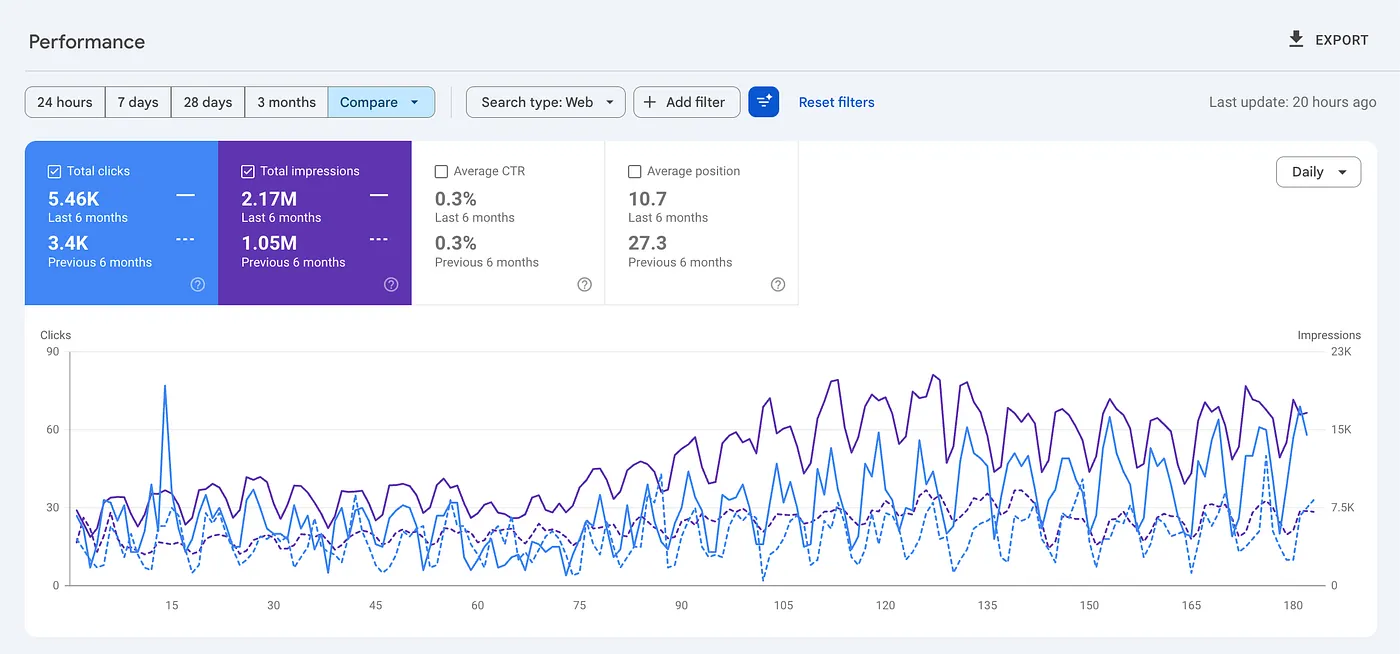
Author Screenshot from GSC
One of the best opportunities to use AI for SEO is updating your old content. Claude has helped me with new content, but it’s even better at updating old content with room for improvement.
I updated some older blog posts on my company’s website over the past few months.
Here’s what happened:
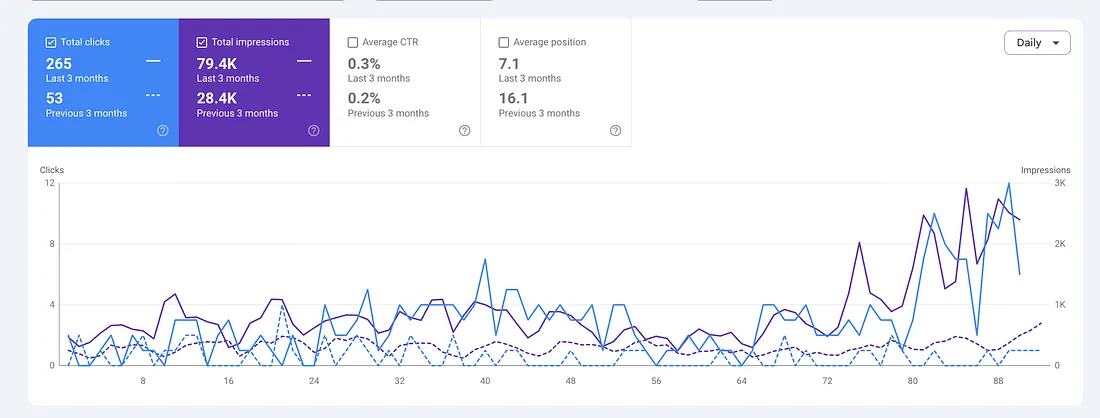
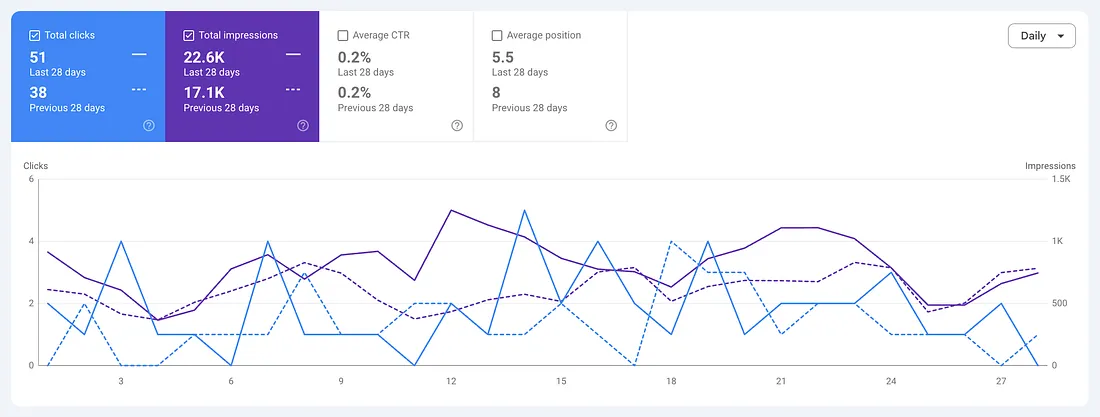
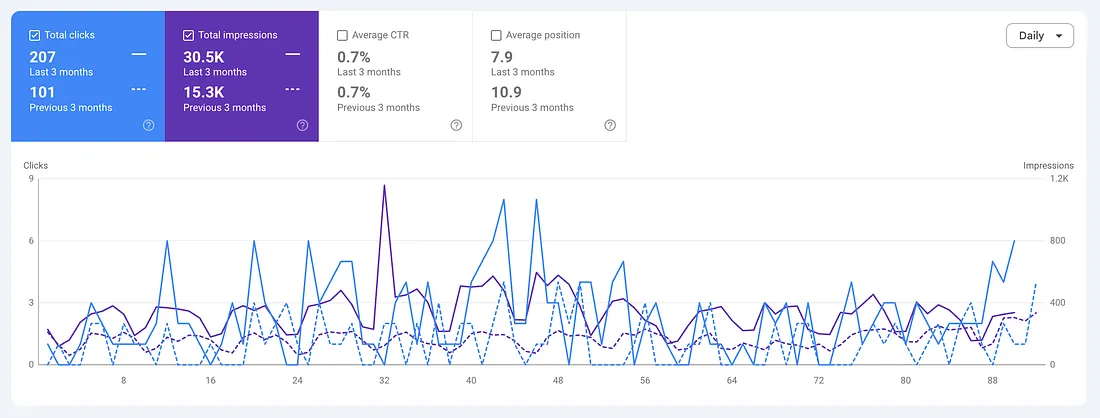
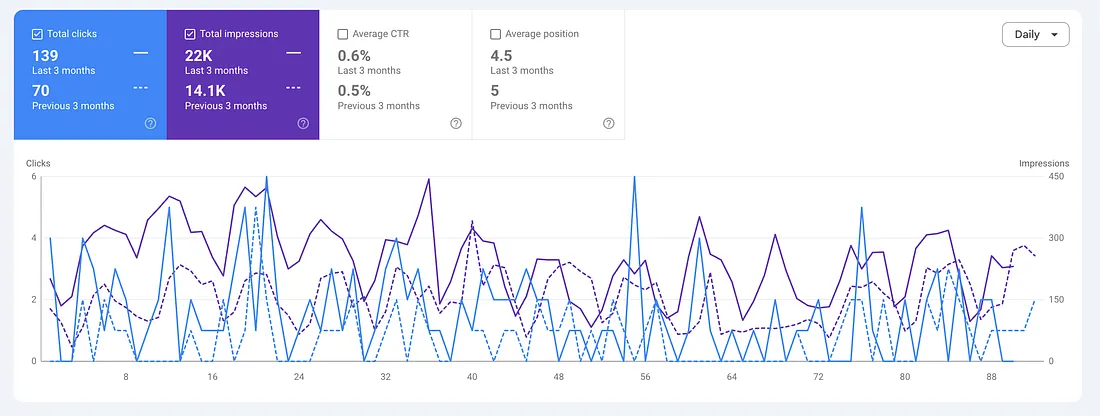
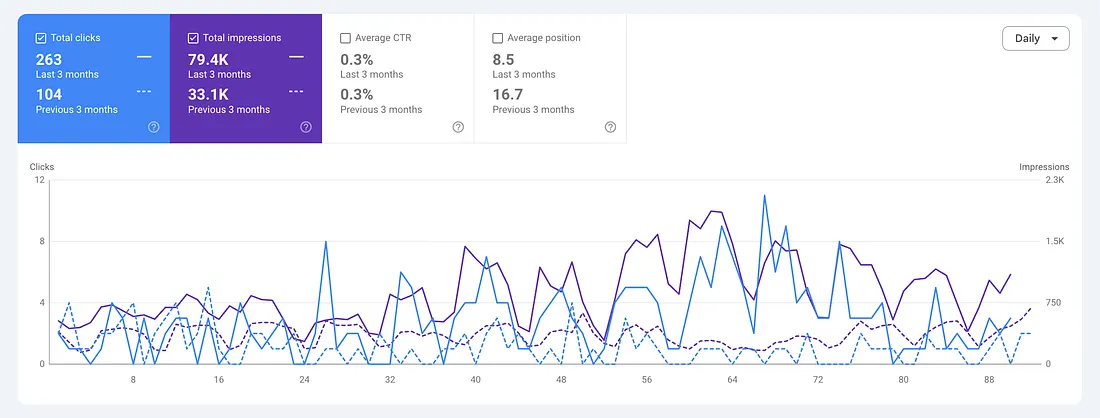
Google Search Console Screenshots
These little improvements add up. Across the site, impressions have doubled. Average position improved from 27 to 10.7. Clicks went from ~565 per month to 1,000+ per month.
I used Claude, free data from Google Search Console, and a simple process that anyone can copy.
Here’s what I did:
Most AI content advice is backwards
Section titled “Most AI content advice is backwards”You’ve probably seen the posts about AI and PSEO (programic SEO).
“I published 2,500 articles with AI in 30 days!” It can “work” for a few weeks, but these sites are getting wrecked by Google. Mass-produced AI content is thin, generic, and written for no one in particular. And if your goal is to convert readers into potential customers, it doesn’t work.
What actually works is the opposite of that approach.
==You use AI as a research partner and first-draft collaborator on content you already understand — then you review it, edit it, and make sure it’s accurate before it goes live.==
Every article I updated went through me before it was published. I checked technical accuracy, adjusted the tone, and made sure it actually represented what my company does. Even if the article was written mostly by AI, the ones I updated had been indexed and ranking for over 6 months.
I think Claude writes better than me.But, you need human input if you want sustained rankings and if you want people to read your content.
Why update instead of writing new content?
Section titled “Why update instead of writing new content?”Most websites are sitting on blog posts that are already indexed by Google and getting some impressions. Your page is in the search results.
This is low-hanging fruit.
Google knows the page exists. It already associates the page with relevant keywords. You don’t need to convince Google to discover a brand new page, you just need to make the existing one better.
I use a simple decision framework to figure out what to do with each piece of content:
Made in Canva
- Is the content getting traffic and creating value?
- If yes — is it competing with your own other pages?
- Is it unique enough to stand alone, or should you combine it with similar content?
- If no — is it important to the customer journey?
- Is it incomplete, outdated, or confusing?
- Does it add value to the business at all?
Each answer leads to a different action: rewrite to target different keywords, combine with another page, update and add depth, or delete and redirect the URL.
The articles I updated were getting impressions but sitting towards the bottom of page 1/2. The content was either too thin or needed a different perspective on the topic.
Step 1: Give AI context about your business
Section titled “Step 1: Give AI context about your business”Before writing or rewriting anything, I had a conversation with Claude about the business.
What are our capabilities. Who are our top customers. How we talk about ourselves. What makes us different from the competitors.
I treated it like a new marketing hire. If someone just joined your company and you said “rewrite this blog post,” they’d produce something generic, even if they’re a great writer.
If you spent a few hours giving them context — who your customers are, what they care about, what language you use — they’d write something that actually sounds like your company.
After the initial context conversation, the article rewrites had accurate terminology, internal links to relevant pages, and industry-specific language that matched how we actually talk to customers. I wasn’t correcting every other sentence. The foundation was solid, and I could focus my review time on technical accuracy rather than basic tone and framing.
If you skip this step, you’ll get generic AI content that sounds like every other AI-written blog post on the topic.
Step 2: Pick the right articles to update
Section titled “Step 2: Pick the right articles to update”Once Claude understood the business, I needed to figure out which articles were worth updating. Google Search Console makes this easy.
I went into GSC and looked at individual blog post performance. Specifically, I was looking for pages with:
- High impressions + low clicks — Google is showing the page to people, but they’re not clicking through. That’s a ranking problem (stuck on page 2) or a meta title/description problem (people see it but aren’t compelled to click).
- Poor CTR relative to position — if you’re ranking in positions 3–7 and getting a 0.1% CTR, something is off. Either the search is answered quickly by an AI overview, or your title or meta description is broken.
- Average position in the 7–15 range — these are pages sitting right on the edge of page 1. Sometimes, a small improvement in content quality can push them up 2–3 positions, which means the difference between being seen and being invisible.
I wasn’t looking for pages with zero impressions. I was looking for pages where Google was giving me a chance and there are opportunities to improve.
Step 3: Export and upload your GSC data
Section titled “Step 3: Export and upload your GSC data”For the articles I wanted to update, I did three things:
- Exported the Queries report from GSC, filtered to that specific page. This gives you every search term that’s driving impressions to that URL, along with the clicks, impressions, CTR, and average position. It tells you exactly what people are searching for when your page shows up in the search results.
- Copied the article URL.
- A simple prompt along the lines of: “I want to update this article and boost rankings for relevant keywords. Here’s the GSC data.”
Claude reads the GSC data to understand what queries were performing well and which had the most potential. It fetched the live article to see the current content. Then it ran competitive searches for the top keywords to analyze what’s ranking above my page.
Step 4: Diagnosis before rewriting
Section titled “Step 4: Diagnosis before rewriting”Claude gave me an analysis of why the existing content was underperforming. And the diagnosis was different for every article.
Article 1 had 198 search queries generating around 2,600 impressions but only 1 total click. Claude identified that the article was ranking in positions 2–5 for several valuable keywords but was significantly thinner than the competing pages. The top-ranking competitors included specific data points that my article was missing.
Another article had a description section that had been copy-pasted from a different page and referenced the wrong industry. Claude caught it immediately because it had read the page content and knew it didn’t match the GSC queries that were driving traffic to it.
Another article was indexed but had zero impressions. Claude analyzed the competitive landscape and told me the topic was dominated by enterprise companies with massive domain authority — and that a rewrite wouldn’t change anything. Instead, it recommended re-angling the article to a perspective my company actually had authority on.
The point is that every article had a different problem and diagnosis. A blanket “make it longer and add keywords” approach would have missed most of this.
Step 5: Rewrite with Intent Alignment
Section titled “Step 5: Rewrite with Intent Alignment”Claude rewrote each article to address the specific gaps it found.
The rewrites typically included:
Adding sections that matched high-impression queries.
GSC tells you exactly what people are searching for when they land on your page. If you’re getting 140 impressions for a question and your article doesn’t have a section that answers that question, you’re leaving traffic on the table. Claude identified and the gaps.
Improving technical depth to match or beat page-1 competitors.
If every article ranking above you includes specific data and yours doesn’t, you probably won’t outrank them. Claude researched the competing content and made sure the rewrites matched or exceeded the depth of what was ranking.
Fixing / adding internal links. Every rewrite included links to relevant posts and landing pages. That’s tedious to do manually, but that Claude handled automatically because it knew our site structure from the context conversation in Step 1.
Suggesting new meta titles and descriptions. When the CTR data showed that people were seeing our page in results but not clicking, Claude proposed new meta titles and descriptions designed to improve the click-through rate.
The key principle behind all of this: the rewrite was never about making the article longer for its own sake. It was about matching the content to what people are actually searching for. GSC gives you the exact queries. The rewrite targets those queries.
Step 5.5: The stuff I couldn’t build myself
Section titled “Step 5.5: The stuff I couldn’t build myself”Claude also built interactive HTML elements that I embedded directly into the blog posts.
Styled comparison tables. Interactive decision flowcharts that walk the reader through a series of yes/no questions and lead them to a recommendation. Process flow diagrams showing how something works.
When someone lands on an article comparing three options, a clean comparison table is more useful than a wall of text. When someone is trying to make a decision, a flowchart gets them to the answer faster than any paragraph could.
I don’t know how to build these from scratch. Claude wrote the HTML and CSS in seconds, matched to the existing design system on the website, and I pasted the code into Webflow.
The flowcharts and tables make the articles more useful, more engaging, and a bit harder for competitors to replicate.
Step 6: Review everything before publishing
Section titled “Step 6: Review everything before publishing”Every rewrite went through me before publishing.
I read the full article. I adjusted phrasing that didn’t match how we talk to customers. I verified that internal links pointed to the right pages. I made sure the content accurately represented what the company does — not what Claude assumed.
Claude is great at research, structure, competitive analysis, and filling content gaps. It’s not always correct on specific technical details.
The human review catches those things and turns a first draft into a trustworthy published article.
If you publish AI-generated content without reviewing it, you’re gambling with your credibility. The review step is non-negotiable.
Steal this process
Section titled “Steal this process”Here’s the whole thing, step by step:
- Have a context conversation with Claude about your business. Treat it like onboarding a new hire. Cover your products/services, customers, industry, competitive advantages, and tone. Do this once — it carries across conversations.
- Identify underperforming articles in Google Search Console. Look for pages with decent impressions but low clicks, poor CTR, or average positions in the 7–15 range. These are your highest-ROI targets.
- Export the GSC Queries report for each article (filtered to that specific page). Give Claude the export file and the article URL.
- Let Claude diagnose the problem before rewriting. Don’t skip the analysis. The diagnosis tells you what kind of fix each article needs — more depth, better structure, missing subtopics, meta description improvements, or something else entirely.
- Review the rewrite with your own expertise. Check technical accuracy, verify tone, make sure it represents your business correctly. This is what separates useful AI-assisted content from the generic stuff that’s flooding the internet.
- Publish and monitor. Changes typically take a few weeks to show up in GSC. Compare the same 28-day windows before and after.
That’s it. Google Search Console is free. Claude is $20/month. The process takes a few hours per article, not a few days. And because you’re updating pages that are already indexed, you’re working with Google’s existing trust in your domain instead of starting from zero.
I didn’t blindly trust Claude to do my SEO.
The combination of Claude + me is what moved the needle. Claude brought the research depth and execution speed. I brought the domain knowledge and quality control. Using Claude speeds up the process and unlock more capabilities than I have on my own.
If you’re sitting on a blog with underperforming content and you haven’t tried this yet, you’re leaving the easiest wins on the table.
Want to learn more about SEO strategies that work? Check out this list of 100+ curated articles:
SEO / Niche Websites
Section titled “SEO / Niche Websites”101 stories