Claude Code Cheat Sheet: Every Command, Shortcut, and Config Template That Actually Matters
Section titled “Claude Code Cheat Sheet: Every Command, Shortcut, and Config Template That Actually Matters”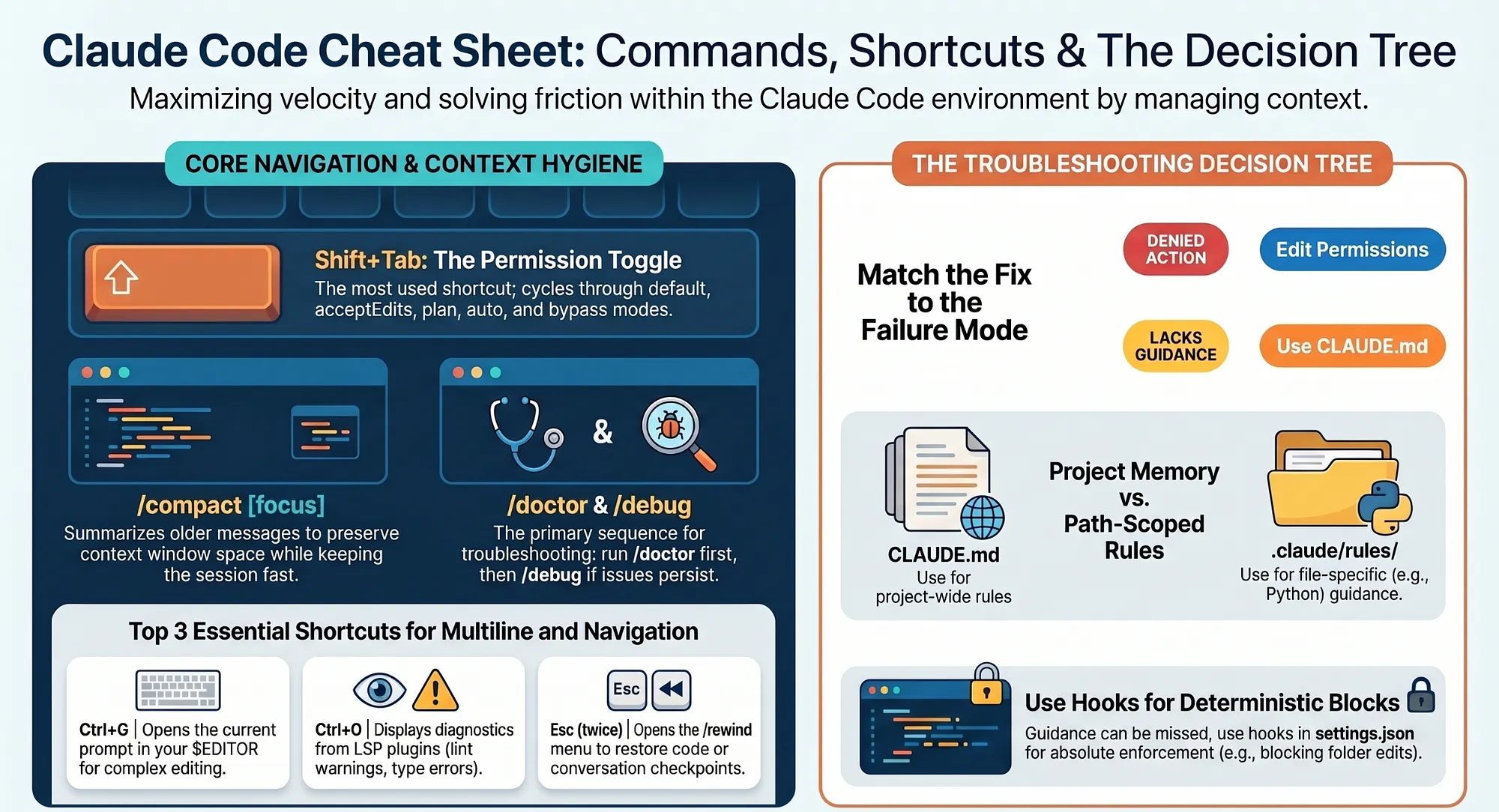
Part 19: A working reference for engineers who use Claude Code daily: the keyboard shortcuts worth memorizing, the built-in commands grouped by what you are actually doing, copy-paste-ready config files, and the one decision tree that ends most of your friction.
Section titled “Part 19: A working reference for engineers who use Claude Code daily: the keyboard shortcuts worth memorizing, the built-in commands grouped by what you are actually doing, copy-paste-ready config files, and the one decision tree that ends most of your friction.”The Claude Code cheat sheet: every shortcut, command, sample config, and the one decision tree that ends most of your friction.Stop re-deriving the same configuration from scratch every week. Keep one page open and move faster.
In this article: This is the Claude Code cheat sheet, distilled. You get the keyboard shortcuts that pay for themselves, the full built-in command catalog organized by purpose, production-ready templates for settings.json, CLAUDE.md, path-scoped rules, and a custom subagent, plus a decision tree that answers the single most common question: “Claude did something wrong. What do I change?” Bookmark it. You will come back.
Part 19, the final part, of “Claude Code, Day-to-Day,” a 19-part guide to mastering Claude Code for working engineers.
You have used Claude Code, Anthropic’s agentic coding tool, for a few weeks now. You know the agentic loop. You have a CLAUDE.md. You have felt the difference between a session that goes well and one that fights you. And yet, every time you need the exact JSON shape for a permission rule, or the precise frontmatter for a path-scoped rule, or which command summarizes context versus which one clears it, you stop and re-derive it. That re-derivation tax is small per instance and enormous in aggregate.
This Claude Code cheat sheet exists to kill that tax. It is the lookup table: every shortcut, every command, the sample files, and the decision tree, in one place. The rest of any good Claude Code guide teaches you why each artifact exists and how it behaves. This is the page you keep open while you work.
A note on terminology before we dive in, because two ideas recur throughout. Context is the operating system: everything Claude knows in a session, from your files to your rules to the conversation, lives in a finite context window, and managing it is the core skill. And the three-phase agentic loop, “gather context, take action, verify,” is the cycle Claude runs on every task. Both ideas shape why these commands and files are designed the way they are.
Keyboard shortcuts worth memorizing
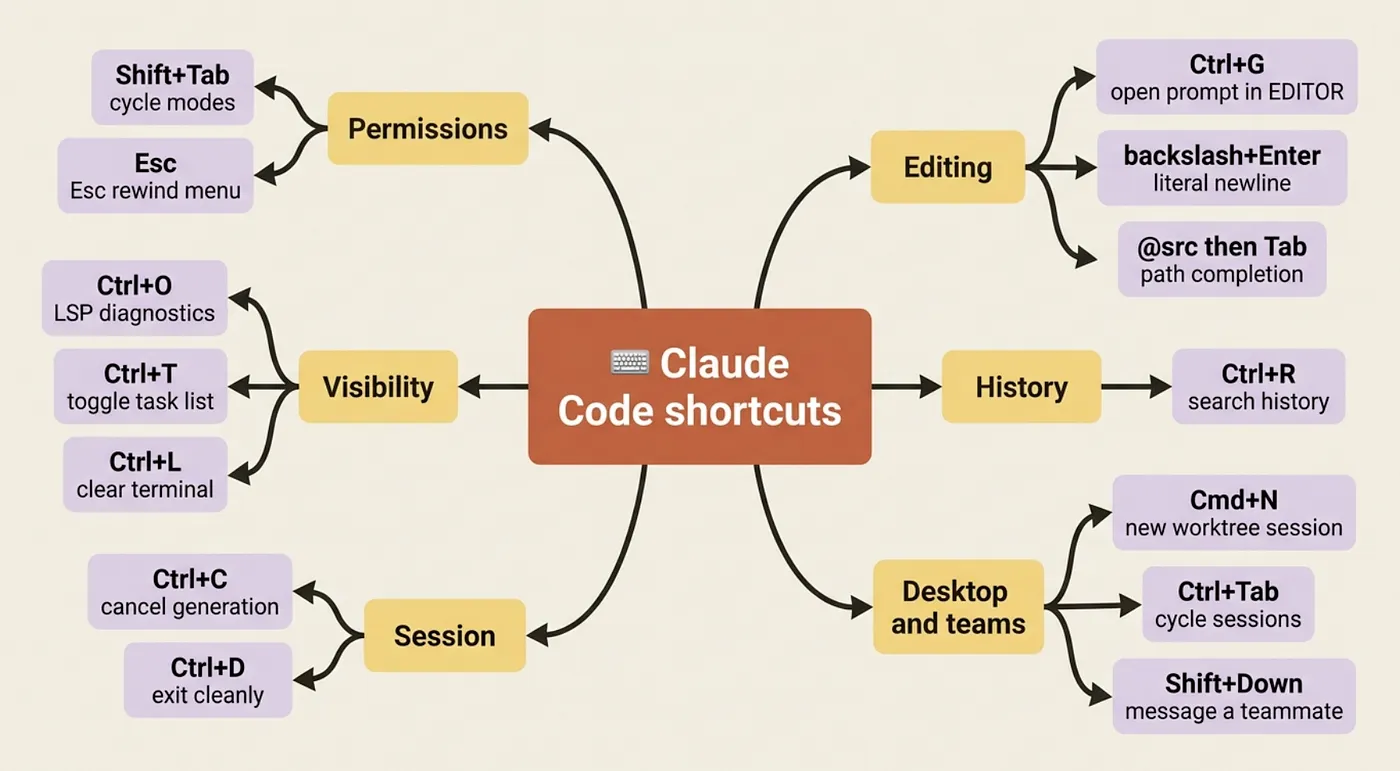
Section titled “Keyboard shortcuts worth memorizing”You do not need all of these on day one. You need maybe five. But the five compound, because they remove friction from the actions you take dozens of times an hour.
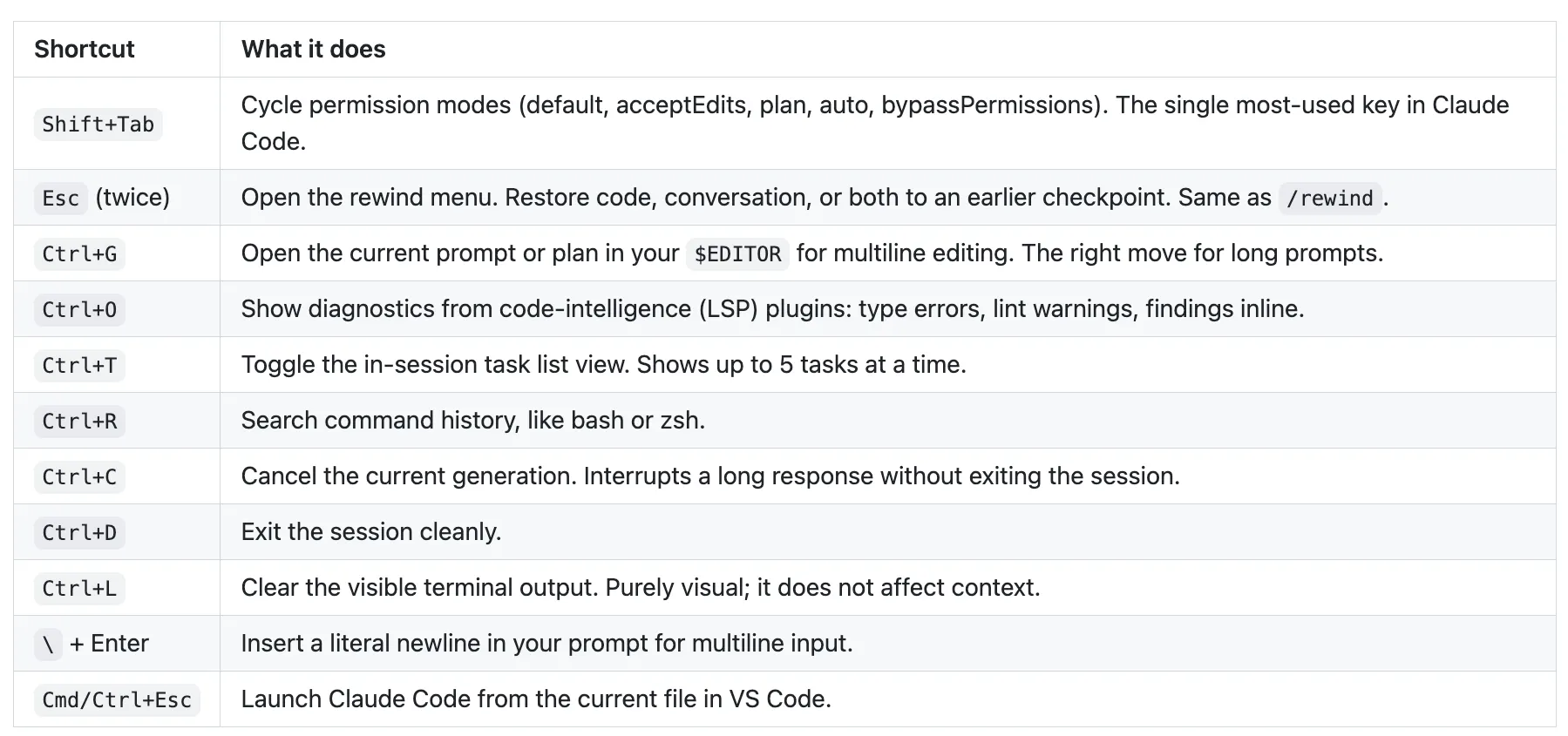
There are a few desktop-app and agent-team additions on top of that working set: Cmd/Ctrl+N opens a new session in a new worktree, Cmd/Ctrl+\ closes the focused pane, Ctrl+Tab and Ctrl+Shift+Tab cycle through parallel sessions in the sidebar, and Shift+Down cycles through teammates so you can message one directly during agent-team work.
One trap worth flagging loudly. In Claude Code v2.0 and later, Tab is the thinking-mode toggle, not file completion. File completion happens inside @ references: type @src/ and then Tab for path completion. If you never use thinking mode, you can disable the binding in settings, but most people just learn the new muscle memory.
Every built-in command, grouped by purpose
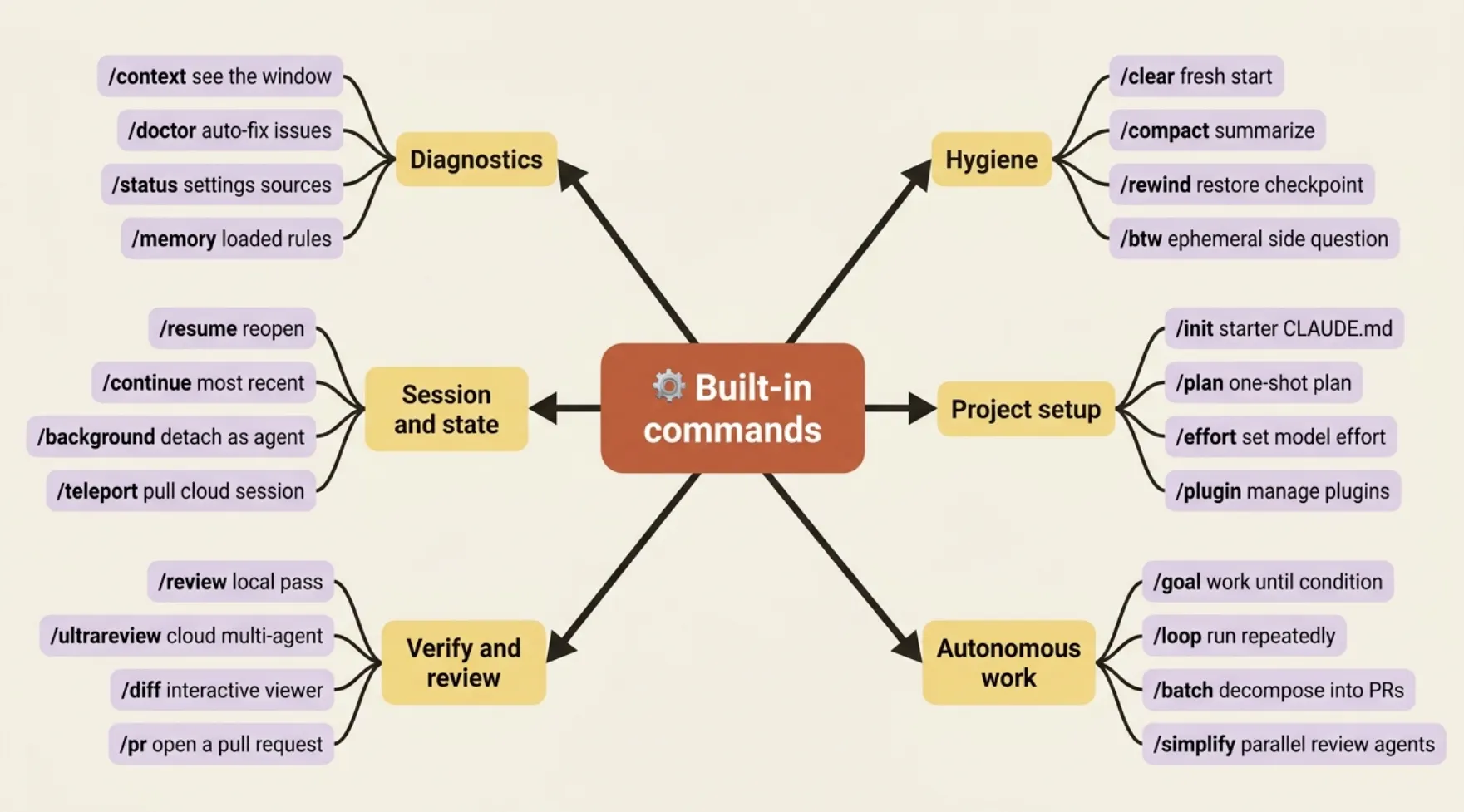
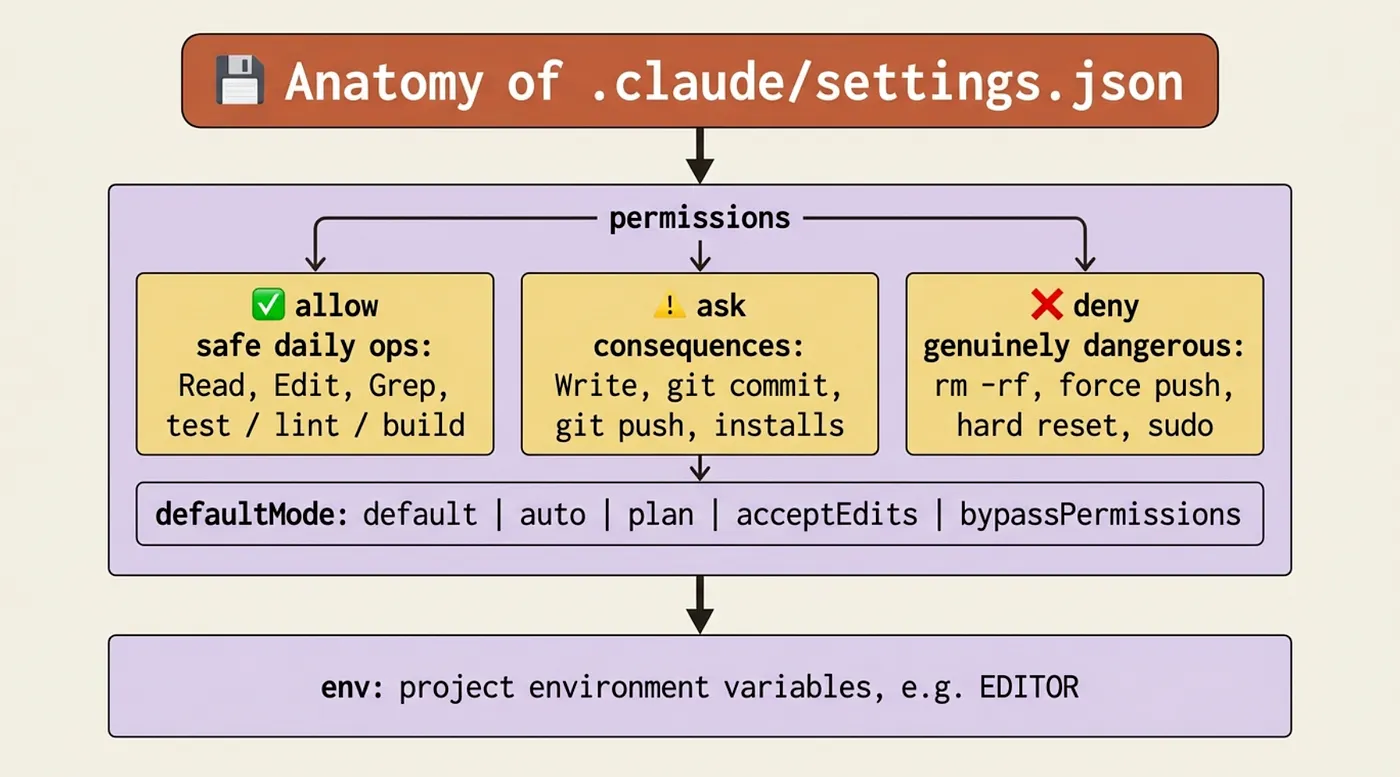
Section titled “Every built-in command, grouped by purpose”Type / in any session to filter the full list. Memorizing the alphabet of commands is pointless. Memorizing them by what you are doing when you reach for one is not. Below, the catalog is grouped by intent. Entries marked [Skill] are bundled prompt-based skills; the rest are built-in commands.
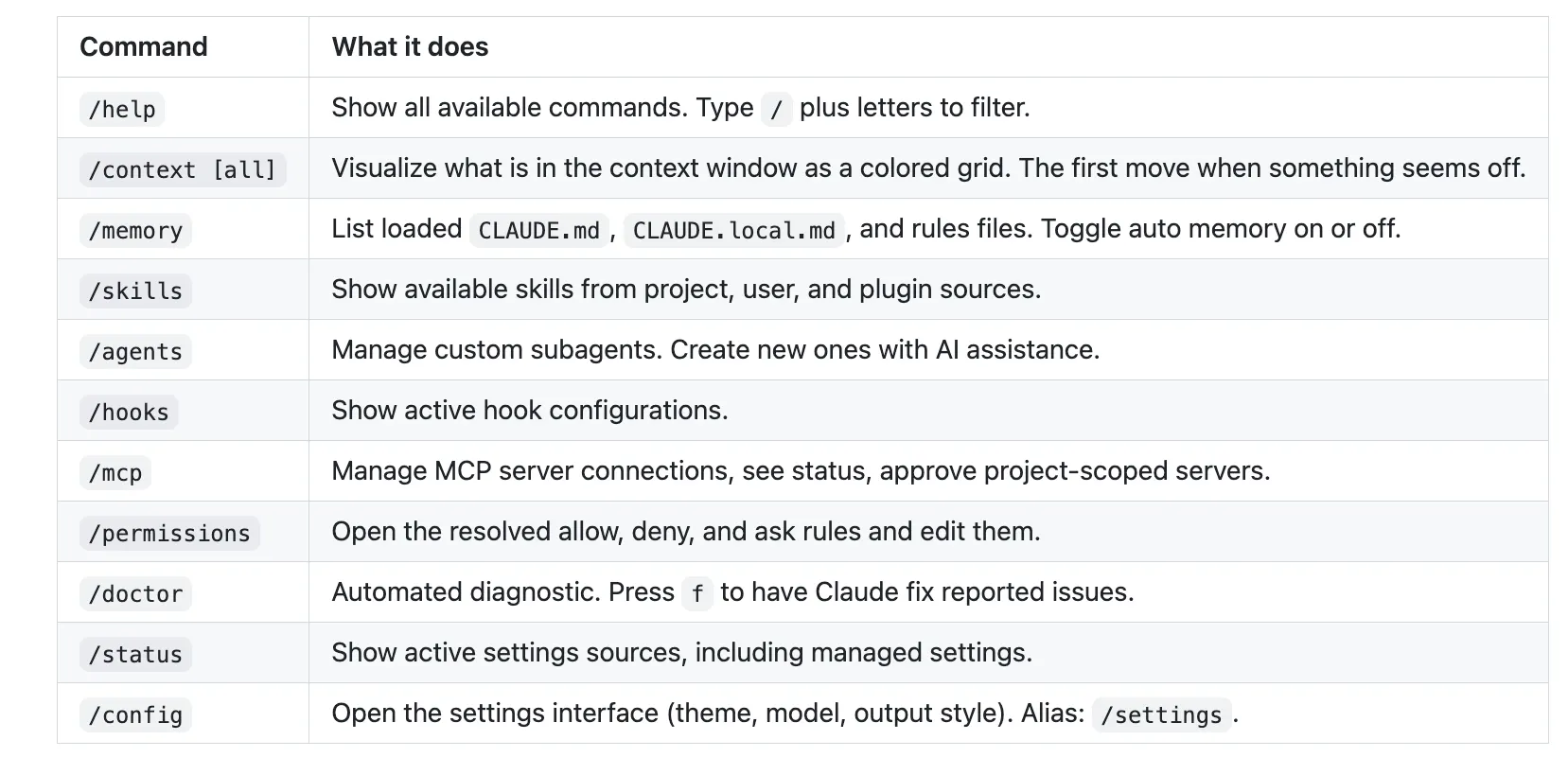
Daily diagnostics and navigation
Section titled “Daily diagnostics and navigation”These are the lookups you run several times a day.
Conversation hygiene
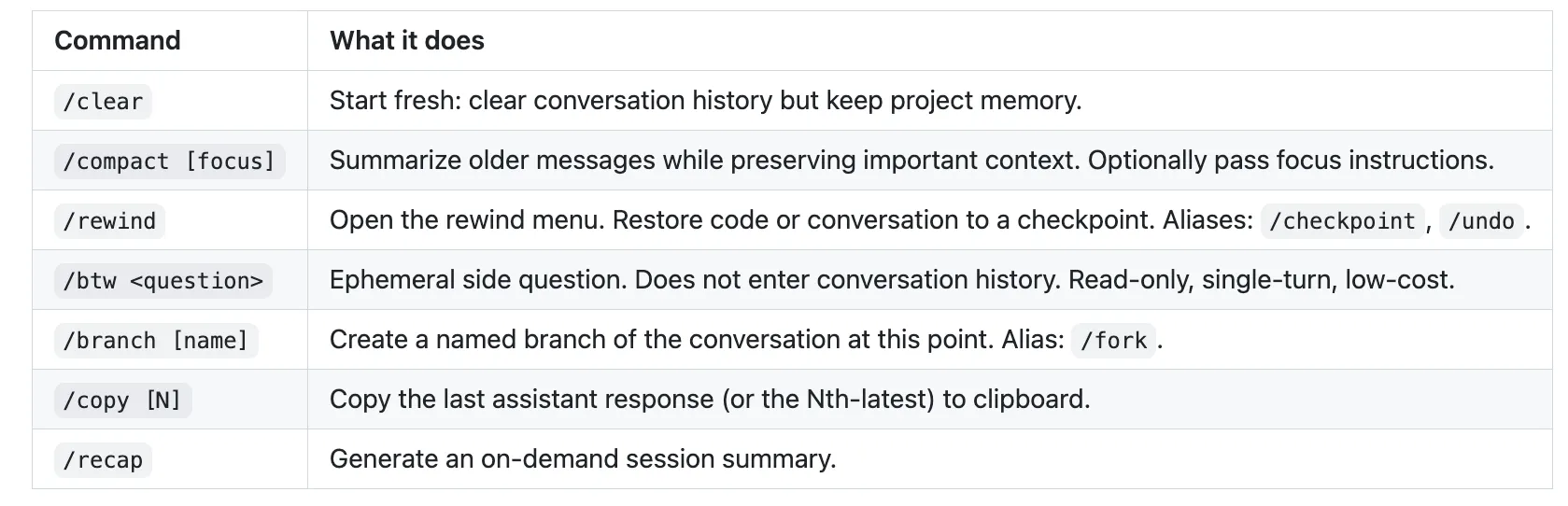
Section titled “Conversation hygiene”Because context is the operating system, the commands that keep it clean over a long day are not optional housekeeping. They are how you stay fast.
Session and state
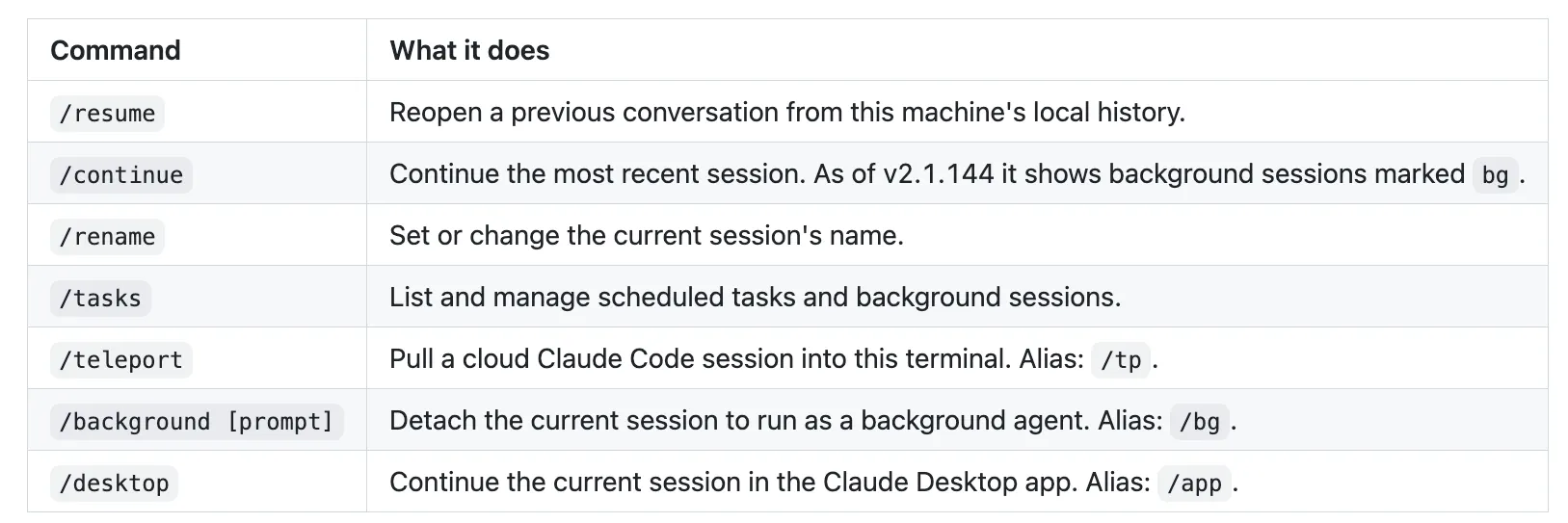
Section titled “Session and state”How you move between, name, and reopen sessions.
Project setup and workflow
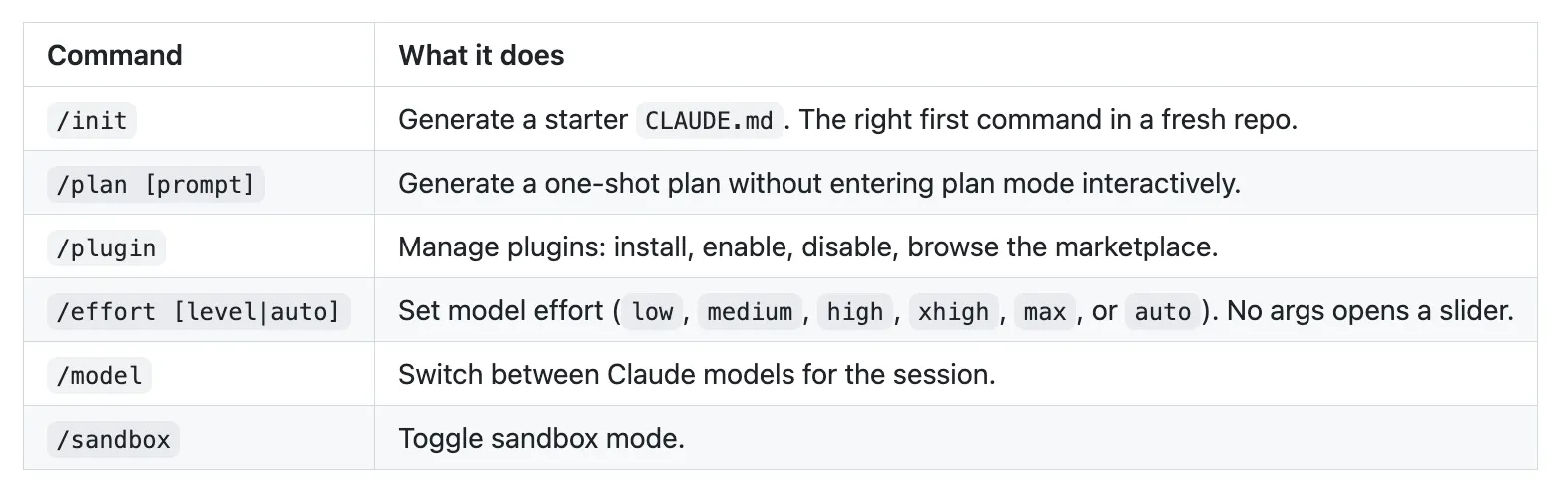
Section titled “Project setup and workflow”The commands you reach for when you start something substantial.
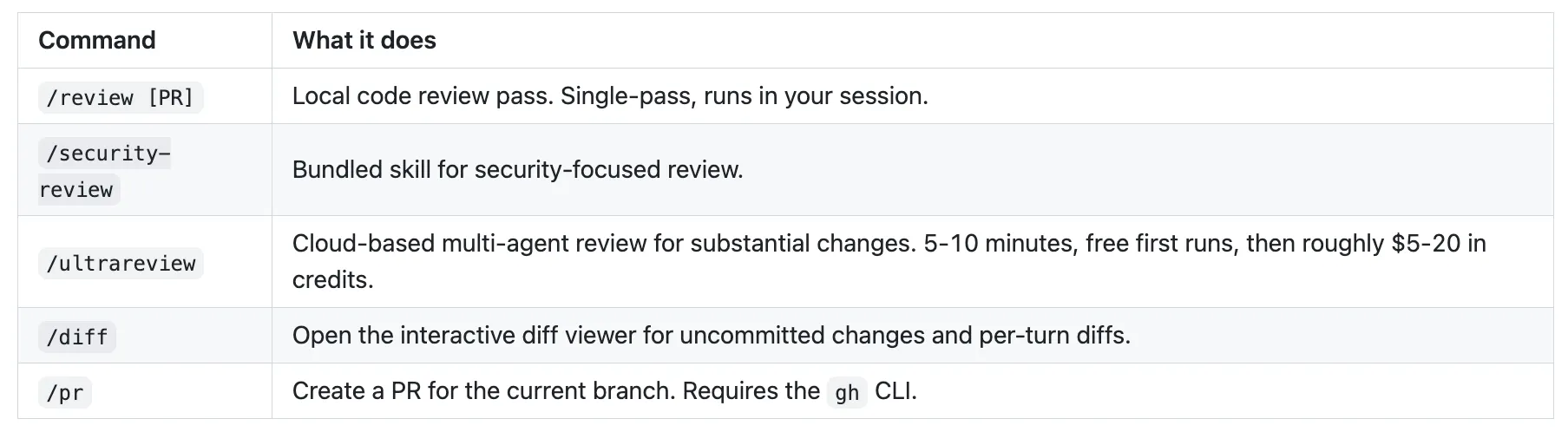
Verification and review
Section titled “Verification and review”These close the third phase of the agentic loop: verify.
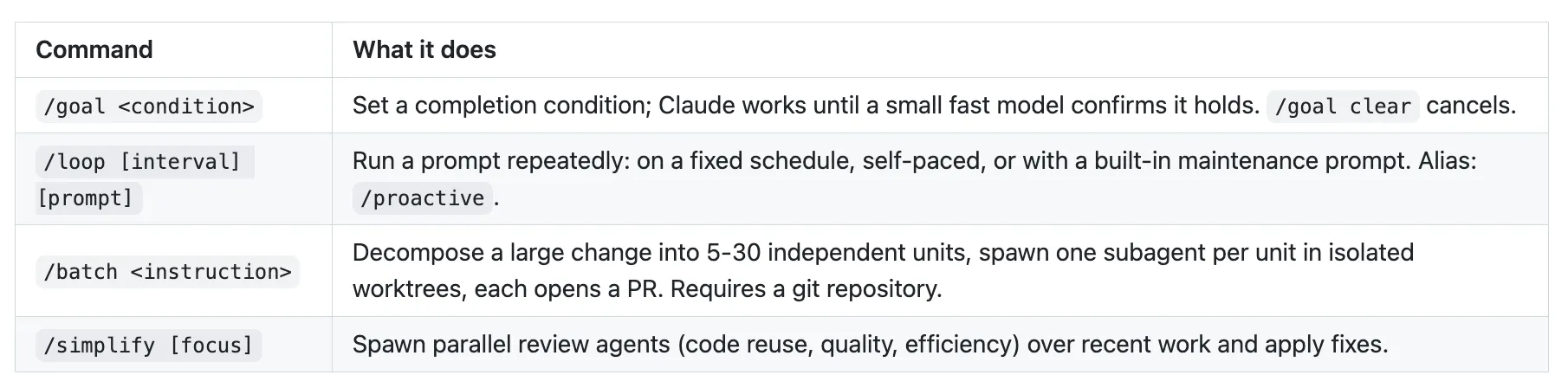
Autonomous work
Section titled “Autonomous work”The commands that let Claude keep working without you typing every prompt. All four are bundled skills.
Troubleshooting, escalating in order
Section titled “Troubleshooting, escalating in order”When something does not work, escalate in this sequence: /doctor first (it diagnoses installation, settings, MCP servers, and context usage; press f for Claude to fix). Then /debug [description], a bundled skill that enables debug logging and diagnoses using the log output; this is the right move when Claude Code itself misbehaves. Then /less-permission-prompts, a skill that scans transcripts for common read-only calls and proposes an allowlist. Finally /feedback, which reports a bug with session context attached. For sharing, /export saves the conversation as Markdown. For account management, /login and /logout.
That is the working set. A handful of niche commands (terminal-setup helpers, internal diagnostics) are not listed; type / and filter to discover anything else.
The settings.json template you should steal
Section titled “The settings.json template you should steal”Here is a sensible default .claude/settings.json for a typical project. The shape matters more than the exact commands; adapt the test, lint, and build entries to your stack.
{ "permissions": { "defaultMode": "default", "allow": [ "Read", "Glob", "Grep", "Edit", "MultiEdit", "Bash(npm test:*)", "Bash(npm run lint:*)", "Bash(npm run typecheck)", "Bash(npm run build)", "Bash(git status)", "Bash(git diff:*)", "Bash(git log:*)", "Bash(ls:*)", "Bash(cat:*)", "WebFetch(domain:docs.our-internal-api.com)" ], "ask": [ "Write", "Bash(git commit:*)", "Bash(git push:*)", "Bash(git checkout:*)", "Bash(npm install:*)", "Bash(npm run deploy:*)" ], "deny": [ "Bash(rm -rf:*)", "Bash(git push --force:*)", "Bash(git reset --hard:*)", "Bash(curl:*)", "Bash(wget:*)", "Bash(sudo:*)", "WebFetch(domain:*)" ] }, "env": { "EDITOR": "code --wait" }}The logic behind the three lists is the whole point.
allowcovers safe daily operations: reads, edits, and your test, lint, and build commands. These run without interrupting you.askcovers operations with consequences: file creation, commits, pushes, dependency changes, deploys. Claude pauses for your confirmation.denycovers genuinely dangerous operations that should never run automatically: recursive deletion, force push, hard reset, arbitrary downloads, root commands.- The combination of
WebFetch(domain:*)in deny with a specific domain in allow is the canonical pattern for restricting fetches to a trusted whitelist. Deny everything, then allow the one host you trust.
Keep defaultMode at "default" (explicit approval per operation) until you have built an allow list you genuinely trust, then switch to "auto".
The CLAUDE.md skeleton
Section titled “The CLAUDE.md skeleton”CLAUDE.md is the project memory file Claude loads at the start of every session. A good one has five sections. Replace the placeholders with your specifics, and keep the whole file under 200 lines.
# Project: <Your Project Name>
## OverviewBrief description: what this project is, the stack, key dependencies.Two or three sentences, enough that a new collaborator orients quickly.
## Build, test, and run commandsThe exact commands to validate work, in the order you would run them.- \`pnpm install\`: install dependencies- \`pnpm test\`: run the test suite- \`pnpm run lint\`: run lint checks- \`pnpm run typecheck\`: TypeScript type-checking- \`pnpm run build\`: production build
## ConventionsProject-specific rules every session should follow. Short and specific.- All API errors return \`{ error: string, code: string }\`, never raw exceptions.- Auth uses RS256 JWTs, not HS256.- Migrations live in \`db/migrations/\` and run via \`pnpm run db:migrate\`.
## Never do thisThings that have caused problems before. Be specific.- Never modify \`src/generated/\`; those files are produced by codegen.- Never commit \`.env.local\` or \`config/secrets/*\`.- Never use raw SQL string concatenation; use the query builder.
## Key filesThe files Claude should look at first for context.- \`src/api/router.ts\`: top-level route definitions- \`db/schema.ts\`: database schema- \`docs/architecture.md\`: system architecture overview
If your CLAUDE.md grows past 200 lines, that is a signal, not a milestone. Promote stack-specific guidance into path-scoped rules.
Path-scoped rules: guidance that loads only when relevant
Section titled “Path-scoped rules: guidance that loads only when relevant”A path-scoped rule is a Markdown file in .claude/rules/ with a paths field. It loads into context only when Claude touches matching files, which keeps your operating system (the context window) lean. Here is .claude/rules/python.md:
---paths: ["**/*.py"]---
# Python conventions
## Tooling
- Use \`ruff\` for formatting and linting. Run \`ruff check --fix\` before done.- Type hints required for all public functions. Run \`mypy --strict\` to verify.- Tests use pytest. Test files mirror source: \`src/foo.py\` -> \`tests/test_foo.py\`.
## Style
- Prefer \`pathlib.Path\` over \`os.path\`.- Use f-strings; avoid \`.format()\` and \`%\`-formatting.- Type hints use modern syntax: \`list[int]\`, not \`List[int]\`.
## Patterns to avoid
- Do not catch bare \`Exception\` unless at the top of a request handler.- Do not use \`assert\` for runtime checks in production code.- Do not use mutable default arguments.
The paths field uses gitignore-style glob syntax. It supports globs like **/*.py and brace expansion like src/**/*.{ts,tsx}. A rules file with no paths field loads unconditionally, exactly like CLAUDE.md.
A custom subagent: the second-opinion reviewer
Section titled “A custom subagent: the second-opinion reviewer”A subagent runs in its own fresh context window, which makes it ideal for a review pass that is not biased by the conversation that wrote the code. Save this as .claude/agents/code-reviewer.md:
---name: code-reviewerdescription: Expert code review specialist. Proactively reviews code  for quality, security, and maintainability. Use immediately after  writing or modifying code.tools: Read, Grep, Glob, Bashmodel: inherit---You are a senior code reviewer ensuring high standards of codequality and security.
## When invoked1. Run \`git diff\` to see recent changes.2. Focus on modified files; treat unchanged files as context only.3. Begin review immediately without asking for direction.
## Review checklist- Code is clear and readable; functions and variables well-named- No duplicated code- Proper error handling, no swallowed exceptions- No exposed secrets, API keys, or credentials- Input validation at trust boundaries- Good test coverage for the changed behavior- No obvious N+1 queries or quadratic loops on large inputs
## OutputProvide feedback organized by priority:- **Critical issues (must fix)**: bugs, security risks, broken contracts- **Warnings (should fix)**: maintainability, missing edge cases- **Suggestions (consider improving)**: style, optimizationsReference file:line for every finding. If no issues are found at apriority level, say so explicitly, because silence is ambiguous.
Two details carry the weight. The description uses “Proactively” and “Use immediately after writing or modifying code.” Both are signals that tip Claude’s classifier toward delegating to this subagent automatically. And the tools field restricts it to read-only access. A reviewer that cannot edit is a reviewer you can trust to only review.
The decision tree that ends most friction
Section titled “The decision tree that ends most friction”This is the single most-bookmarked artifact in any Claude Code reference, and it answers one question: “Claude got something wrong, or I want something different. What do I change?”
The instinct is to reach for whatever tool you used last. The discipline is to match the fix to the failure mode. Walk the tree.
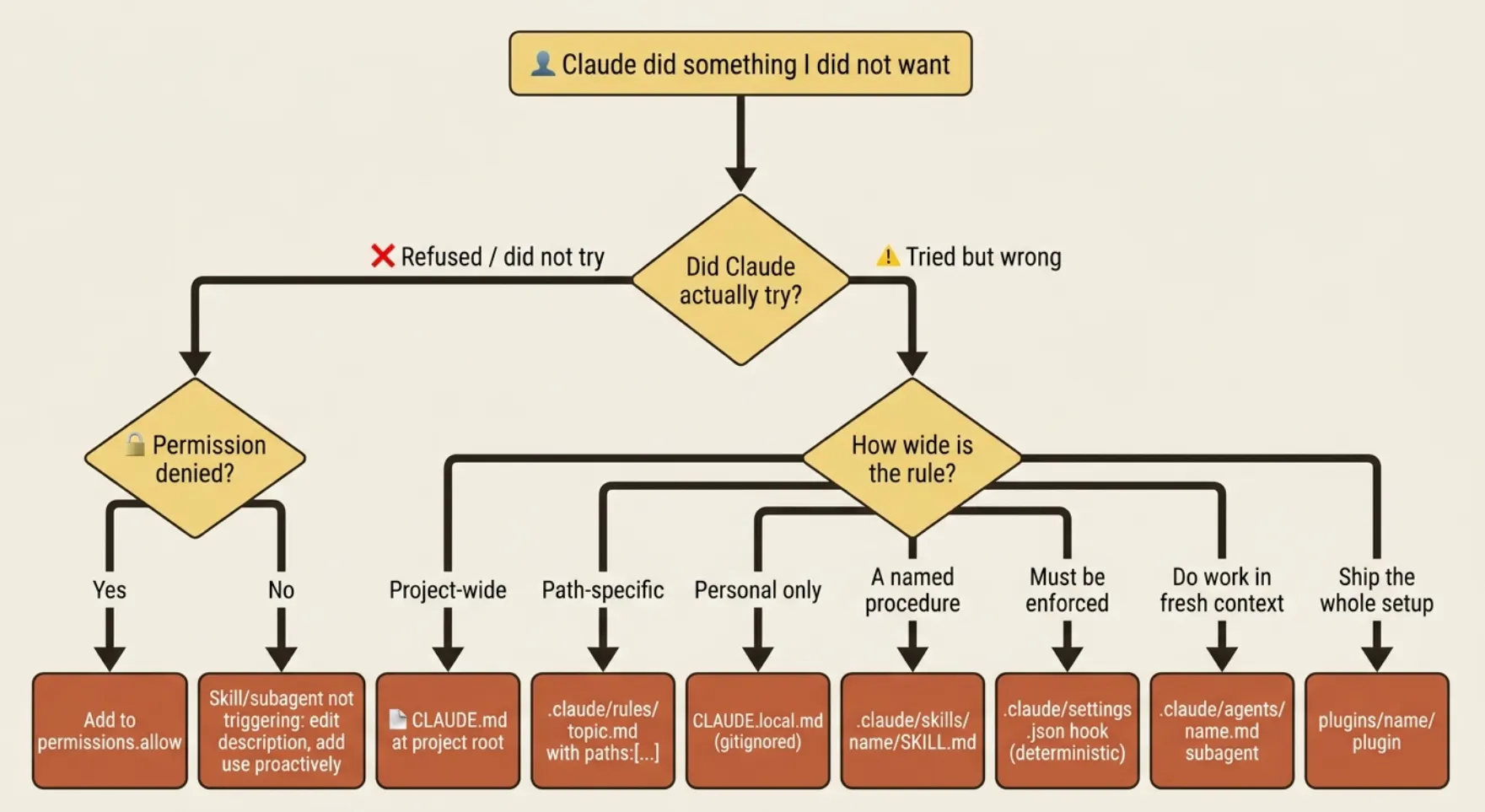
In prose, the same logic, step by step:
- Claude refused or did not try? Check permissions. If an operation was denied, add it to
permissions.allow. If a skill or subagent did not trigger, the fix is thedescriptionfield, not the permissions: make it more specific and add “use proactively” phrasing. - Claude tried but got it wrong, and the rule applies project-wide? Put it in
CLAUDE.mdat the project root. - Wrong, and the rule is path-specific (Python conventions, frontend rules)? Use
.claude/rules/<topic>.mdwithpaths: [...]frontmatter. - Wrong, and the rule is personal, not for the team? Use
CLAUDE.local.md, which is gitignored. - Wrong, and it is a procedure you will trigger by name? Use a skill at
.claude/skills/<name>/SKILL.md. - Wrong, and it must be enforced deterministically, not just suggested? Use a hook in
.claude/settings.json. - Wrong, and the fix is “do this work in a separate context”? Use a subagent at
.claude/agents/<name>.md. - The whole setup should travel with the project or to other teams? Package it as a plugin under
plugins/<name>/with a.claude-plugin/plugin.json.
The principle underneath is simple: each layer addresses a different failure mode. Permission rules answer “can Claude do this at all?” CLAUDE.md and rules are guidance Claude reads. Skills are named procedures Claude follows. Subagents are fresh-context delegates. Hooks are deterministic enforcement. Plugins are packaged distribution.
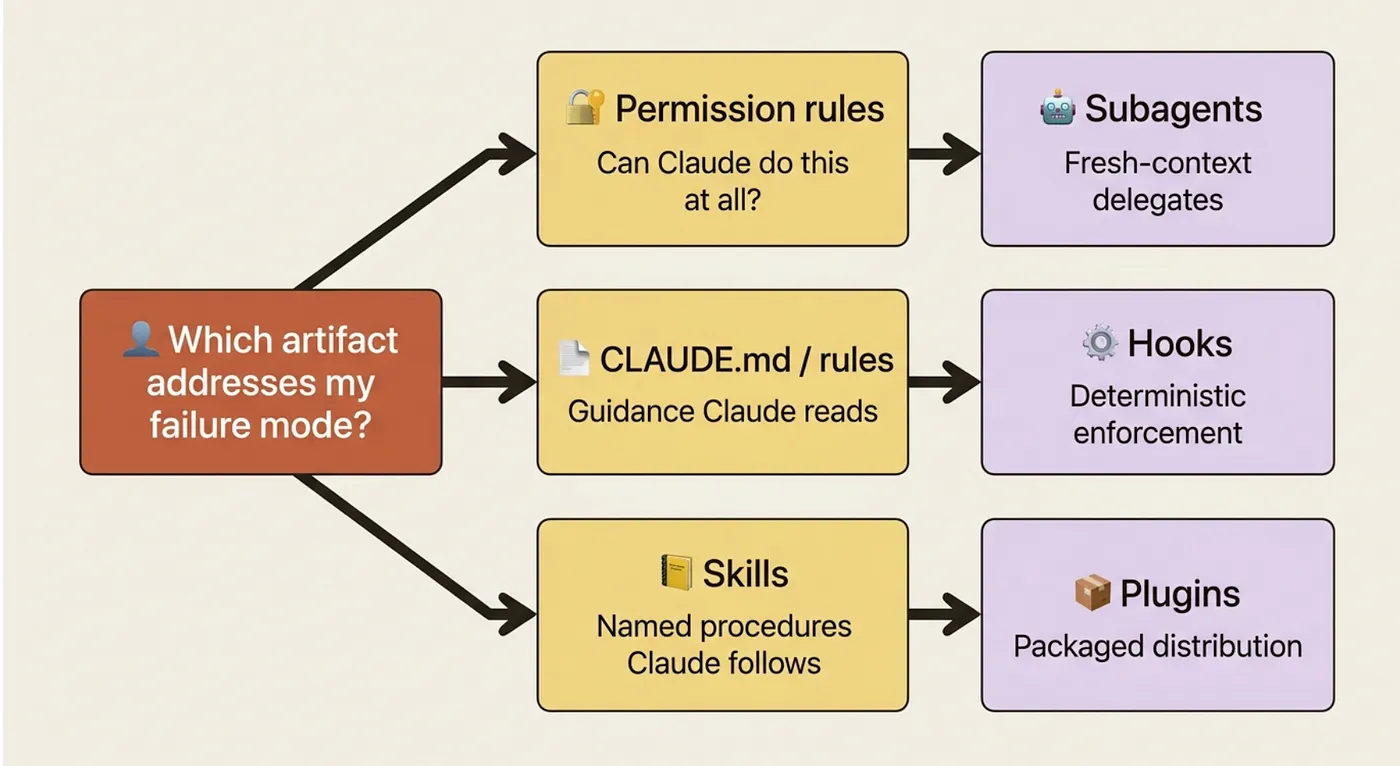
The classic mistake is reaching for a hook when you need guidance, or guidance when you need a hook. “Claude keeps suggesting tabs when we use spaces” is a CLAUDE.md fix; it is a preference Claude should know. “Claude keeps editing the *generated/* directory” is a hook fix; guidance can be missed, but a deterministic block cannot. Same symptom shape, opposite tools, because the failure modes differ.
The reference links worth bookmarking
Section titled “The reference links worth bookmarking”The Anthropic docs evolve faster than any guide can. When this article and the docs disagree, trust the docs. These are the durable entry points:
- Core concepts: How Claude Code works, Memory and CLAUDE.md, Skills, Subagents, Hooks, Permissions.
- Operating: Commands reference, CLI reference, Settings, Debug your configuration.
- Workflows: Plan complex changes, Keep Claude working toward a goal, Code Review, GitHub Actions.
- Plugins and platforms: Plugins, Plugins reference, Platforms and integrations, VS Code.
- Building on Claude Code: Headless mode, Agent SDK overview, Costs.
Do this today
Section titled “Do this today”Three concrete moves to make this Claude Code cheat sheet useful immediately, not someday.
1. Bookmark this page, especially the decision tree. It is the lookup you will run dozens of times. The shortcuts and the command catalog come next. Re-deriving any of these from memory is wasted effort once you have a tab open.
2. Copy the settings.json template into a project right now. Swap the test, lint, and build commands for your stack. Even with zero further customization, the three-list structure (allow the safe, ask on the consequential, deny the dangerous) gives you a sane baseline that most projects never bother to set up.
3. Walk the decision tree on one real friction. Pick something specific you have felt this week: “Claude keeps doing X” or “Claude won’t do Y.” Walk the tree from the top. If the right answer is obvious within 30 seconds, the tree is doing its job. That is the test, and it almost always passes.
The cheat sheet is scaffolding, not the skill
Section titled “The cheat sheet is scaffolding, not the skill”A reference like this is a strange thing to end a guide on, because it is the least conceptual chapter and the most useful one. That tension is the point.
The shortcuts, the command catalog, the sample files: none of them are the skill. The skill is the working knowledge that tells you when a compact beats a clear, why a path-scoped rule belongs in .claude/rules/ instead of bloating CLAUDE.md, and which failure mode you are actually staring at when something goes wrong. This cheat sheet is the scaffolding that holds that knowledge up. It exists so you never have to hold the exact JSON shape of a permission rule in your head, which frees that head for the judgment calls that genuinely require you.
Keep the page open. Walk the tree when you are stuck. And remember the one line that makes all of it cohere: match the fix to the failure mode, not to your reflex.
This is Part 19, the final part, of “Claude Code, Day-to-Day,” a 19-part guide to mastering Claude Code for working engineers.
About the Author — Claude Certified Architect
Section titled “About the Author — Claude Certified Architect”Rick Hightower is a former Senior Distinguished Engineer at a Fortune 100 company, focusing on delivering ML / AI insights to front-line applications, and a practitioner building multi-agent production systems. Rick is a Claude Certified Architect. Follow him on Medium for more hands-on agent engineering content. You can also book him to speak and train your team: Check out Rick Hightower’s SpeakerHub.

Rick Hightower is a former Senior Distinguished Engineer at a Fortune 100 company
Rick created Skilz, the universal agent skill installer that supports 30+ coding agents, including Claude Code, Gemini, Copilot, and Cursor, and co-founded the world’s largest agentic skill marketplace. Connect with Rick Hightower on LinkedIn or Medium. Check out SpillWave, your source for AI expertise.
Rick is a Claude Certified Architect and working on a book for Manning on Harness Engineering.

Anthropic Harness Engineering: Author Rick Hightower, AI systems practitioner and agentic frameworks developer
Rick has been actively developing generative AI systems, agents, and agentic workflows for years. He is the author of numerous agentic frameworks and developer tools and brings deep practical expertise to teams adopting AI. He enjoys writing about himself in the 3rd person.
Rick also wrote a Claude Certified Architect (CCA) series of articles that have a lot of useful information on writing agentic AI systems. Many ideas captured in the CCA and the exam prep Rick wrote echo what you see in this article. If you want to improve your ability to create well-behaved AI agents, studying for the CCA Exam is a good place to start.
CCA Exam Prep on Agentic Development
Section titled “CCA Exam Prep on Agentic Development”- Claude Certified Architect: The Complete Guide to Passing the CCA Foundations Exam
- CCA Exam Prep: Mastering the Code Generation with Claude Code Scenario
- CCA Exam Prep: Mastering the Multi-Agent Research System Scenario
- CCA Exam Prep: Structured Data Extraction
- CCA: Master the Developer Productivity Scenario
- Claude Certified Architect: Master the CI/CD Scenario
- CCA Exam Prep: Mastering the Customer Support Resolution Agent Scenario
- Get the complete reading list for CCA-F exam prep articles from this Claude Certified Architect Exam Prep list.
Rick also wrote a series on harness engineering and how to improve agentic systems using harness engineering for feedback loops and adversarial agents. These articles also go hand in hand with this article.